Cloud Technology Essentials
By reading these notes, you will gain knowledge tailored to your role, whether you are a beginner or practitioner focusing on Cloud technology foundations or a manager looking to master Cloud leadership and strategy.
1. What is Cloud Computing?
Cloud computing means using someone else’s computer (servers) and other compute services over the internet to store data, run applications, and manage services without buying any hardware.
Cloud Computing is like “Renting a House” instead of buying one. You don’t have to build the walls or fix the roof; someone else (the Cloud Provider like AWS, Azure, or GCP) does that. You just move in with your furniture (your code and data) and pay only for the time you stay there.
It is the on-demand delivery of IT resources (servers, storage, databases) over the internet with pay-as-you-go pricing. Instead of buying and maintaining physical data centers, you access technology services on an as-needed basis.
- No need to buy servers, you simply “rent” from Cloud service providers like AWS, Azure, GCP.
- You pay only for what we use.
- Access from anywhere via internet.
- Cloud gives speed, scalability, and less operational headache.
Cloud = Someone else’s computer, available on demand, and you pay only for use.
Before cloud → company needs to buy servers, AC room, networking, admins, etc. long process.
With cloud → click a button and create a server in minutes.
1.1. Cloud computing providers list
1.2. Traditional IT vs Cloud Computing
This table highlights the differences between traditional on-premise IT and modern Cloud Computing.
| Category | Traditional IT (On-Premise) | Cloud Computing |
| 1. Infrastructure Location | Hardware is physically kept in your office. | Runs in provider’s global data centers. |
| 2. Ownership | You buy, own, and depreciate hardware. | Provider owns hardware; you rent resources. |
| 3. Cost Model | CAPEX (High upfront capital cost). | OPEX (Pay-as-you-go operating cost). |
| 4. Setup Time | Takes weeks or months to procure. | Instant. Ready within minutes. |
| 5. Scalability | Fixed and manual (Expensive to grow). | Auto-scaling. Grows/shrinks with demand. |
| 6. Maintenance | Your team fixes cooling, cables, and power. | Provider handles all hardware maintenance. |
| 7. Software Updates | Manual patching of BIOS and Firmware. | Automated updates by the provider. |
| 8. Deployment Speed | Slow, manual, and prone to human error. | Fast, automated via Infrastructure as Code (IaC). |
| 9. Reliability | Dependent on your local backup setup. | High availability via Multi-AZ & Regions. |
| 10. Disaster Recovery | Costly and complex to build a 2nd site. | Built-in DR options with one click. |
| 11. Security | 100% your responsibility (The “Moat”). | Shared Responsibility Model. |
| 12. Access | Limited by VPN or Office Network. | Access from anywhere via the Internet. |
| 13. Performance | Limited by the hardware you bought. | On-demand performance boosting (Nitro/GPU). |
| 14. Updates | Requires physical hardware replacement. | Instant upgrades via software console. |
| 15. Automation | Hard to automate physical wires. | Strong automation (API-driven). |
| 16. Innovation | Slow to adopt AI/ML (High cost). | Ready-made AI/ML services available instantly. |
| 17. Monitoring | Siloed, local monitoring tools. | Unified, cloud-native monitoring (CloudWatch). |
| 18. Security Tools | You buy and configure separate firewalls. | Integrated WAF, IAM, and Encryption. |
| 19. Backup | Manual tapes or external hard drives. | Automatic snapshots and multi-region replication. |
| 20. Global Reach | Local reach only (Slow for global users). | Edge Locations. Reach the world in minutes. |
| 21. Storage | Fixed disk space (Must buy more disks). | Elastic storage (Grows automatically). |
| 22. Networking | Physical switches and cables. | Virtual Private Cloud (VPC), Load Balancers. |
| 23. Utilities | You pay for AC, Power, and UPS. | All utilities included in the service cost. |
| 24. Team Effort | Large “Hardware” IT team needed. | Smaller “DevOps” team focusing on Code. |
| 25. Ideal For | Legacy apps with very predictable loads. | Modern apps, startups, and high-growth sites. |
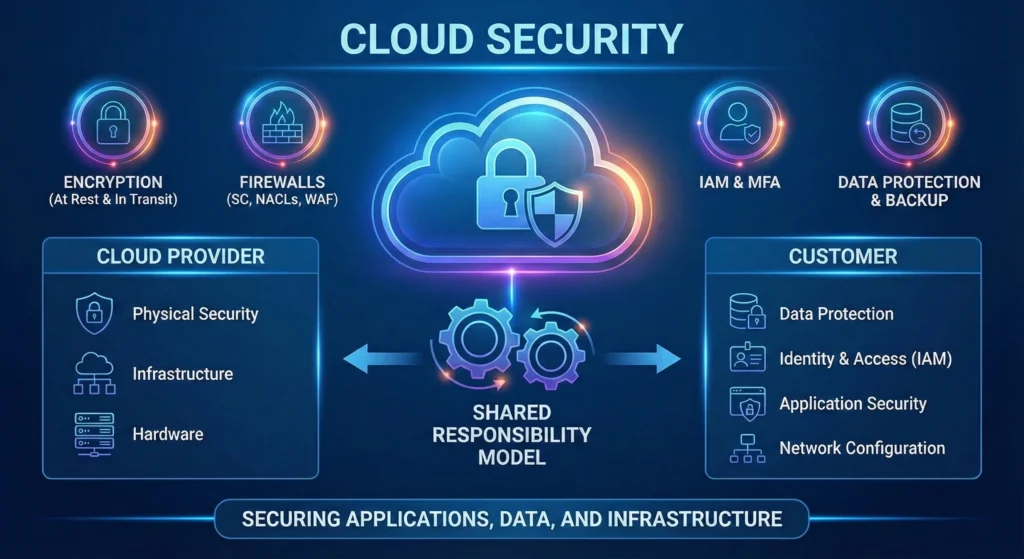
1.2 The “Shared Responsibility Model”
One of the biggest mistakes in Cloud is assuming the provider handles all security. In a DevSecOps culture, we follow the Shared Responsibility Model.
| Feature | Cloud Provider (AWS/Azure/GCP) | The Customer |
| Responsibility Type | “Security OF the Cloud” | “Security IN the Cloud” |
| Physical Layer | Data Centers, Cables, Power, Cooling. | None |
| Infrastructure | Global regions, AZs, Edge locations. | None |
| Hardware | Server racks, hard drives, switches. | None |
| Virtualization | Hypervisor security (Nitro/KVM). | None |
| Operating System | Managed OS (like in RDS/Lambda). | Guest OS (EC2), Patching, Hardening. |
| Network Security | Core network infrastructure. | VPC, Security Groups, NACLs, VPN. |
| Identity (IAM) | Platform for managing identities. | Permissions, MFA, Least Privilege. |
| Data Security | Infrastructure for encryption (KMS). | Encrypting Data at Rest & in Transit. |
| Applications | None | Coding secure logic, API security. |
1.3 Secure Cloud Practice
- Immutability: In the cloud, we don’t fix servers; we replace them. If a server has a security vulnerability, kill it and launch a new, patched version from an automated script.
- Infrastructure as Code (IaC): Every item in the “Cloud Computing” should be managed by code (Terraform/CloudFormation). Clicking buttons in the console is for beginners; writing code to build the cloud.
- Observability: Because “Access is from anywhere,” you must log everything. Every login, every file change, and every network connection should be monitored using Cloud-native tools.
2. Why Cloud Became Popular?
In the old days, starting a software business was like starting a factory you needed a huge building, expensive machines, and months of setup. Cloud changed the game. It turned infrastructure into a utility, just like electricity. you just plug it in and pay for the units you consume. Cloud became popular because it removed the “fear of failing” by making it cheap and fast to try new ideas.
The “Big Three” Problems Cloud Solved: –
- Speed (Agility): – Get your website live in minutes, not months.
- Cost (Economy): – No need to block lakhs of rupees in hardware. Pay only for the minutes your server runs.
- Flexibility (Elasticity): – If your website gets a sudden surge of traffic (like a Diwali sale), the cloud grows automatically. When the sale ends, it shrinks back to save money.
2.1. Business Benefits of Cloud
From a business leadership perspective, Cloud is a “Growth Accelerator.”
- Zero Upfront Investment: – Move from CapEx (Capital Expenditure) to OpEx (Operational Expenditure).
- Just-in-Time Infrastructure: – No more “Guessing Capacity.” You get what you need, exactly when you need it.
- Reduced Time-to-Market: – Spend time on your business logic, not on fixing server cables.
- Global Footprint: – Start in Mumbai and expand to London or New York with a few clicks.
2.2. Cloud Advantages
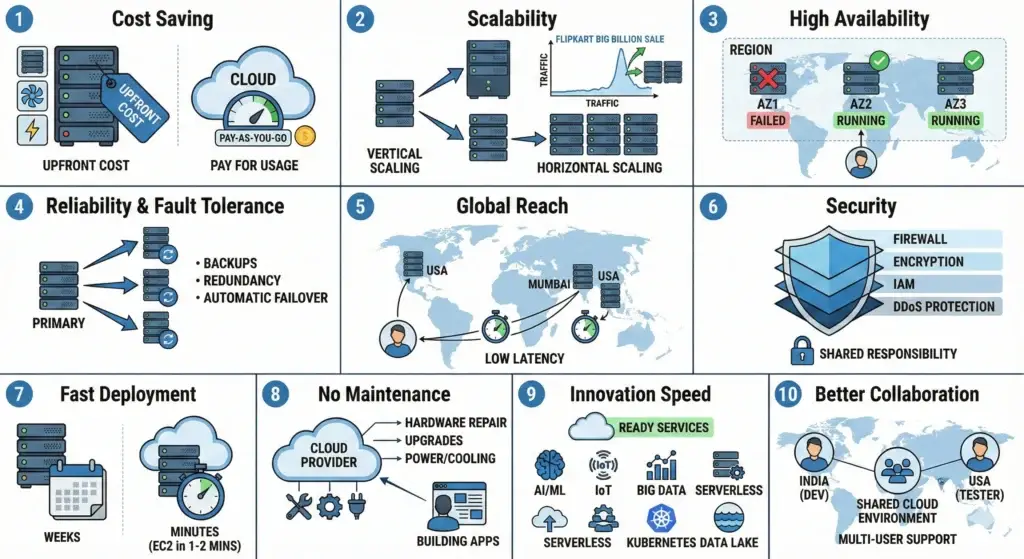
| Feature / Benefit | Short Notes | DevSecOps / SRE Perspective |
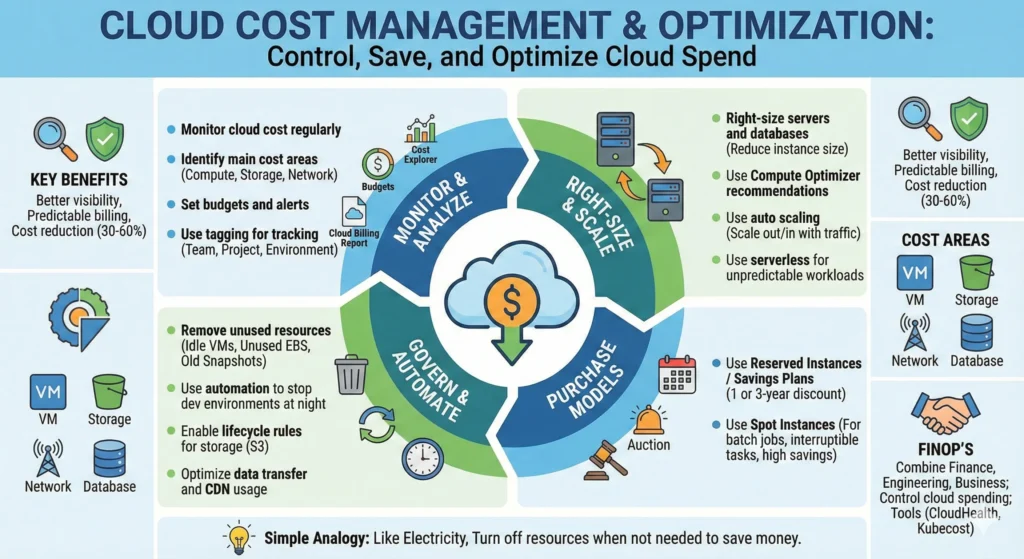
| 1. Cost Saving | Eliminates huge upfront hardware costs. Uses a Pay-as-you-go model. | FinOps: You can track the cost of every single microservice and shut down unused resources to stop “money leakage.” |
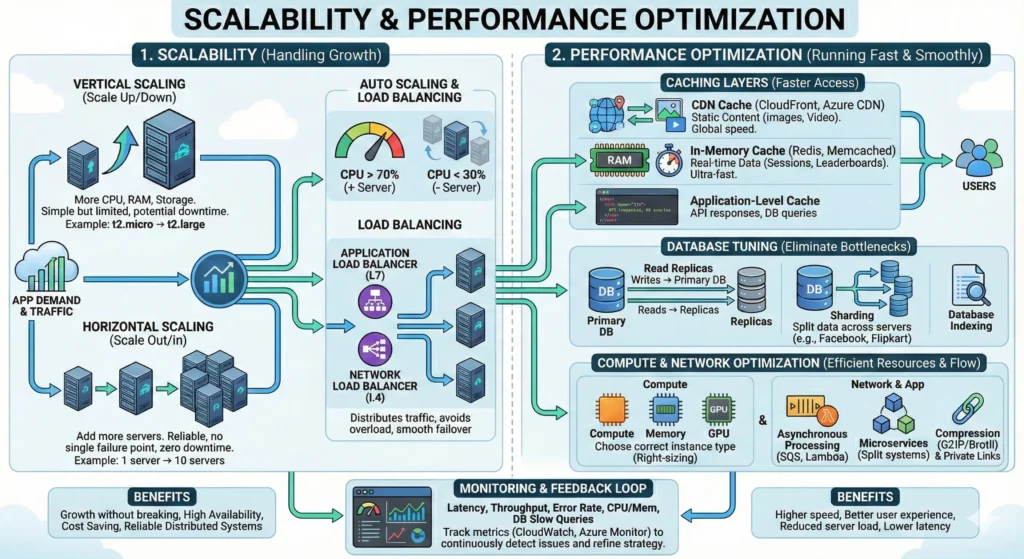
| 2. Scalability | Vertical: Making a server bigger (more RAM/CPU). Horizontal: Adding more servers to a group. | Auto-Scaling: SREs design systems that “breathe” with traffic, ensuring the site never crashes during peak loads. |
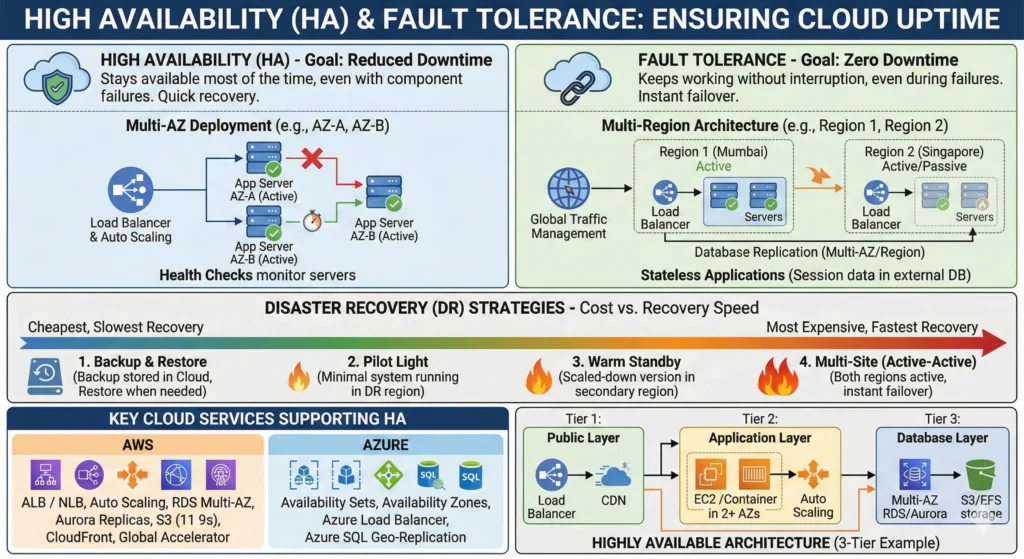
| 3. High Availability | Uses Regions and Availability Zones (AZs). If one data center goes down, another takes over. | Resilience: We design “Multi-AZ” architectures so that even a natural disaster at one location doesn’t stop our website. |
| 4. Reliability & Fault Tolerance | Automatic data replication and self-healing systems. | Self-Healing: In the cloud, if a server becomes “unhealthy,” the system automatically kills it and starts a new one. |
| 5. Global Reach | Servers located in 30+ regions worldwide (e.g., Mumbai, Singapore, USA). | Low Latency: By keeping data close to the user (Edge Locations), we ensure a “snappy” and fast user experience globally. |
| 6. Security | Built-in layered defense (Firewalls, IAM, DDoS Protection, Encryption). | Security-as-Code: We use tools to “scan” our cloud configuration to ensure no one accidentally leaves a database open to the public. |
| 7. Fast Deployment | Virtual servers (like EC2) launch in 1–2 minutes compared to 4–6 weeks for physical ones. | CI/CD: We can test and deploy new website features 10 times a day because the infrastructure is ready instantly. |
| 8. Zero Maintenance | The provider handles all physical repairs, AC, power, and hardware upgrades. | Focus on Innovation: The “Ops” team shifts from “fixing hardware” to “optimizing code and performance.” |
| 9. Innovation Speed | Instant access to AI/ML, Serverless (Lambda), Kubernetes, and Big Data. | Experimentation: You can test a new AI feature for just 50 rupees. If it works, scale it; if not, delete it. |
| 10. Better Collaboration | Unified platforms where global teams can work on the same infrastructure. | Centralized Governance: All developers follow the same security policies defined in the cloud console. |
2.3. Real-World Use Cases
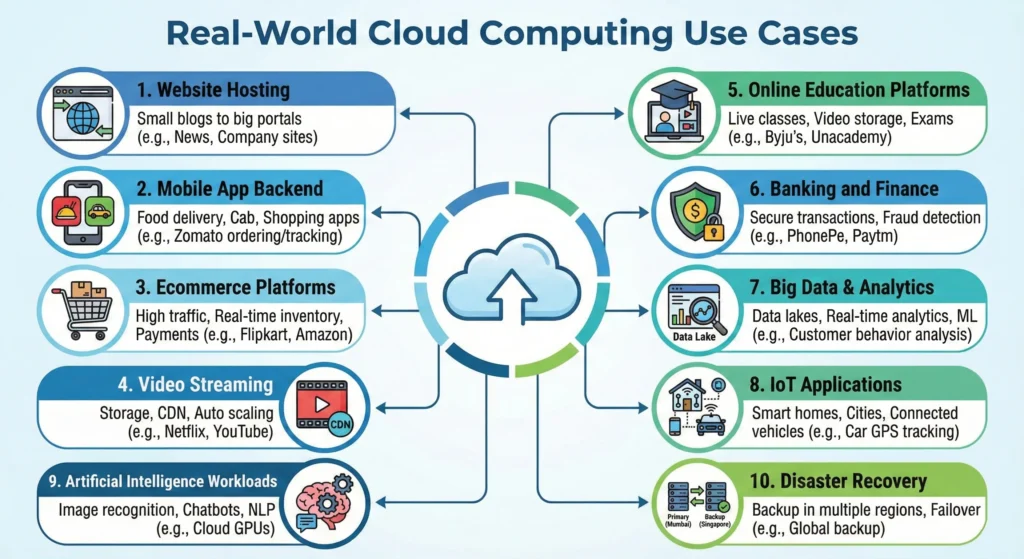
To make your KB more practical, here are common scenarios where Cloud is the only logical choice:
- Content Streaming (Netflix/Hotstar): Using CDNs (Content Delivery Networks) to stream high-quality video to millions of users simultaneously with zero buffering.
- E-commerce Websites: During “Big Billion Day” or “Great Indian Sale,” traffic can increase by 100x. Cloud handles this spike and then scales down at midnight to save costs.
- Backup & Disaster Recovery: Small companies can store terabytes of data in AWS S3 for a very low cost, ensuring their data is safe even if their office computer is damaged.
- Startups & MVPs: A founder can launch a “Minimum Viable Product” for almost zero cost using Free Tier services, only paying once they get real customers.
Guru Tip – “Cloud is not just a place to store data; it is a way to automate your business.” A DevSecOps engineer doesn’t just look at the cost of the cloud, also look at the security and stability it provides. If you use the cloud but still configure everything manually, you are not getting the full benefit. Always aim for Automation.
3. Key Characteristics of Cloud Computing
According to NIST SP 800-145, there are 5 essential characteristics. If even one is missing, it is not Cloud Computing.
| Characteristic | Simple Notes | DevSecOps / SRE Insight |
| 1. On-Demand Self Service | You can launch a server or database instantly via a portal/API without talking to a human (no tickets to IT). | Automation Ready: Since there’s an API, we can use Terraform to build security-hardened infra automatically. |
| 2. Broad Network Access | Accessible from anywhere (Laptop, Mobile, Office) using standard internet protocols. | Zero Trust: Since it’s “anywhere access,” we must move away from IP-based security to Identity-based security. |
| 3. Resource Pooling | Multiple customers share the same physical hardware (Multi-tenancy), but are securely isolated from each other. | Isolation Audit: We must ensure that “Tenant A” can never see “Tenant B’s” data. Cloud providers handle this at the Hypervisor level. |
| 4. Rapid Elasticity | Resources scale up or down instantly. It looks “unlimited” to the user. | Security at Scale: Our security tools (scanners/firewalls) must also scale automatically as the website grows. |
| 5. Measured Service | You are billed for exactly what you use (like a water meter). | FinOps: We use this to identify “Zombie Resources” (idle servers) that are wasting money and increasing the attack surface. |
3.1 Design for Failure: The “Chaos” Mindset
In the Cloud, hardware will fail. Cables will break. Power will go out. A Guru doesn’t try to prevent failure; they prepare for it.
The Pessimist’s Rule of Thumb: –
“Everything fails, all the time.” – Werner Vogels, CTO of Amazon
- Assume Hardware Failure: – Don’t put everything in one server. Use Auto-Scaling Groups.
- Assume Data Center Outage: – Don’t stay in one building. Deploy across Multiple Availability Zones (Multi-AZ).
- Assume Regional Disaster: – For critical apps, replicate data across Multiple Regions (e.g., Mumbai and Singapore).
- Assume Traffic Surges: – Prepare for “The Slashdot Effect” where thousands of users hit your site at once. Use Load Balancers.
- Assume Human Error: – People will make mistakes. Use Infrastructure as Code (IaC) so you can “Redeploy” your whole cloud in minutes if someone deletes a database.
3.2. CSA and NIST
You don’t have to invent security rules. Two global organizations have already done the hard work for you.
Cloud Security Alliance (CSA) and the National Institute of Standards and Technology (NIST) are two prominent organizations that play significant, complementary roles in defining and promoting cloud security best practices.
| NIST: The Foundation (The “Theory”) | CSA: The Practical Tools (The “Action”) |
| The National Institute of Standards and Technology provides the formal definitions used by governments and big enterprises. NIST SP 800-145: The “Bible” that defines what Cloud actually is. NIST SP 800-53: A massive catalog of over 1,000 security controls. If you are working for a bank or government, this is your primary rulebook. NIST CSF (Cybersecurity Framework): A high-level roadmap focused on five functions: Identify, Protect, Detect, Respond, Recover. | The Cloud Security Alliance takes NIST’s theory and turns it into tools you can use on Monday morning. Cloud Controls Matrix (CCM): The gold standard. It’s a spreadsheet with 197 security goals (Controls) across 17 domains (like IAM, Cryptography, and Logging). CAIQ (Consensus Assessments Initiative Questionnaire): A set of “Yes/No” questions. Guru Tip: Before you buy any SaaS tool for your company, ask them for their CAIQ report. If they don’t have one, they might not be secure. STAR Registry: A public database where cloud providers (like AWS/Google) post their security self-assessments. |
4. Types of Cloud Deployment Models
Deployment models describe who owns the hardware and who has access to it.
- Public Cloud is like a Public Bus: Many people share the same bus, it’s cheap, and follows a fixed route.
- Private Cloud is like a Personal Car: Only you use it, you have total control, but you pay for all maintenance.
- Hybrid Cloud is like having a Car and a Bus Pass: You use the car for private family trips (Sensitive Data) and the bus for daily office commutes (Web traffic).
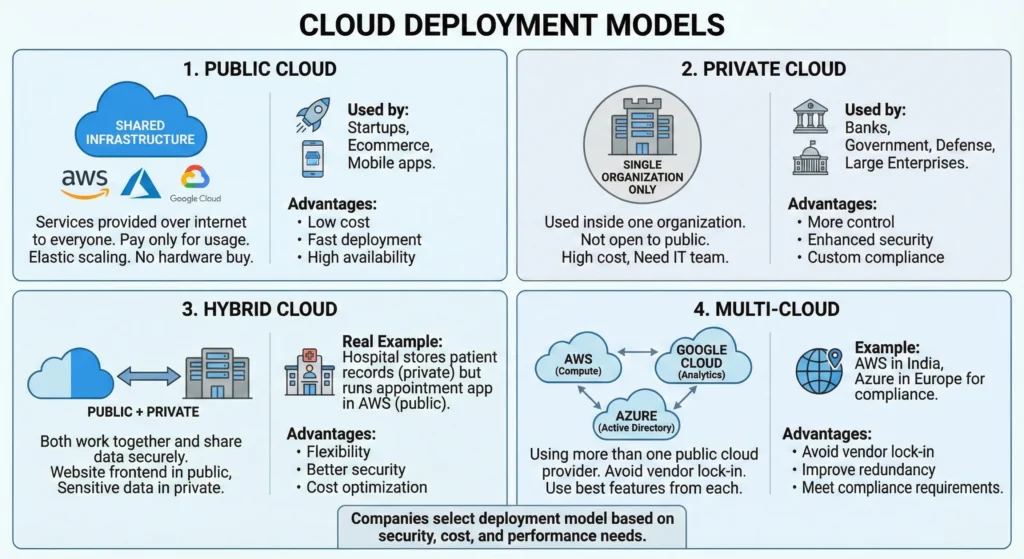
Understanding how cloud resources are deployed and applied is critical for designing secure and scalable architectures.
1. Core Cloud Deployment Models
These are the standard models used by 99% of businesses today.
| Deployment Model | Detailed Description | Ideal For | DevSecOps Guru Perspective |
| Public Cloud | Infrastructure is shared by millions of customers over the public internet. | Startups, Dev environments, and global web apps. | Scalability at Speed: Best for rapid innovation. Security is handled via IAM and Encryption. • Low Cost: – No hardware CapEx. • Scalability: – Instant elastic scaling. • Zero Maintenance: – Hardware managed by provider. |
| Private Cloud | Hardware is dedicated to one single organization. No “noisy neighbors.” | Banks, Government, and high-security Defense projects. | Maximum Control: You control the physical hardware and the network “Air-Gap.” Expensive but highly secure. • Control: Complete administrative authority. • Security: High data isolation. • Compliance: Meets GDPR, HIPAA, PCI-DSS strictly. |
| Hybrid Cloud | A mix of Public and Private cloud. Data moves between them via a “Secure Tunnel” (VPN/Direct Connect). | Healthcare and Finance (Legacy apps + Modern web). | Cloud Bursting: Keep customer PII (Personally Identifiable Information) on-premise, but scale web servers in the public cloud. • Flexibility: Best of both worlds. • Security: Protects core sensitive IP. • Bursting: Offloads traffic spikes to public cloud. |
| Multi-Cloud | Using two or more Public clouds (e.g., AWS for Hosting + GCP for AI). | Large Enterprises wanting to avoid “Vendor Lock-in.” | High Availability: If AWS goes down, your site stays up on Azure. Requires complex security management across platforms. • No Vendor Lock-in: Independence from one provider. • Reliability: Service continuity even if one cloud fails. • Optimization: Using Google for AI and AWS for compute. |
2. Specialized Deployment Models – Advanced
| Deployment Model | Description | Ideal For | Advantages |
| Community Cloud | Infrastructure shared by several organizations with common concerns (e.g., security, jurisdiction, mission). | Joint ventures, research universities, or government agencies collaborating on shared projects. | • Cost Sharing: Cheaper than a private cloud. • Collaboration: Simplifies data sharing. • Unified Security: Common standards for all members. |
| Distributed Cloud | Public cloud services distributed to specific physical locations (edge, on-premise) but managed by the original provider. | Applications requiring ultra-low latency or strict data residency (keeping data in-country). | • Low Latency: Processing happens closer to the user. • Consistency: Uses standard public cloud APIs. • Data Residency: Solves legal location constraints. |
| Bare Metal Cloud | Rental of dedicated physical hardware without any virtualization layer (hypervisor) installed. | High-performance computing (HPC), gaming, or legacy apps that don’t support virtualization. | • Raw Performance: No virtualization overhead. • Control: Full hardware access. • Predictability: Consistent disk/network speed. |
DevSecOps Note on Deployment
- Data Residency: – Under India’s DPDP Act (Digital Personal Data Protection), certain sensitive data must stay within Indian borders. A Guru uses Distributed Cloud or Local Zones (like AWS Mumbai/Hyderabad) to ensure legal compliance.
- The “Shared Secret” Risk: – In a Public Cloud, if you don’t configure your “Security Groups” correctly, you are essentially sitting in a room with a thin curtain. Always use Encryption at Rest and In Transit to make your data unreadable to others sharing the hardware.
- Hybrid Connectivity: – When connecting Private and Public clouds, the “VPN Tunnel” is your weakest link. Always monitor this connection for “Man-in-the-Middle” attacks.
5. Cloud Service Models
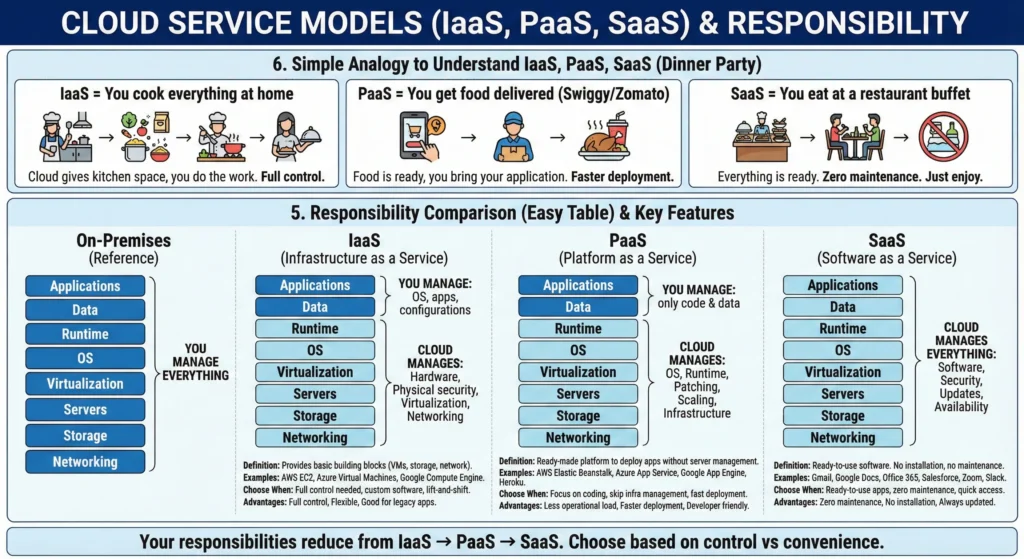
1. A list of Cloud Service Models XaaS
| Service Model | Detailed Description | Real-World Examples | DevSecOps / SRE Perspective |
| IaaS (Infrastructure) | Provides raw Virtual Machines, Storage, and Networks. You manage the OS and Apps. | AWS EC2, Azure VM, GCE | High Effort: You are responsible for OS Patching and Firewall rules. |
| PaaS (Platform) | Managed environment for developing and deploying apps. No need to manage the underlying OS. | AWS Elastic Beanstalk, Heroku | Medium Effort: You focus only on Application Security and Code scanning. |
| SaaS (Software) | Fully managed software accessible via a browser or API. | Gmail, Salesforce, Slack | Zero Maintenance: You only manage User Access (IAM) and Data privacy. |
| FaaS (Serverless) | Run small pieces of code (functions) triggered by events. No servers to manage. | AWS Lambda, Google Functions | Cost Efficient: Zero cost when idle. Focus on Function-level security. |
| CaaS (Containers) | Managed services to deploy and scale Docker containers/Kubernetes. | Amazon EKS, Azure AKS | Microservices King: Best for “Scaling Fast.” Requires Container Image Scanning. |
| DBaaS (Database) | Fully managed SQL or NoSQL databases. The provider handles backups and patching. | Amazon RDS, MongoDB Atlas | Reliability: High Availability is built-in. You only secure the Database Queries. |
| STaaS (Storage) | Cloud storage for files, backups, and static assets. | AWS S3, Google Cloud Storage | Data Protection: You must ensure Encryption and block “Public Access.” |
| NaaS (Network) | Virtual networking, VPNs, and Load Balancers provided as a service. | AWS VPC, Cloudflare | The Perimeter: Defines how your traffic flows. Essential for DDoS Protection. |
| IDaaS (Identity) | Cloud-based management of user logins, MFA, and SSO. | Okta, Auth0, Microsoft Entra | The New Firewall: Identity is the most critical security layer in 2025. |
| SECaaS (Security) | Security tools (WAF, Scanners) delivered via the cloud. | AWS Shield, CrowdStrike | Defense: Automates threat detection and response at the edge. |
| AIaaS / MLaaS | Pre-built AI models or platforms to build your own custom Machine Learning models. | OpenAI API, AWS SageMaker | Innovation: Allows you to add “Intelligence” to your app without being an ML expert. |
| BaaS / DRaaS | Automated backup and Disaster Recovery sites. | AWS Backup, Veeam Cloud | Business Continuity: Ensures your website can “Come back to life” after a hack/crash. |
As a DevSecOps Practitioner, you must understand how the “Responsibility” shifts as you move from IaaS to SaaS:
- IaaS is the most “Risky” for beginners: – Because you own the OS. If you don’t patch the Linux/Windows kernel, your cloud is vulnerable.
- SaaS is the “Easiest” but “Least Flexible”: – You can’t change how the software works; you can only change who can log in.
- The “Serverless” Revolution (FaaS): – It is the most secure model for many because the “Server” exists only for milliseconds while your code runs. This makes it very hard for a hacker to “stay” inside your system.
- Identity is King (IDaaS): – In modern cloud, we don’t care about IP addresses as much as we care about “Who is this user?” Always enforce MFA (Multi-Factor Authentication) across all service models.
6. Global Infrastructure – Region, Availability Zone, Edge Location
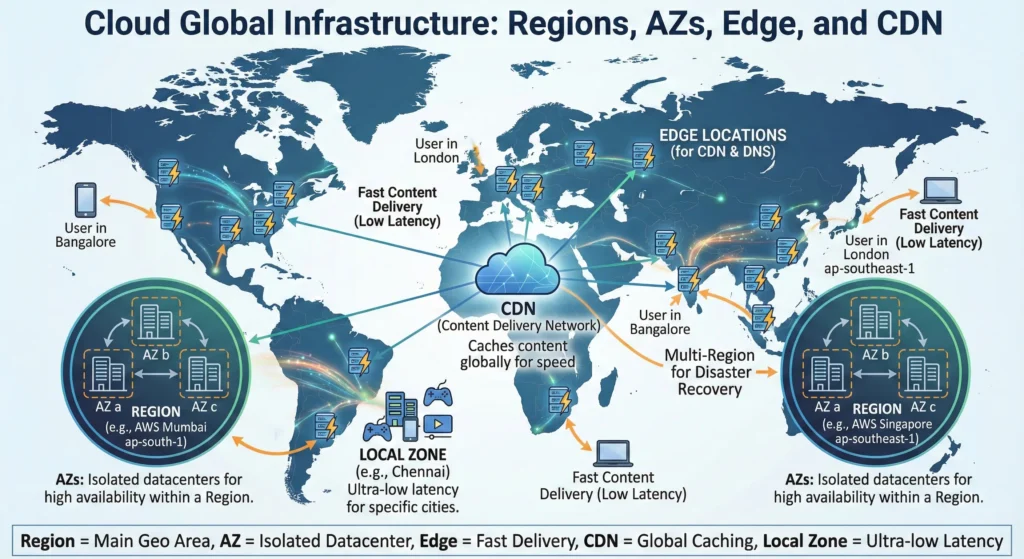
| Component | Definition & Role | Example | DevSecOps / SRE Perspective |
| Region | A physical location in the world where data centers are clustered. | AWS Mumbai (ap-south-1). | Compliance: Certain laws (like India’s DPDP Act) require data to stay inside the country. |
| Availability Zone (AZ) | One or more discrete data centers with redundant power and networking. | AZ-a, AZ-b in Mumbai. | High Availability: If one building catches fire, your website keeps running in the other building. |
| Edge Location | Content delivery sites located close to users for caching. | CloudFront server in Bangalore. | DDoS Protection: Attacks are blocked at the “Edge” before they ever reach your main servers. |
| Local Zone | Mini-regions placed in specific cities for ultra-low latency. | AWS Local Zone in Delhi. | Real-time Apps: Used for gaming or manufacturing where even 10ms delay is too much. |
| Multi-Region Replication | Copying data between two different Regions. | Replicating Mumbai data to Singapore. | Disaster Recovery: If an entire region goes offline (extremely rare), your business survives. |
7. Major Cloud Services by category
Services from 1 to 6 is very important should learn.
7.1. Compute Services
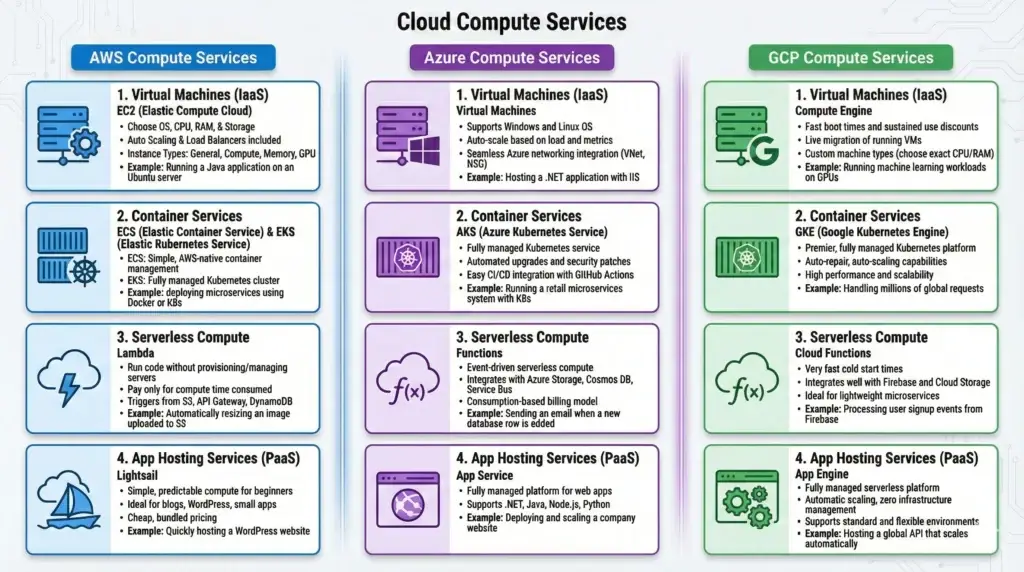
7.2. Storage Services
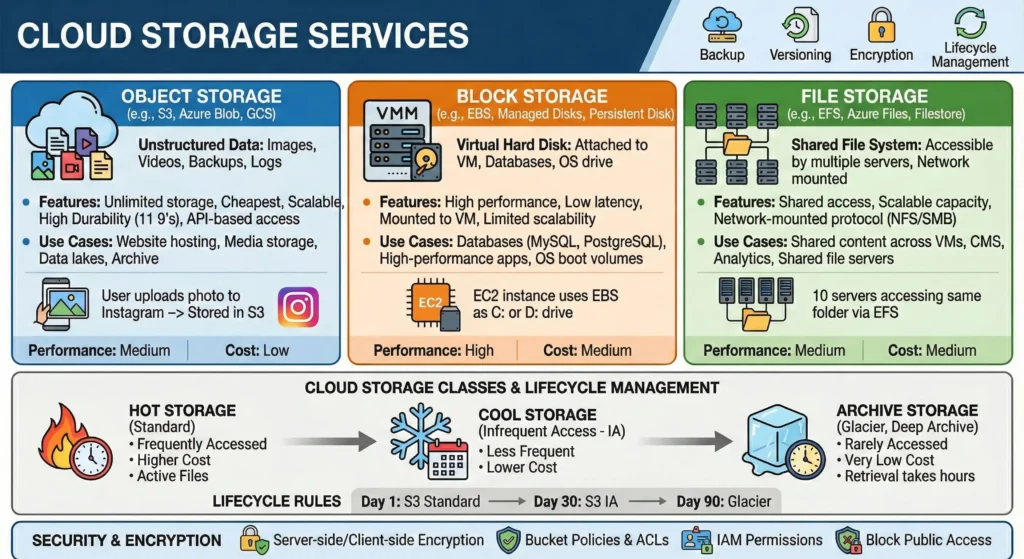
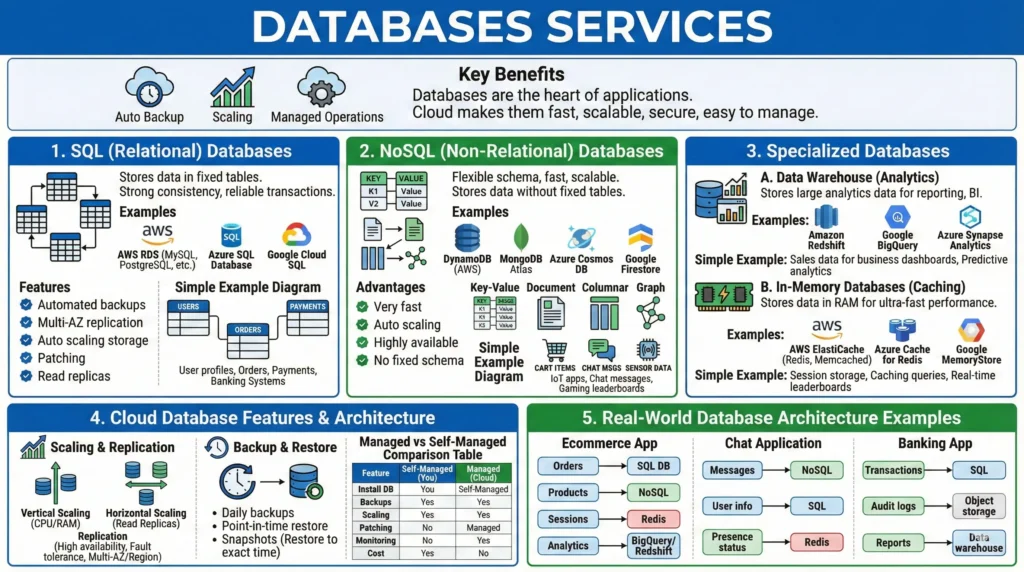
7.3. Databases Services
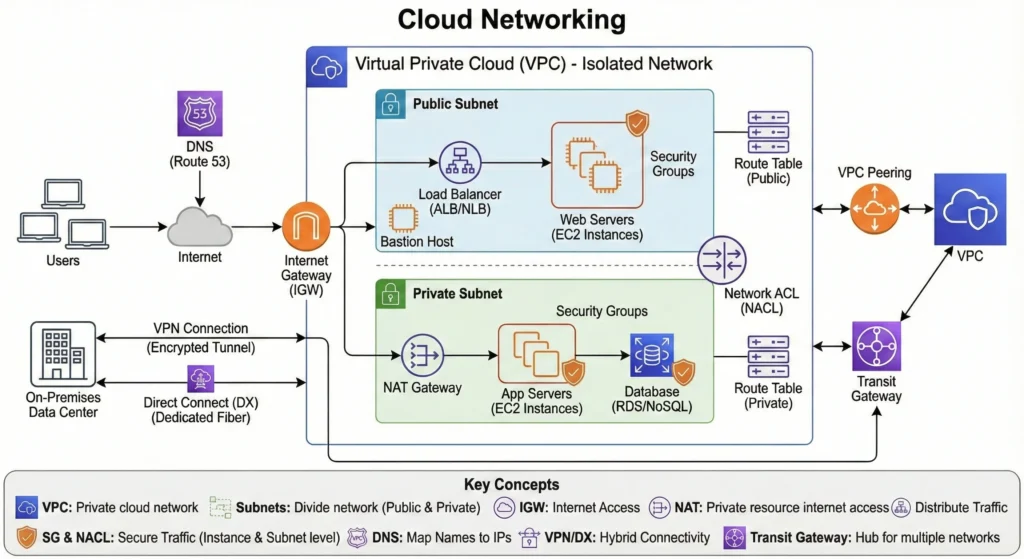
7.4. Networking in Cloud
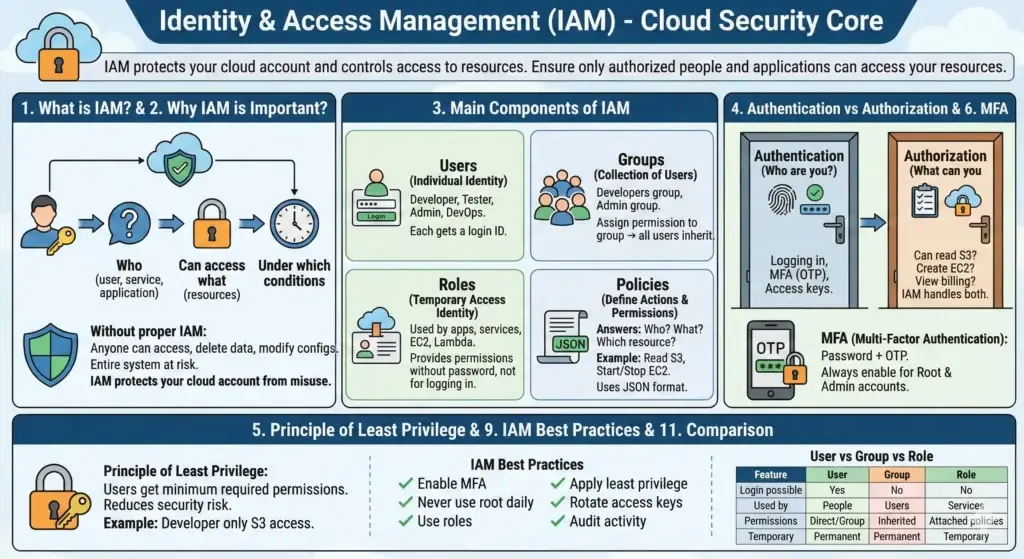
7.5. Identity and Access Management (IAM)
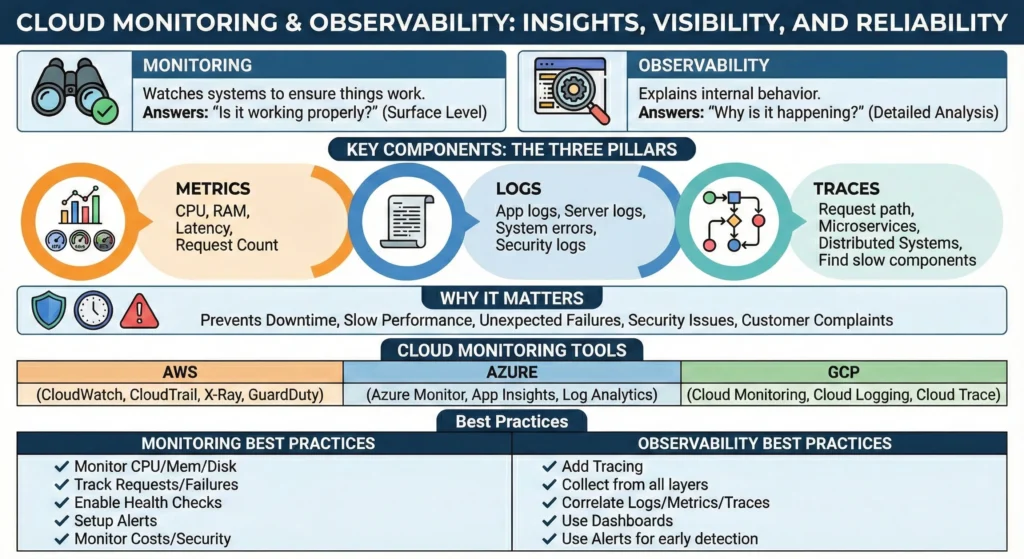
7.6. Monitoring & Observability
Good if you learn this below listed services
7.7. Cloud Security Essentials
7.7.1. Cloud Security Posture Management (CSPM) Checklist
Before you go live, use this checklist to ensure your cloud isn’t just “running,” but “hardened.”
- Identity & Access (The “Who”)
- [ ] Root Account Lockdown: Is the Root/Global Admin user secured with MFA and the access keys deleted?
- [ ] Least Privilege: Do users and services have the minimum permissions required to do their job?
- [ ] No Hardcoded Keys: Are you using OIDC or IAM Roles instead of storing long-lived Access Keys in your code/GitHub?
- [ ] MFA Everywhere: Is Multi-Factor Authentication mandatory for every human user?
- Network Security (The “Where”)
- [ ] Public Access Blocked: Are your S3 buckets and Databases blocked from the public internet?
- [ ] Security Group Audit: Are you only opening specific ports (e.g., 443 for HTTPS) rather than “All Traffic”?
- [ ] Private Subnets: Are your backend servers and databases placed in Private Subnets with no direct public IP?
- Data Protection (The “What”)
- [ ] Encryption at Rest: Is every disk, database, and storage bucket encrypted using KMS (Key Management Service)?
- [ ] Encryption in Transit: Is all traffic moving between your users and the cloud protected via SSL/TLS (HTTPS)?
- [ ] Backup Validation: Do you have automated backups, and have you tested a “Restore” recently?
- Governance & Logging (The “How”)
- [ ] Audit Trails Enabled: Is AWS CloudTrail (or equivalent) turned on in all regions to log “Who did what”?
- [ ] Billing Alarms: Have you set up a budget alert to notify you if costs spike unexpectedly?
- [ ] Automated Scanning: Are you using a tool (like AWS Config or GuardDuty) to scan for real-time security threats?
7.8. Cloud Scalability and Performance Optimization
7.9. Cost Management
7.10. Cloud Disaster Recovery
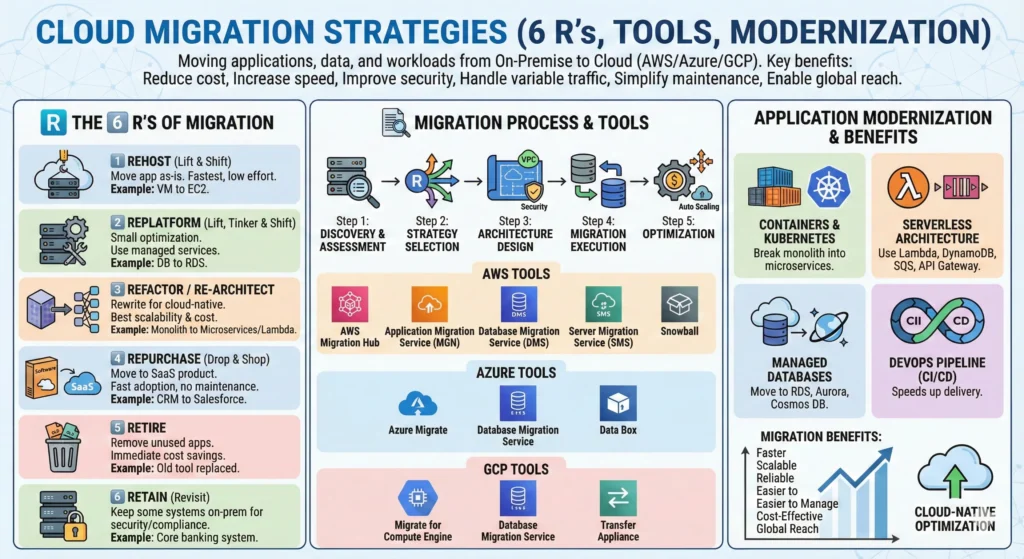
7.11. Migration to Cloud
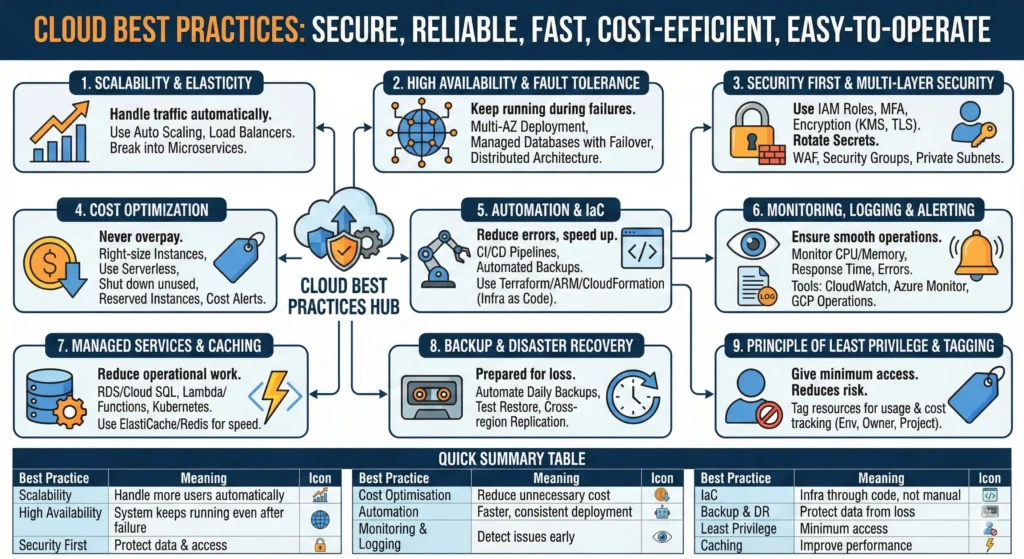
7.12. Cloud Best Practices
8. Compare AWS and Azure and Google Cloud Documentation
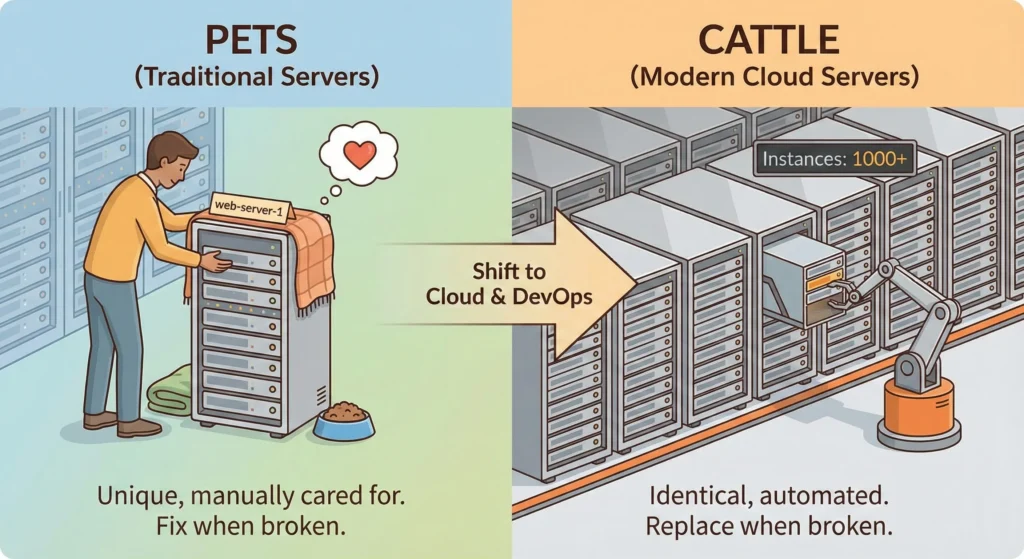
9. Pet vs Cattle Analogy (Concept)
A fundamental concept in Cloud computing and DevOps that describes two different approaches to managing servers and infrastructure.
- Encourages automation, not manual work.
- Makes infrastructure scalable and reliable.
- Enables immutable infrastructure (no manual changes on servers).
- Reduces downtime.
- Supports CI/CD and modern deployment workflows.
| 🐶 Pets (Traditional Servers) | 🐄 Cattle (Modern Cloud Servers) |
| Pets → Fix the server when it breaks. | Cattle → Replace the server when it breaks. |
| 1. Each server has a unique name (example: web-server-1, database-01). 2. You take care of the server manually. 3. If it gets sick (fails), you repair it. 4. Configuration is done manually. 5. Changes take time and are risky. 6. Scaling is very difficult. | 1. Servers are not unique all are identical copies. 2. No manual care. 3. If one fails, you replace it immediately. 4. Environments are automated using scripts/templates (Terraform, CloudFormation). 5. Scaling happens automatically. 6. Ideal for Auto Scaling Groups, Kubernetes nodes, ECS tasks, etc. |
| 1. A physical server in your data centre running for 5+ years. 2. If it crashes, the team spends hours fixing it. | 1. EC2 Auto Scaling: if one instance fails → AWS launches another one automatically. 2. Container replicas in Kubernetes: if a pod dies → a new one is created. |