
Kube-API Server
The Kubernetes API Server (kube-apiserver) is effectively the “brain” and the “heart” of the Kubernetes control plane. It is the central management entity that intercepts all REST requests, validates them, and executes the logic bound to them. It is the only component in the Kubernetes architecture that communicates directly with the Etcd database.
Quick Reference
- The Hub: It is the central meeting point where all traffic enters the cluster.
- The Guard: It validates every single request before processing it. No exceptions!
- The Messenger: It is the only component allowed to write data to the Etcd database.
- The Scaler: Unlike other control plane tools, the API Server acts like a web server you can run many of them at once (Stateless).
- The Listener: It uses a “Watch” mechanism to notify other components instantly when things change, rather than them asking repeatedly.
- Stateless: It stores no data itself; it pushes everything to Etcd.
- RESTful: It speaks standard HTTP (GET, POST, PUT, DELETE).
- Secure: It enforces TLS encryption for all communications.
| Component | Role | Simple Analogy | Best Way to Remember |
| Kube-API Server | The Gatekeeper | Front Desk / Customs Officer | “All roads lead to the API Server.” |
| Authentication | ID Check | Showing your Passport | “Who are you?” |
| Authorization | Access Check | Checking your Visa/Ticket | “Are you allowed here?” |
| Admission Control | Safety Check | Metal Detector / Security Scan | “Is your request safe?” |
| Etcd | The Brain’s Memory | The Bank Vault | “Where the truth is stored.” |
The Central Hub: How It Works
Think of the API Server as the Grand Central Station of Kubernetes. No matter who you are or what you are a DevOps engineer running kubectl commands, a CI/CD pipeline deploying code, or a Kubelet on a worker node reporting a pod crash you must go through the API Server.
- The Only Writer: No other component (Scheduler, Controller Manager, or Kubelet) can write to Etcd directly. They must send a request to the API Server, which then writes to Etcd. This ensures that the state of the cluster is managed consistently and securely.
- Statelessness: The API Server itself is stateless. It processes requests but stores all data in Etcd. This is a critical architectural decision that allows the API Server to scale horizontally easily.
The Three Gates of Security
Before any request is processed, it must pass through three distinct security gates in a specific order:
1. Authentication (AuthN) – “Who are you?”
Kubernetes does not have a native “User” object or database for humans. It relies entirely on external identity providers for people, while managing internal system components itself. Whenever an HTTP request hits the API server, K8s extracts credentials and attempts to authenticate it using one or more configured authenticators.
Kubernetes divides identities into two categories:
- Normal Users (Humans): Managed externally, independent services (like Okta, Google Workspace, LDAP, or Active Directory). Kubernetes expects string identifiers like
jane@example.comoradmin. - Service Accounts (Robots): Managed by Kubernetes itself. These are namespaced resources used by Pods to talk to the API Server.
- Credential: Stored as a generic Secret (legacy) or an ephemeral TokenRequest (modern).
- Naming:
system:serviceaccount:<namespace>:<service_account_name>
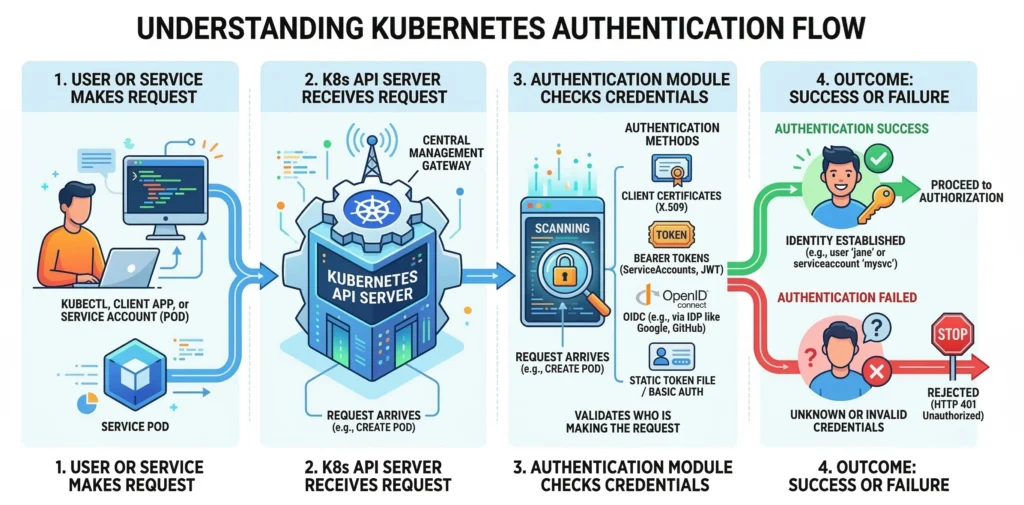
Built-in Kubernetes Groups
Kubernetes automatically assigns specific groups based on the auth method, which is critical for Role-Based Access Control (RBAC):
system:authenticated: Automatically added to all successfully authenticated users.system:unauthenticated: Assigned to anonymous requests (if enabled).system:masters: The “root” group, usually bound to cluster-admin privileges (often granted via X509 client certs during cluster creation).
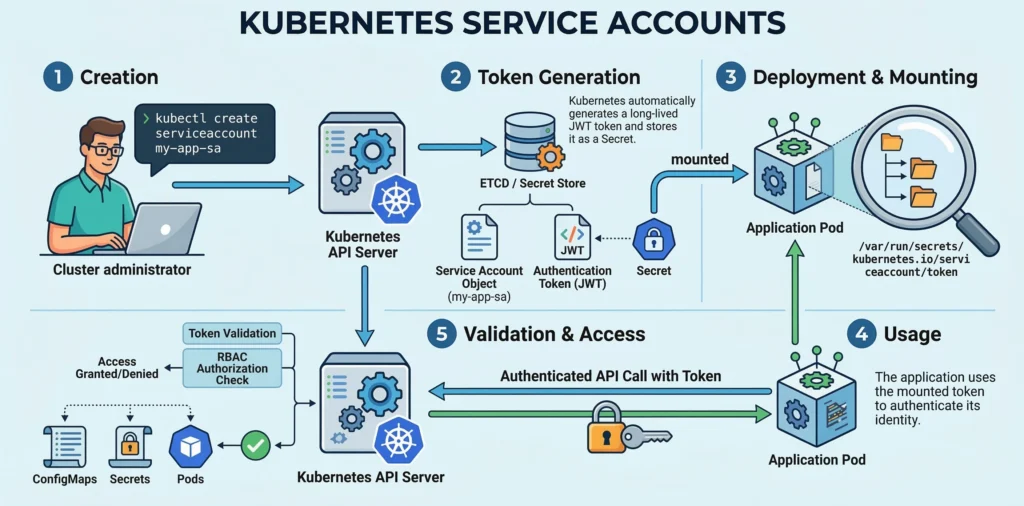
Machine Authentication: Service Accounts
Service accounts are the native way for Pods and internal processes to authenticate with the API server.
- The Modern Standard (Bound Service Account Tokens): Since Kubernetes v1.22, K8s no longer uses static, non-expiring secrets. Instead, the
kubeletuses theTokenRequestAPI to generate a temporary JSON Web Token (JWT) on the fly when a Pod starts. - How it Works: This token is injected into the Pod as a Projected Volume at
/var/run/secrets/kubernetes.io/serviceaccount/token. The Pod uses this token in its HTTP headers to talk to the API Server. - Security Benefits: Modern tokens are time-bound (they expire and rotate automatically), audience-bound (tied specifically to the API server), and object-bound (if the Pod is deleted, the token instantly becomes invalid).
Human & Admin Authentication Methods
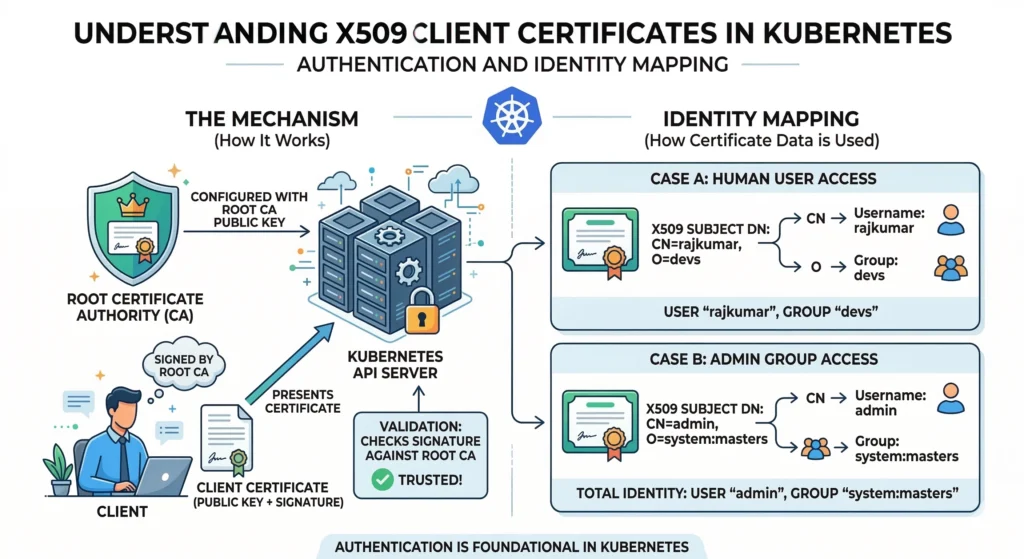
X509 Client Certificates
This is the foundational method, heavily used for cluster administrators (via kubeadm) and internal cluster components (like the kubelet communicating with the API server).
- How it Works: The API server is configured with a root Certificate Authority (CA). Any client certificate signed by this CA is trusted.
- Identity Mapping:
CN(Common Name) = User Name (e.g.,CN=rajkumar)O(Organization) = Group (e.g.,O=devs,O=system:masters)
- Drawback: There is no way to invalidate or revoke a certificate easily once issued without rotating the entire cluster’s root CA. They are best kept for automated systems or break-glass admin access.
- Tools: OpenSSL, CFSSL, or the native Kubernetes
CertificateSigningRequest(CSR) API.
OpenID Connect (OIDC) – The Production Standard
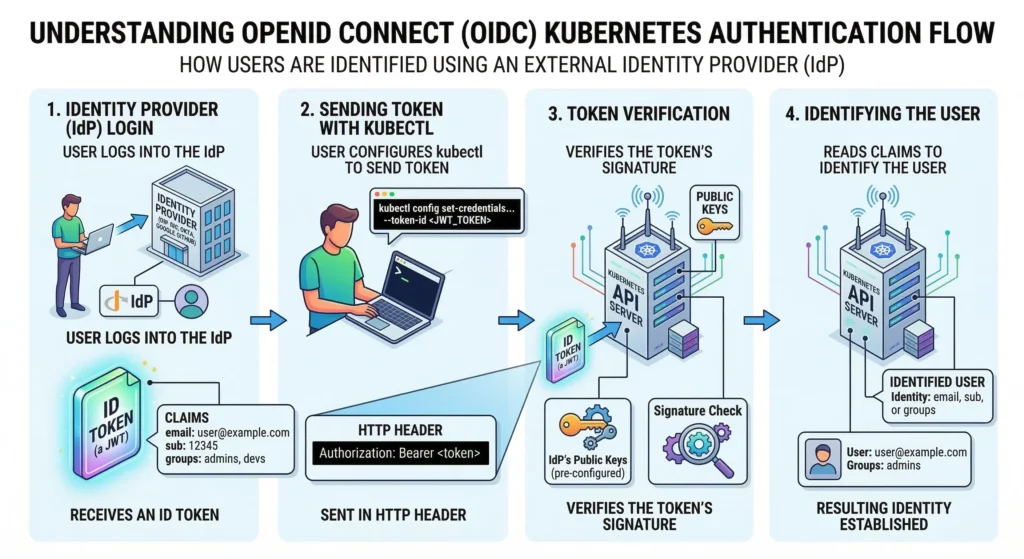
OIDC is an authentication layer on top of OAuth 2.0. This is the industry standard for integrating K8s with Okta, Azure AD, Google Workspace, or Keycloak. Kubernetes cannot store user passwords, so it trusts these Identity Providers (IdP).
- The Flow:
- User logs into the IdP (e.g., Okta) and receives an ID Token (a JWT).
- User configures
kubectlto send this token to the K8s API Server in the HTTP Header (Authorization: Bearer <token>). - The API Server, pre-configured with the IdP’s public keys, verifies the token’s signature.
- If valid, K8s reads specific claims (like
email,sub, orgroups) to identify the user.
- Advantage: Passwords are never seen by Kubernetes. If an employee leaves, you disable them in Okta, and their K8s access is instantly revoked.
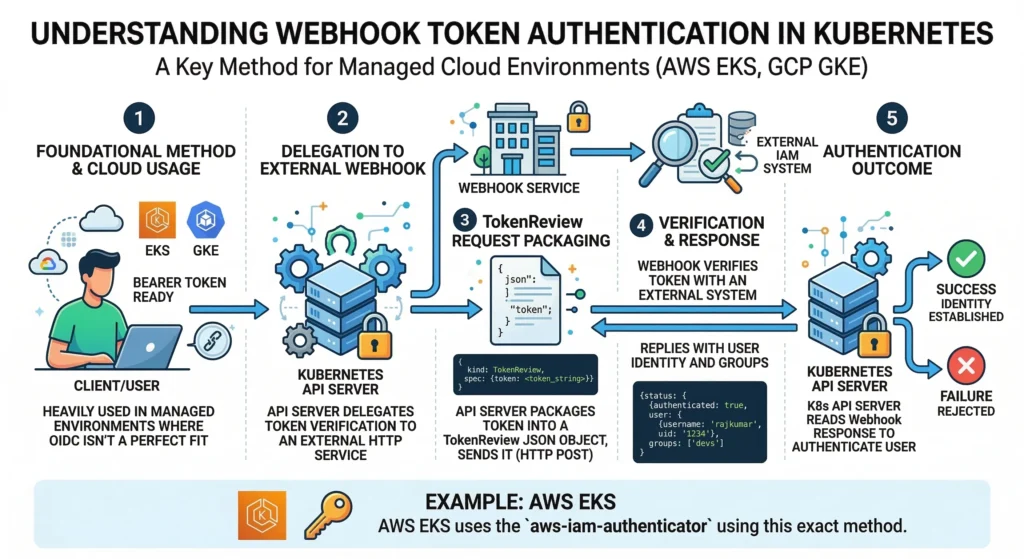
Webhook Token Authentication
Used heavily in managed cloud environments (like AWS EKS or GCP GKE) where OIDC isn’t a perfect fit.
- How it Works: The API server delegates the verification of a bearer token to an external HTTP service. The API server packages the token into a
TokenReviewJSON object, sends it to the webhook, and the webhook replies with the user’s identity and groups. - Example: AWS EKS uses the
aws-iam-authenticatorusing this exact method.
Authenticating Proxy
Used for highly complex legacy setups (like strict LDAP) or specific zero-trust architectures.
- How it Works: A proxy server sits in front of the API Server to handle all auth logic. If successful, it forwards the request to the API Server, injecting headers like
X-Remote-User: jane. - Security Requirement: The API server must be configured to only trust these headers if the proxy itself authenticates via mutual TLS (mTLS).
- Tools: Pinniped, Teleport.
Edge Cases & Advanced Methods
- Impersonation: Administrators can test RBAC rules by impersonating users via HTTP headers (
Impersonate-User: jane). In the CLI, this is done viakubectl get pods --as=jane. This requires explicit RBAC permissions. - Bootstrap Tokens: Short-lived tokens dynamically created as Secrets in the
kube-systemnamespace. They are strictly used to allow new worker nodes to join the cluster viakubeadm join. - Static Token / Password Files (Deprecated): Using a CSV file on the control plane containing
token,user,uid,group. This is highly discouraged for production because changing any user requires a full API server restart. - Anonymous Requests: If a request fails all configured authenticators, K8s assigns it the username
system:anonymous. It then moves to the Authorization (RBAC) phase, where it is almost always denied unless explicitly allowed.
Authentication Methods Compared
| Method | Analogy | Best Use Case | Security Level |
| OIDC (Okta, Google) | “Log in with Google” | Human users in Production (Teams). | Highest (Industry standard) |
| Webhook (AWS IAM) | Bouncer asking a Manager | Managed clouds (EKS, GKE). | Highest (Native cloud integration) |
| Bound SA Tokens | The Temporary Visitor Badge | Pods & internal K8s robots. | High (Short-lived, auto-rotating) |
| X509 Client Certs | The Passport | Admins (kubeadm) & system components. | High (Hard to revoke) |
| Bootstrap Tokens | The Temporary Keycard | Adding new worker nodes to the cluster. | Moderate (Must be short-lived) |
| Static Token/CSV | The Secret Password | Local testing / Learning only. | Lowest (Unsafe, deprecated) |
Common Issues, Problems, and Solutions
| Issue | Symptom | Root Cause / Detailed Solution |
| Expired Certs | x509: certificate has expired | Cause: The client certificate in ~/.kube/config is old.Solution: Renew the certificate or generate a new kubeconfig file. |
| Wrong Context | 401 Unauthorized | Cause: You are pointing to the wrong cluster or using the wrong user profile. Solution: Run kubectl config get-contexts to check your active context. |
| OIDC Refresh Fail | error: You must be logged in to the server | Cause: The OIDC ID Token expired and kubectl cannot refresh it.Solution: Install the kubelogin plugin to handle the refresh flow automatically. |
| Cloud IAM Drift | server has asked for the client to provide credentials | Cause: Your AWS/GCP CLI token expired. Solution: Run your cloud provider’s auth command (e.g., aws eks update-kubeconfig). |
| Stale Impersonation | user "X" cannot impersonate "Y" | Cause: You are trying to use --as=user without proper RBAC rights.Solution: Ensure an admin grants your user the impersonate verb. |
2. Authorization (AuthZ) – “What can you do?”
Once identified, the Kubernetes API Server checks if the user or service account has permission to perform the specific action (e.g., create pods, delete services).
- RBAC (Role-Based Access Control): The standard method for granting permissions to users and groups.
- Node Authorization: A specialized mode specifically for kubelets to read services and write node status.
- Webhook Authorization: Delegates authorization checks to an external REST service.
- Analogy: Checking if your visa or boarding pass allows you into a specific country or VIP lounge.
Scalability and High Availability
Since the API Server is the only component that handles external traffic and internal coordination, it is the primary bottleneck.
- Horizontal Scaling: Because it is stateless, multiple replicas of
kube-apiserver(usually 3 for High Availability) run behind a Load Balancer. - Load Balancing: The Load Balancer (like HAProxy, NGINX, or a Cloud LB) distributes traffic across the available API Server instances.
- Caching: The API server caches cluster state in memory to serve read requests quickly without hammering etcd.
The Watch Mechanism
One of the most powerful features of the API Server is the Watch API. Instead of clients constantly polling the server (“Is there a change?”), they establish a long-lived connection leveraging HTTP/2 or WebSockets. The API Server pushes updates to connected clients immediately when a change occurs.
- Why it matters: This is how the
kube-schedulerknows instantly that a new Pod needs to be scheduled, or howkube-proxyknows a Service IP has changed.
API Priority and Fairness (APF)
In high-traffic clusters, the API Server can easily get overwhelmed. API Priority and Fairness is a feature that categorizes and prioritizes incoming requests.
- Function: It prevents a flood of low-priority requests (like log scraping) from starving critical requests (like Kubelet heartbeats or system component updates).
Extensibility & Auditing
- Custom Resource Definitions (CRDs): Users can define their own resources (e.g.,
PrometheusRule, Backup). To the API Server, these act exactly like native Pods. Check the CRD documentation for deeper insights. - The Aggregation Layer: A specialized routing layer inside the API Server allowing extension API servers (like
metrics-server) to sit behind the main API IP. - Audit Logs: Records every single request (who did what and when) to a file or external backend. This is mandatory for security compliance like SOC2 and PCI-DSS. View the Audit documentation.
- Defaults: Uses TCP port 6443 for secure HTTPS connections. APIs are heavily versioned (e.g.,
v1,v1beta1) to ensure old scripts don’t break during upgrades.
Quick Reference: Risks, Benefits, and Configurations
| Feature | The Risk / Benefit | Key Detail to Remember |
| Optimistic Concurrency | Prevents data corruption. | If you get a 409 Conflict, someone beat you to the edit. Re-pull the data; do not force it. |
| Encryption at Rest | Secures sensitive data. | By default, etcd stores data in plain text. You must enable EncryptionConfiguration to secure Secrets. |
| Audit Policy | Required for compliance. | The API Server does not log history by default. It must be explicitly configured to pass SOC2/ISO audits. |
| Protobuf | Massive speed increase. | Internal components communicate using binary code (Protobuf) instead of JSON, making serialization up to 10x faster. |
Benefits of the API Server Architecture
- Centralized Security: You only need to secure one entry point (the API Server) to secure all control plane actions.
- Consistency: All data goes through a single validation and admission pipeline, ensuring invalid or malformed data rarely enters
etcd.
Common Challenges and Troubleshooting
| Issue | Symptom | Root Cause | Detailed Solution |
| Certificate Expiry | x509: certificate has expired error when running kubectl. | The control plane certificates (valid for 1 year by default in kubeadm) have lapsed. | Run kubeadm certs check-expiration to verify. Renew them using kubeadm certs renew all and restart the control plane static pods. |
| Wrong Context | 401 Unauthorized | You are pointing to the wrong cluster or using the wrong user profile. | Run kubectl config get-contexts to see who you are logged in as. |
| OIDC Refresh Fail | error: You must be logged in to the server (Unauthorized) | The OIDC ID Token expired and kubectl doesn’t know how to refresh it. | Install kubelogin (a kubectl plugin) to handle the refresh flow automatically. |
| Etcd Latency | API Server times out or crashes; generic “server unavailable” errors. | The API Server cannot write to etcd fast enough due to slow disk I/O on the nodes. | Ensure etcd is running on high-performance SSDs (NVMe preferred). Check network latency using etcdctl check perf. |
| API Throttling | 429 Too Many Requests errors. | A controller or user script is spamming the API server, triggering rate limits. | Implement API Priority and Fairness flow schemas. Check client logs for aggressive polling loops and switch them to use “Watches”. |
3. Admission Control: The Kubernetes Gatekeeper
Admission Control is the final phase of the Kubernetes API request lifecycle before an object is persisted in etcd. Think of it as the “policy enforcement” layer that ensures every request follows your organization’s specific security and operational standards.
Even if you have the right keys (Authentication) and the right permissions (Authorization), Admission Control can still say “No”. It looks at the actual content of your request. If you try to deploy a container that uses too much memory or lacks a specific security label, the Admission Controller blocks it to keep the cluster stable and secure.
The VIP Club Security:
- Authentication: You show your ID at the door.
- Authorization: The bouncer checks the guest list; you are on it.
- Admission Control: Before you enter, security checks your bag. Even though you are a guest, you can’t bring in a camera or outside food. If you’re missing a “Member” sticker, they might stick one on your shirt (Mutation) before letting you in.
Quick Reference
| Feature | Mutating Admission Controller | Validating Admission Controller |
| Primary Goal | Modify or “fix” the request. | Approve or Reject the request. |
| Execution Order | Runs First. | Runs Second. |
| Example | Injecting a sidecar (e.g., Istio). | Blocking images from unknown registries. |
| Action | Changes the object’s YAML. | Returns a pass/fail. |
Admission controllers consist of a set of plugins compiled into the kube-apiserver binary.
- Static Plugins: Built-in controllers like
NamespaceExistsorLimitRanger. - Dynamic Admission Control: This is the most powerful version, where Kubernetes sends a “webhook” (an HTTP callback) to an external service (like Open Policy Agent (OPA) or Kyverno) to decide what to do with the request.
In production-grade environments, Admission Control is the foundation of Governance as Code.
- Mutation Phase: This is where we automate “Best Practices.” For example, if a developer forgets to add resource limits, a Mutating Webhook can automatically inject default CPU/Memory limits.
- Validation Phase: This is the “Hard Deny.” We use this to enforce PCI-DSS or SOC2 compliance. If a pod is not scanned for vulnerabilities or tries to run as
root, it is rejected with a clear error message. - Tools:
- Kyverno: Kubernetes-native policy engine (uses YAML).
- OPA Gatekeeper: Uses “Rego” language for complex logic.
- ImagePolicyWebhook: Specifically for verifying container images.
Key Components:
- AdmissionRegistration API: Used to define
MutatingWebhookConfigurationandValidatingWebhookConfiguration. - Webhook Service: The actual logic/code running inside the cluster that evaluates the requests.
Key Characteristics:
- Fail-Closed vs. Fail-Open: You can configure whether a request should be allowed or blocked if the Admission Controller itself crashes.
- Order Matters: Mutating controllers run first because their changes might need to be validated by the validating controllers.
Technical Challenges & Solutions
- Latency. If your webhook is slow, every
kubectlcommand becomes slow.- Solution: Use lightweight logic and ensure the webhook service is highly available (multiple replicas).
- Circular Dependency. If the Admission Controller is a Pod in the cluster, how do you start it if the Controller itself is blocking Pod creation?
- Solution: Use
namespaceSelectorto exclude thekube-systemorpolicy-enginenamespaces from being checked by the controller.
- Solution: Use
https://kubernetes.io/docs/reference/access-authn-authz/admission-controllers