
Kube-Controller Manager
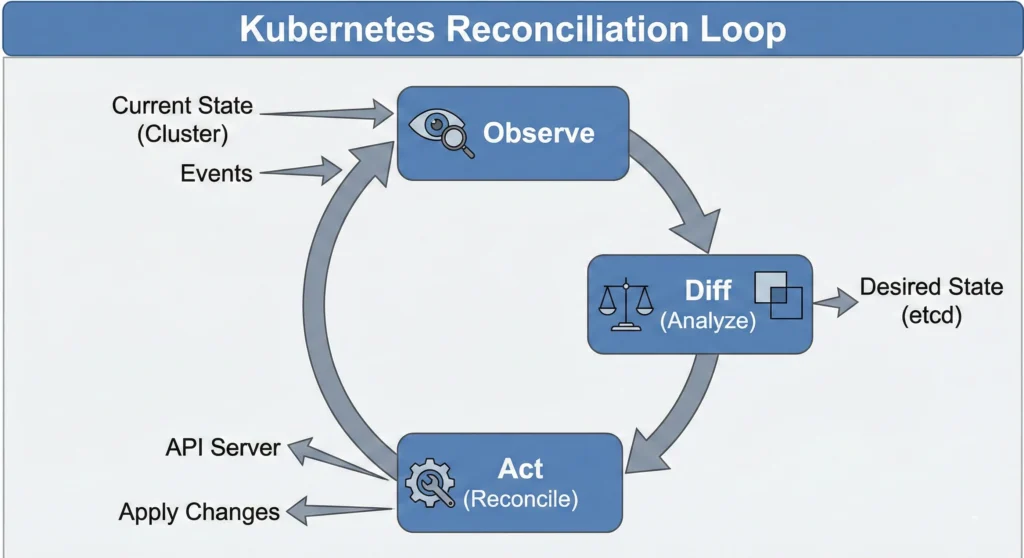
Imagine a Smart Air Conditioner (AC). You set the remote to 24°C (this is your Desired State). The AC constantly checks the room temperature (the Current State). If the room gets hot (26°C), the AC turns on to cool it down. If it gets too cold, it stops. It works non-stop to ensure the room is exactly how you want it.
In Kubernetes, you declare, “I want 3 copies of my application running.” The Kube-Controller Manager is the brain that constantly checks: “Do we have 3 copies?” If one crashes and only 2 are left, it notices the gap and immediately orders a new one to be created. It enforces the rules.
“The Kube-Controller Manager is the brain that fixes the difference between what you want and what you have.”
Quick Reference
- State Watcher: Continuously monitors the cluster state via the API Server.
- Self-Healing: Automatically corrects failures (like restarting crashed pods).
- Single Binary: Even though it does many jobs (Node control, Job control), it runs as one process to keep things simple and reduce overhead.
| Feature | Description | Real-World Analogy |
| Primary Role | Regulates the state of the cluster. | A Cruise Control system in a car. |
| Input | Desired State (YAML configuration). | Setting speed to 80 km/h. |
| Action | Compares Current State vs. Desired State. | Checking speedometer vs. setting. |
| Output | Corrective action (Create/Delete Pods). | Accelerating or braking. |
DevSecOps Architect Level
Now that we understand the basics, let’s look at how a DevSecOps Architect leverages the Controller Manager for high availability and cluster stability.
The Kubernetes Controller Manager is a daemon that embeds the core control loops shipped with Kubernetes. In robotics and automation, a “control loop” is a non-terminating loop that regulates the state of a system.
For a DevSecOps Architect, the Kube-Controller Manager is critical for High Availability (HA) and Cluster Stability. Controllers do not constantly poll the API Server (which would overload etcd). Instead, they use a SharedInformer and DeltaFIFO queue pattern. This “edge-driven, level-triggered” approach means they react instantly to event streams but look at the entire cluster state to decide the next action.
- Leader Election: In a multi-master production cluster, multiple instances of the Controller Manager run for redundancy. Only one can be active at a time to prevent conflicts. They use a Leader Election mechanism (Leases API) to decide the active “Enforcer.”
- Performance Tuning: You can tune flags like
--concurrent-deployment-syncs. Increasing this allows faster reconciling in large clusters but puts more load on the API Server. - Security Context: The Controller Manager requires significant privileges. It must run with its own Service Account and restricted RBAC permissions.
- Metrics & Monitoring: It exposes a
/metricsendpoint for Prometheus. Alert on metrics likeworkqueue_depth(is the controller falling behind?) andrest_client_requests_total(is it spamming the API server?).
Kubernetes Node Controller: The Heartbeat Monitor of Your Cluster
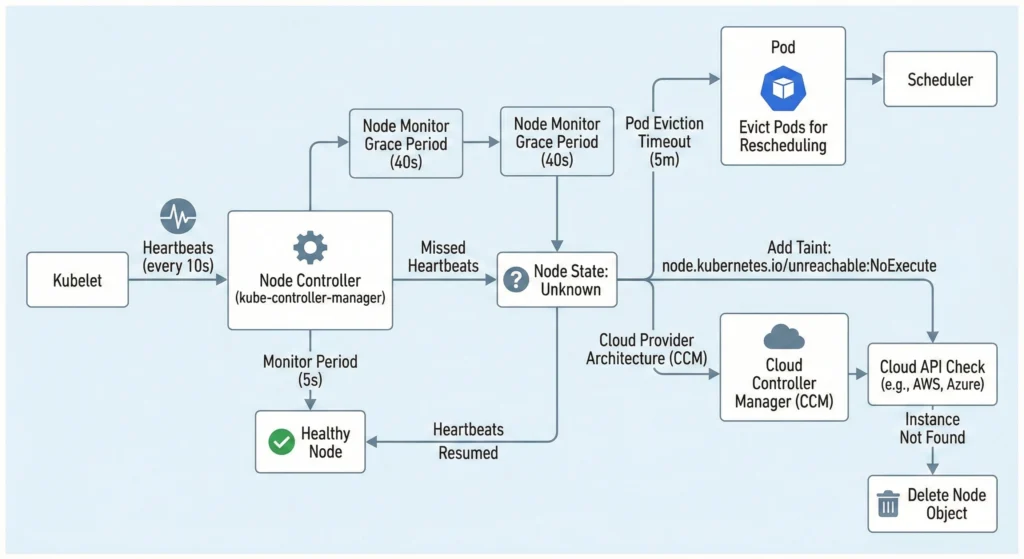
The Node Controller is the Heartbeat Monitor of your cluster. It runs inside the kube-controller-manager on the Control Plane and manages the lifecycle of nodes (Registration, Monitoring, Deletion).
It relies on Heartbeats sent by the Kubelet every 10 seconds. If a node stops sending heartbeats, the controller waits for a grace period before evicting pods.
| Feature | Default Value | Description |
| Monitor Period | 5 seconds | How often the controller checks the status of each node. |
| Node Monitor Grace Period | 40 seconds | How long the controller waits before marking a node as Unhealthy / Unknown. |
| Pod Eviction Timeout | 5 minutes | How long the controller waits after a node is “Unknown” before deleting its Pods. |
| Eviction Rate | 0.1/sec | Speed at which pods are deleted from a down node (prevents mass deletion panic). |
| Zone Awareness | Enabled | Handles failures differently if a whole Availability Zone goes down vs. just one node. |
Architect Tuning: Failure Handling & State Consistency
For an architect, tuning the Node Controller dictates how gracefully a cluster handles catastrophic failures.
The “Unknown” State Logic:
- Step 1: Controller marks Node status condition
ReadytoUnknown. - Step 2: It adds a taint
node.kubernetes.io/unreachablewith aNoExecuteeffect. - Step 3: The API server starts a countdown (default 5 mins). If the node doesn’t return, pods are evicted to be rescheduled elsewhere.
Cloud Provider Architecture (KCM vs CCM): In modern Kubernetes (v1.29+), the kube-controller-manager (KCM) no longer talks directly to cloud APIs like AWS, Azure, or GCP. All cloud-specific logic has been decoupled into the Cloud Controller Manager (CCM).
- If a node goes down, the CCM asks the Cloud API: “Does this VM instance still exist?”
- If the Cloud API says “No,” the CCM immediately deletes the Node object from Kubernetes, skipping the standard 5-minute wait.
Common Issues, Problems, and Solutions
Problem 1: Node Flapping (Ready <-> NotReady)
- Cause: Kubelet is under high load and cannot send heartbeats in time.
- Solution: Increase
--node-monitor-grace-periodin the controller manager or give more CPU to the Kubelet.
Problem 2: Pods Stuck in “Terminating” on Dead Node
- Cause: The Node is down, so the Kubelet cannot confirm the pod is deleted. The Controller waits.
- Solution: Force delete the pod:
kubectl delete pod <pod-name> --grace-period=0 --force.
Problem 3: “Thundering Herd” on Recovery
- Cause: Massive eviction causes Scheduler to overload.
- Solution: Configure
--node-eviction-ratecarefully (default is 0.1 per second).
- Kubernetes Node Architecture: https://kubernetes.io/docs/concepts/architecture/nodes/
- Controller Manager: https://kubernetes.io/docs/reference/command-line-tools-reference/kube-controller-manager/
- Taints and Tolerations: https://kubernetes.io/docs/concepts/scheduling-eviction/taint-and-toleration/
Deployment & ReplicaSet Controllers
While ReplicationControllers were the legacy standard (apiVersion: v1), modern Kubernetes entirely relies on Deployments and ReplicaSets.
- The ReplicaSet Controller: Ensures a specific number of Pod replicas are running at any given time. It uses Set-Based selectors (e.g.,
env in (prod, stage)). - The Deployment Controller: Orchestrates the ReplicaSets. It provides declarative updates, enabling zero-downtime rolling updates and easy version rollbacks.
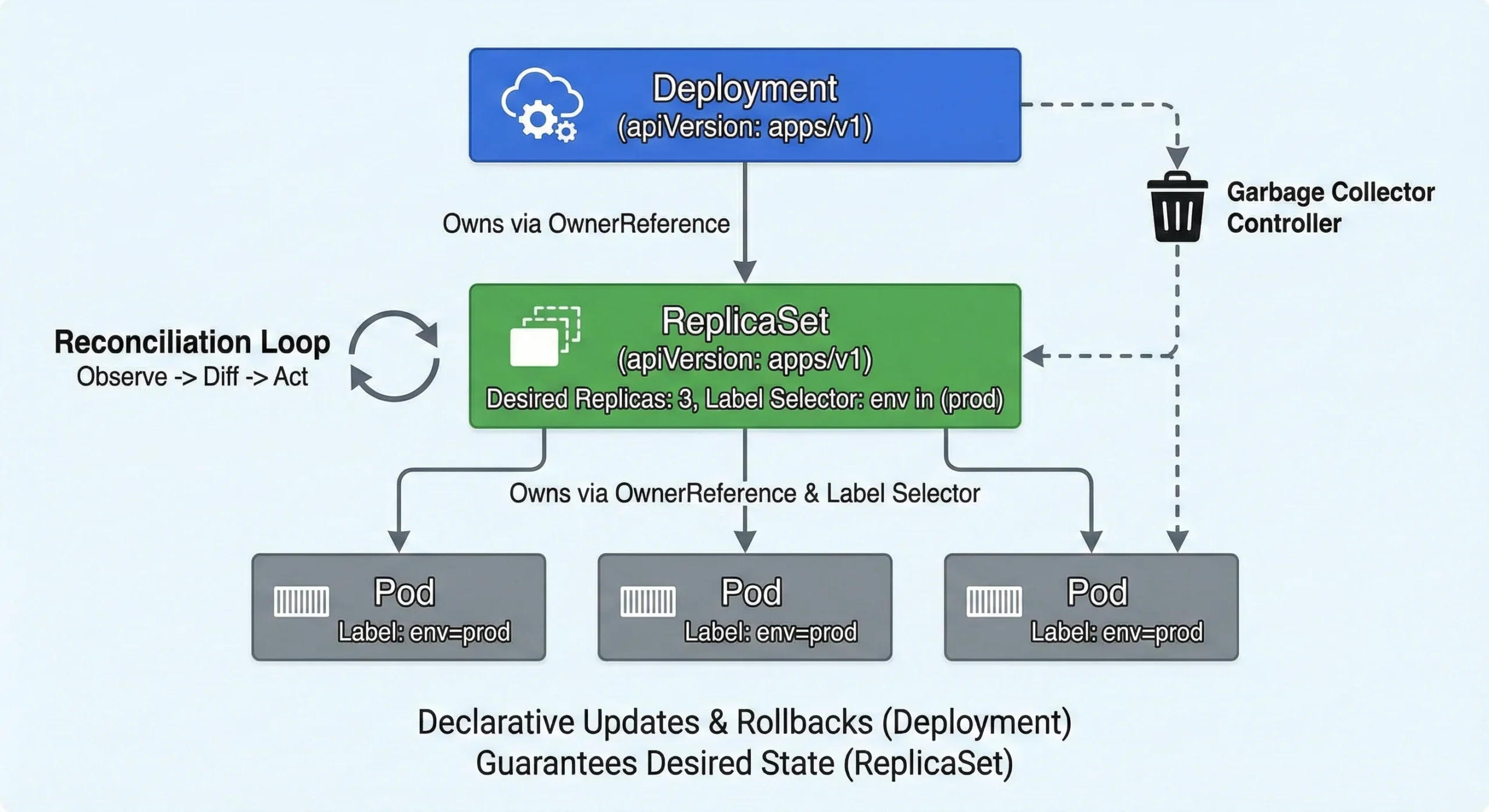
The Goal: Guarantee the Desired State (e.g., 3 Pods running v2 of an app) always matches the Actual State.
Architect Tuning: Garbage Collection & Reconciliation
- OwnerReferences and Garbage Collection: A Deployment does not own Pods directly. The Deployment creates a ReplicaSet (injecting an
ownerReference), and the ReplicaSet creates the Pods (injecting its ownownerReference). When you delete a Deployment, the Garbage Collector Controller reads these references to cascade the deletion down to the Pods safely. - Reconciliation & Label Selectors: The ReplicaSet owns pods strictly by Labels. If it calculates
CurrentReplicas < DesiredReplicas, it creates new pods. IfCurrentReplicas > DesiredReplicas, it terminates the youngest or unready pods first.
Endpoint Controller & EndpointSlices
The Endpoint Controller is the receptionist who has a list of all employees. It checks who belongs to the “Billing Department” (Label Selector), verifies if they are at their desk (Readiness Probe), and updates the internal phone directory (The Endpoints Object) so calls are routed correctly.
The Rule: If a Service has a selector, the Endpoint Controller creates an Endpoints object to bridge the gap between the Service’s stable IP and the Pods’ ephemeral IPs.
| Feature | Details |
| Trigger | Pod creation/deletion, Label changes, Readiness state change. |
| Condition | Only “Ready” pods get into the Endpoints list (unless publishNotReadyAddresses is true). |
| Output | Endpoints (and EndpointSlices). |
Architect Tuning: The “Thundering Herd” Problem
The “Thundering Herd” Problem & EndpointSlices: Historically, the Endpoints object contained all IPs for a service in one massive list. If you had 5,000 pods and one changed status, a massive 1.5 MB object had to be sent to every Node’s kube-proxy, causing severe network congestion.
Kubernetes solved this by introducing the EndpointSlice Controller. It splits that massive list into smaller “slices” (chunks of 100 IPs). kube-proxy now defaults to watching EndpointSlices instead of Endpoints, drastically reducing API server load and network traffic.
- Architect Tuning: You can adjust
--concurrent-endpoint-syncsand--concurrent-service-endpoint-syncsto handle high pod churn rates in massive clusters.