
AWS – Compute – EC2
1. Amazon EC2 – Elastic Compute Cloud
EC2 is an IaaS (Infrastructure as a Service) solution where we have full control at the OS level by selecting the desired CPU, memory, and storage options.
Think of Amazon EC2 as a “Custom-Built Office Space” in the sky.
When you rent a physical office, you don’t own the building (AWS owns the data center), but you choose how many desks (CPU), how much storage (RAM), and who has the keys (Security).
- IaaS (Infrastructure as a Service): You are the office manager. AWS provides the floor and electricity, but you must install the security cameras (Agents) and locks (OS Hardening).
- User Data: Think of this as the “Interior Design Team.” They only come in on the very first day you move in to set everything up. After that, they leave.
- AMIs (Golden Images): These are the “Master Blueprints.” If you need to open 100 identical offices tomorrow, you use this blueprint to ensure every single one is exactly the same.
- Immutable Infrastructure: In DevSecOps, we don’t “repair” a broken office. If a lock is compromised or a wall is damaged, we don’t fix it; we tear the whole room down and build a brand-new one instantly using our blueprint.
If you are new to the cloud, EC2 is your virtual computer. Here is the breakdown of its core components:
- Instance Types: These are different “sizes” of computers. Some are good for simple websites (General Purpose), while others are like supercomputers for heavy math (Compute Optimized).
- Storage (Hard Drives):
- EBS: Like a USB stick you plug in. Even if you turn the computer off, the files stay there.
- Instance Store: Like a temporary “Scratch Pad.” If the computer stops, the data is wiped.
- Networking: This is the “intercom” and “front door” system.
- Security Groups: Your personal bodyguard. He checks everyone coming to your door.
- NACLs: The gatekeeper at the main entrance of the neighborhood.
- Access: Instead of a password, we use Key Pairs (a digital file) to log in.
—
1.1. Service Model: IaaS (Infrastructure as a Service)
In the IaaS model, Amazon EC2 provides the raw building blocks. You aren’t just a “user” of an application; you are the Systems Administrator. This offers the highest level of flexibility but also places the maximum-security burden on your shoulders.
The Responsibility Shift: “Of” vs. “In” the Cloud
AWS Shared Responsibility Model. A common mistake is assuming that because your data is on AWS, it is automatically secured.
- AWS Responsibility (Security OF the Cloud):AWS manages the “Physical Layer.” This includes the high-security data centers, the physical host servers, the storage disks, and the Hypervisor (the software that splits one big physical server into many small virtual EC2s).
- Customer Responsibility (Security IN the Cloud):Once you launch an instance, you are responsible for everything from the Guest OS upwards. If your Linux kernel has a vulnerability or your Windows server isn’t patched, AWS will not fix it for you. You must manage:
- OS Hardening: Disabling unnecessary services and ports.
- Patch Management: Installing security updates for the OS and applications.
- Network Security: Configuring Security Groups and NACLs.
- Data Protection: Encrypting your data at rest (EBS) and in transit.
Full Control: Root & Administrator Access
Unlike Managed Services (like RDS or Lambda), EC2 gives you Root (Linux) or Administrator (Windows) privileges. This is a double-edged sword:
- The Power: You can install deep-level security agents like CrowdStrike Falcon, Wazuh, or OSSEC. These agents monitor the kernel for “Rootkits” or unauthorized process execution.
- The Risk: With great power comes the risk of “Human Error.” A single misconfigured
sudorule or an open SSH port can lead to a full system takeover.
Guru Tip: Since you have full control, your first step after launching a “Raw” EC2 should always be to run a Hardening Script (like a CIS Benchmark tool) to lock down the OS before deploying your code.
- AWS Shared Responsibility Model Official Page: The definitive guide on the split of duties.
- Wazuh (Open Source Security Platform): A powerful tool you can install on EC2 for EDR, log analysis, and integrity monitoring.
- CrowdStrike Falcon: A leading cloud-native EDR agent that requires root access to protect your EC2 fleet.
—
1.2. OS Options & Hardening
AWS supports Windows, Ubuntu, Red Hat, Amazon Linux, and macOS. However, from a security standpoint, not all OS choices are equal:
- Golden Images: Instead of using a raw Public AMI, DevSecOps teams build “Hardened” images. This means pre-installing security patches and removing unnecessary software (like Telnet or legacy drivers) before the application even starts.
1.3. DevSecOps Best Practices for EC2
To be a “Guru,” you must implement these four security pillars for every EC2 instance:
| Feature | DevSecOps Action | Why? |
| Identity | IAM Roles (Instance Profiles) | Never store AWS Access Keys (AK/SK) inside your code or config files. Roles provide temporary, auto-rotating credentials. |
| Access | SSM Session Manager | Stop opening Port 22 (SSH) or 3389 (RDP). Session Manager allows shell access without a public IP or open inbound ports. |
| Integrity | Nitro System | Use Nitro-based instances. They provide hardware-level isolation and ensure no human (not even AWS staff) can access your instance’s. |
| Vulnerability | Amazon Inspector | Automatically scan your EC2 instances for software bugs or unintended network exposure every time you deploy. |
1.4. Deployment Strategy – Immutable Infrastructure
- Instead of logging into a server to “fix” a bug (which is risky and unrecorded), update the script (Terraform/CloudFormation), build a new AMI, and replace the old server.
- Benefit: This ensures that no “Configuration Drift” happens and every server in production is exactly what the security team approved.
Key Terms to Remember
- Hardening: The process of securing an OS by minimizing its surface of vulnerability.
- Least Privilege: Giving the EC2 instance only the specific permissions it needs (e.g., only access to one S3 bucket, not all).
- IMDSv2: The secure version of the Instance Metadata Service that protects against SSRF (Server-Side Request Forgery) attacks.
Real-World Challenges
- Configuration Drift
- An engineer logs in “just for 5 minutes” to fix a small bug manually. Now, that server is different from the others.
- The Impact: When you scale up, the new servers won’t have that fix, causing your app to crash.
- Fix: Use AWS Config to detect changes and SSM Inventory to track what is actually installed.
- Secret Leakage in Metadata (IMDSv1)
- Older instances use IMDSv1 which is vulnerable to SSRF (Server-Side Request Forgery). An attacker can steal your IAM Role credentials with a simple URL command.
- Fix: Strictly enforce IMDSv2. It requires a “Session Token,” making it nearly impossible for hackers to steal credentials.
- The “Stateful” Trap
- Immutable infrastructure is easy for web servers (stateless), but very hard for databases or legacy apps that save files locally.
- The Impact: If you terminate the instance to “patch” it, you lose your data.
- Fix: Always separate data from compute. Use EBS Volumes that “Detach/Reattach” or store data in Amazon S3/RDS.
- Alert Fatigue
- Tools like Amazon Inspector or GuardDuty can send 1,000 alerts a day.
- The Impact: Security teams start ignoring the alerts because there are too many “Low Priority” ones.
- Fix: Use AWS Security Hub to aggregate and filter alerts. Only “High” and “Critical” should trigger a PagerDuty/Slack notification.
- Kernel Compatibility
- Moving from old Xen instances to new Nitro instances requires specific drivers (ENA/NVMe).
- The Impact: If your Golden AMI doesn’t have these drivers, the instance will simply not boot, leading to “Instance Status Check Failed.”
- Fix: Always test your AMI on a small t3.micro before pushing it to the production fleet.
2. Hardware Configuration Instance Types
AWS EC2 Instance Types decide the hardware configuration of your cloud server.
Each instance type defines CPU, RAM, network speed, storage options, and accelerator hardware.
Choosing an EC2 Instance Type is like choosing the right vehicle for a job. You wouldn’t use a Formula 1 car (Compute Optimized) to move furniture, nor a tiny scooter (T-series) to haul a heavy trailer (Big Data). In DevSecOps, we don’t just look at “speed”; we look at Isolation (Nitro System), Compliance (Dedicated Hosts), and Sustainability (Graviton).
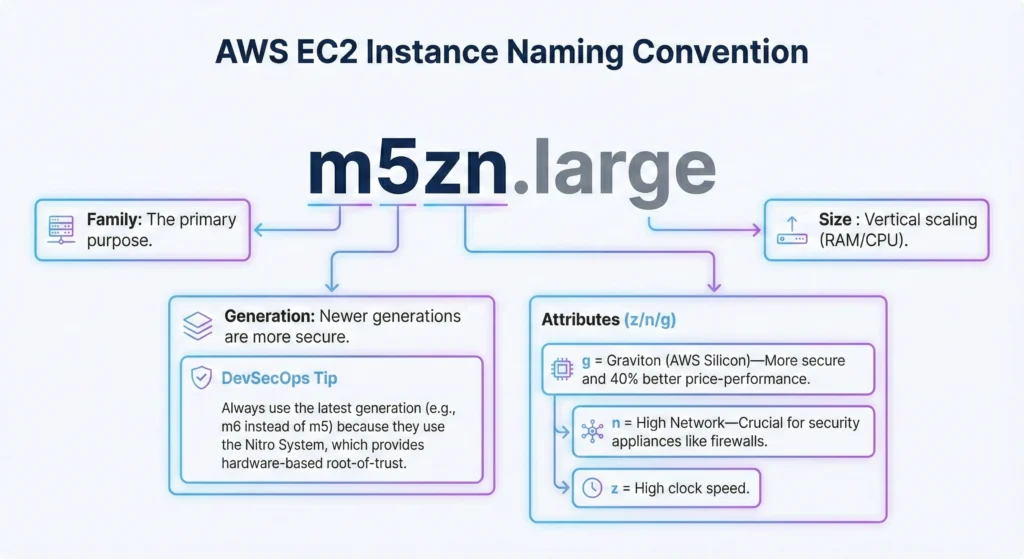
2.1. The Naming Logic: m5zn.large
Understanding the suffixes is a “Guru” skill for optimizing security and performance:
m= Family: The primary purpose.5= Generation: Newer generations are more secure. DevSecOps Tip: Always use the latest generation (e.g., m6 instead of m5) because they use the Nitro System, which provides hardware-based root-of-trust.- Attributes (z/n/g):
g= Graviton (AWS Silicon) More secure and 40% better price-performance.n= High Network Crucial for security appliances like firewalls.z= High clock speed.
large= Size : Vertical scaling (RAM/CPU).
2.2 The Complete EC2 Instance Series Guide
| Family Category | Series Letter | DevSecOps | Use Case |
| General Purpose | M, T, A | M is the Main choice. T is for non-prod; if CPU credits hit zero, your app stops (DoS risk). A (Graviton) is the most secure; ARM architecture is less prone to common x86 buffer overflow attacks. | Balanced resources. Microservices, Code Repositories, Build Servers. Web servers, code repositories, microservices, development environments. |
| Compute Optimized | C, H | C is for CPU. Essential for high-traffic WAF (Web Application Firewalls) and SSL termination. H is for high-sequential throughput; good for deep packet inspection. | High performance processors. Batch processing, media transcoding, gaming servers, scientific modeling. high-speed security scanning. |
| Memory Optimized | R, X, Z, U | R = RAM. X/Z are for huge datasets. U (High Memory) supports up to 24TB RAM. Security Tip: Nitro-based “Total Memory Encryption” protects data residing in these massive RAM pools. | High RAM. Relational databases (RDS), in-memory caches (Redis), real-time big data analytics. SAP HANA, Real-time log analytics. |
| Storage Optimized | I, D, H | I uses local NVMe. Data is Ephemeral if the instance stops, data is wiped. Guru Tip: Always use LUKS (Linux) or BitLocker (Windows) to encrypt these disks since they are physically attached to the host. | High Disk I/O. NoSQL databases (Cassandra, MongoDB), data warehousing, distributed file systems. ElasticSearch. |
| Accelerated Computing | P, G, F | P/G use GPUs. F uses FPGAs. In DevSecOps, these are used to run AI-based threat detection to identify “Zero-Day” patterns in network traffic. | GPU or FPGA hardware. Machine Learning (ML), video rendering, floating-point number calculations. 3D Rendering. |
| AI/ML Specialized | Trn, Inf | Trn (Trainium) and Inf (Inferentia) are AWS-native AI chips. They provide a cost-effective way to run Security AI models that monitor CloudTrail and VPC logs for anomalies. | AI Model Training and real-time Inference. |
| Specialized Hardware | Mac | Dedicated Apple Mac mini hardware. Critical for Mobile DevSecOps; ensures that iOS app builds happen on clean, dedicated physical hardware without virtualization lag. | iOS/macOS CI/CD pipelines and app testing. |
3. AMI (Amazon Machine Image) – The “Golden Image” Strategy
An AMI is a “master blueprint” of your server. It contains the OS, security settings, and your application. In DevSecOps, we don’t just “click and launch.” We follow the Golden Image process: we take a base OS, “harden” it (remove weaknesses), install security agents, and then lock it down as a private AMI for the whole company to use.
3.1. AMI Types & Security Risks
Not all AMIs are safe. As a Guru, you must know where your image comes from:
| AMI Type | Trust Level | DevSecOps Perspective |
| Private AMI | High | These are your internal “Certified” images. Guru Tip: Use Tags like Security_Status: Approved to track them. |
| Marketplace | Medium | Good for specialized software (e.g., CIS Hardened Linux). You pay for the expertise of the vendor. |
| Public AMI | Low | High risk of “Image Poisoning.” Use only verified providers (AWS, Red Hat, Debian) if a Private AMI isn’t ready. |
| Community | Critical Risk | Never use in Production. These can contain crypto-miners or “phone-home” backdoors. |
3.2. The “Golden Image” Lifecycle
In a professional DevSecOps setup, we use EC2 Image Builder to automate this:
- Base: Start with a clean, official OS (e.g., Amazon Linux 2023, Ubuntu etc).
- Harden: Disable unused ports, remove default passwords, and set up CIS Benchmarks.
- Install: Add security agents (CrowdStrike, CloudWatch Agent, Inspector).
- Scan: Use Amazon Inspector to check the image for vulnerabilities before saving.
- Distribute: Share the “certified” AMI with other AWS accounts in your organization.
3.3. Key Technical Properties and best practices
- Regional Resource: An AMI created in Mumbai (
ap-south-1) cannot be used in US-East (us-east-1) directly. You must Copy the AMI to the new region first.- When copying AMIs across regions, always Encrypt the target copy using a KMS key in that region.
- Storage-backed: AMIs are essentially snapshots of EBS volumes stored in S3.
- Launch Permissions: You can make an AMI “Public” (dangerous!) or share it with specific AWS Account IDs (Secure).
- Deregister Old AMIs: Don’t keep old, unpatched AMIs. If an AMI has a “Critical” vulnerability, deregister it so no one can launch new servers from it.
- Enforce IMDSv2: When creating an AMI, configure it to require Instance Metadata Service Version 2. This prevents SSRF attacks from stealing your server’s identity.
- No Hardcoded Secrets: Never create an AMI that has API keys, passwords, or SSH keys “baked in.” Use AWS Secrets Manager to pull these at runtime instead.
- Automated Cleanup: Use a “Recycle Bin” for AMIs to prevent accidental deletion of images currently being used by Auto Scaling Groups.
Real-World Challenges
- AMI Sprawl (The “Library” Problem)
- Over time, you end up with hundreds of AMIs (v1, v1.1, v1.2-beta). This wastes S3 storage costs and makes it impossible to know which one is “actually” safe.
- Fix: Implement an AMI Lifecycle Policy. Automatically Deregister and delete snapshots of any AMI older than 90 days that isn’t currently associated with a running instance.
- The “Stateless” Struggle
- If your application stores data inside the AMI (like logs or local DBs), you can’t replace the AMI without losing data.
- Fix: Force developers to use External Storage (EBS, EFS, or S3). The AMI should be “Disposable.”
- Pipeline Bottlenecks (Speed vs. Security)
- A full security scan and bake process can take 30–60 minutes. During an active zero-day exploit, this delay is dangerous.
- Fix: Use In-Place Patching via SSM Run Command for urgent “Emergency” fixes, but follow up immediately with a new Golden AMI bake to maintain consistency.
- Cross-Account Sharing Risks
- Accidentally making a Private AMI “Public” can leak your internal source code and configuration to the world.
- Enable the “Block Public Access for AMIs” setting at the AWS Account level. This is a “Safety Switch” that prevents anyone from making an image public, even by mistake.
- Patching “Ghost” Vulnerabilities
- You patch the OS, but the Application Libraries (like a vulnerable Python package) are still hidden inside the AMI.
- Fix: Use Software Bill of Materials (SBOM) tools during the bake process to list every library inside the AMI and scan them specifically.
4. EC2 Storage – The Hard Disks
EC2 storage is like the storage on your phone. You have EBS (like an SD card you can move), Instance Store (built-in storage that wipes if you reset), and EFS (like Google Photos/Cloud storage shared by multiple phones). In DevSecOps, we follow the “Encrypted by Default” rule no data should ever sit on a disk without a digital lock (KMS Encryption).
4.1. Storage Types & Security Trade-offs
| Storage Type | DevSecOps & Security Perspective | Use Case |
| EBS (Block) | Persistent & Encryptable. Supports KMS encryption at rest. Best for Boot volumes and DBs. | Primary disk for EC2 OS and apps. Persistent storage. Databases, Apps. |
| EFS (File) | Shared & Regional. Multi-AZ by default. Data is encrypted in transit and at rest. Ideal for shared secrets or config files. | Shared file storage for multiple EC2 instances. Scales automatically. Multi AZ storage service, CMS, Home dirs. |
| Instance Store | Ephemeral (Temporary). Data is lost on Stop/Terminate. Security Tip: Use this for “buffer” data that you don’t want to persist long-term. | Very fast temporary storage. Data lost on stop/terminate, Caching, Scratch space. |
4.2. EBS Volume Types
In DevSecOps, picking the volume isn’t just about speed; it’s about Cost vs. Security Overhead.
- gp3 (General Purpose): The modern standard. It allows you to provision IOPS and Throughput independently. Perfect for 90% of DevSecOps tools.
- io2 (Provisioned IOPS): The “High-End” choice. Supports EBS Multi-Attach (with Block Express) and provides 99.999% durability. Use this for critical production databases.
- st1 / sc1 (HDD): Low cost, but slow. Only use for big data logs where you don’t need fast random access.
4.3. EBS Encryption
You must emphasize this on your site: Encryption is non-negotiable.
- Encryption by Default: Go to EC2 Settings → Data Protection → Enable “Always encrypt new EBS volumes.”
- KMS Integration: Use Customer Managed Keys (CMK) instead of AWS Managed Keys for better audit trails in CloudTrail.
- Data in Transit: EBS automatically encrypts data moving between the instance and the volume.
4.4. Backup & Recovery
A “Guru” doesn’t just back up; they automate for Compliance.
- Amazon Data Lifecycle Manager (DLM): Great for simple, tag-based automation of EBS snapshots.
- AWS Backup (The “Guru” Choice): Centralized backup service.
- Cross-Region Copy: Protects against a whole AWS Region going down.
- Cross-Account Backup: Protects against a “Ransomware” attack where your main account is compromised.
- WORM (Write Once Read Many): Using AWS Backup Vault Lock to make backups immutable (they cannot be deleted by anyone, even the root user).
DevSecOps Checklist for Storage Security
- [ ] Classify Data: Is it Public, Private, or Secret?
- [ ] Enable Encryption: Is “EBS Encryption by Default” turned on in every region?
- [ ] Snapshot Hygiene: Are you using DLM to delete old snapshots to save costs?
- [ ] Least Privilege: Does the EC2 IAM Role have permissions to only the KMS key it needs?
Real-World Challenges
- The “Orphaned Volume” Cost Leak
- When you delete an EC2 instance, the EBS volumes are sometimes left behind (if “Delete on Termination” is unchecked).
- Impact: You keep paying for disks that are doing nothing. This is a “DevOps” failure.
- Fix: Use AWS Config Rules to automatically find and delete (or snapshot) “Available” volumes that haven’t been attached for more than 7 days.
- Encryption “Migration” Headaches
- You cannot encrypt an existing unencrypted volume directly.
- Impact: If you find an old unencrypted volume with 10TB of data, you have to take a snapshot, copy that snapshot to an encrypted version, and then create a new volume.
- Fix: Shift-Left. Enforce “Encryption by Default” from day one so you never have to do this manual migration.
- Instance Store Data Loss
- Developers often put important data on the Instance Store because it is “free and fast,” forgetting it is Ephemeral.
- Impact: The host hardware fails, the instance stops, and the data is gone forever.
- Fix: Ensure your application replicates data to EBS or S3 continuously if using Instance Store for performance.
- Shared Storage (EFS) Performance Bottlenecks
- EFS performance is based on “Burst Credits” or “Provisioned Throughput.”
- Impact: If your application suddenly grows, the EFS might become extremely slow, making it look like a Denial of Service (DoS) attack.
- Fix: Monitor the BurstCreditBalance metric in CloudWatch and switch to Elastic Throughput mode for unpredictable workloads.
- Snapshot Data Leakage
- Public EBS Snapshots.
- Impact: If a developer accidentally makes a snapshot “Public,” the entire world can see your files, including passwords and customer data.
- Fix: Use Service Control Policies (SCPs) at the Organization level to Deny the ec2:ModifySnapshotAttribute action for public sharing.
5. EC2 Instance Lifecycle – Power States
What happens when you start EC2 instance.
| State | DevSecOps & Security Perspective | Actionable Guru Tip |
| Pending | “The Birth” – This is where your User Data scripts run. If these scripts are hacked, your server is born “poisoned.” | Verify integrity: Ensure your bootstrap scripts are pulled from a secure, versioned S3 bucket. |
| Running | “The Attack Surface” – Billing starts, but so does the risk. Active connections can now be made. | Continuous Scan: Trigger an Amazon Inspector scan immediately upon entering this state. |
| Stopping | “The Shutdown” – Use this state to gracefully push the final security logs to S3 or CloudWatch before the connection cuts. | Log Flushing: Ensure your logging agent (CloudWatch/Fluentbit) flushes all buffers before shutdown. |
| Stopped | “Forensic Ready” – You stop paying for CPU, but the disk (EBS) remains. This is the best state to detach a disk for investigation. | Isolation: If you suspect a hack, Stop (don’t Terminate) to preserve the disk state for forensics. |
| Hibernation | “Memory Capture” – Critical for DevSecOps. It saves the RAM contents to the EBS volume. | Malware Analysis: If a server acts weird, Hibernate it. You can then analyze the RAM to find “Fileless Malware” or hidden processes. |
| Terminated | “The End” – The instance is gone. By default, the root EBS volume is deleted. | Data Sanitization: Use “Delete on Termination = OFF” for data volumes if you need to perform an “Exit Audit.” |
DevSecOps Implementation Guide
- Termination Protection “Anti-Accident” Lock
- Enable Termination Protection for all “Production” or “Stateful” instances (like Databases). This prevents a developer or a buggy script from accidentally deleting a critical server via the API or CLI.
- Incident Response: “Stop vs. Terminate”
- If Amazon GuardDuty alerts you that an instance is compromised:
- NEVER Terminate immediately. You will lose all evidence (RAM and temp files).
- Isolate the instance: Change the Security Group to a “Quarantine SG” (No Inbound/Outbound).
- Hibernate or Stop: Capture the memory and disk snapshots to understand how the hacker got i
- If Amazon GuardDuty alerts you that an instance is compromised:
- User Data & Metadata Security – When an instance is in the Pending state, it pulls metadata.
- IMDSv2 Only: Ensure your lifecycle process forces IMDSv2. This prevents “Metadata SSRF” attacks where a hacker could steal the IAM Role credentials while the server is running.
- No Secrets in User Data: Never put passwords or API keys in the User Data script. Use AWS Secrets Manager to pull them securely once the instance is Running.
- Auto Scaling Lifecycle Hooks – use Lifecycle Hooks during Auto Scaling.
- When an instance is about to be terminated, the hook pauses the process. This gives you time to run a security audit script or export final logs before the instance vanishes forever.
Real-World Challenges
- The “Ghost Log” Challenge
- When an instance is terminated suddenly (e.g., during a Spot interruption), any logs not yet synced to CloudWatch are lost forever.
- Solution: Implement Lifecycle Hooks to give logging agents time to “flush” data before the termination completes.
- Hibernation Compatibility
- Hibernation only works if the EBS root volume is encrypted and you have enough space to dump the RAM.
- Solution: Always enable Encryption by Default at the account level (using KMS) so your instances are always hibernation-ready for forensic use.
- Bootstrap Failures (The “Zombie” Instance)
- A User Data script fails halfway through (e.g., a network timeout). The instance shows as Running in the console, but the security agents aren’t installed.
- Solution: Use CloudFormation WaitConditions or SSM Automation to monitor bootstrap success. If it fails, the instance should be automatically terminated (Fail-Fast).
- IMDSv2 Migration Friction
- Legacy applications or older SDKs might break if you suddenly force IMDSv2.
- Solution: Use the MetadataNoToken CloudWatch metric to identify which applications are still using the insecure IMDSv1 before enforcing the change account-wide using an SCP (Service Control Policy).
- SSM Agent Connectivity
- For modern “No SSH” access, the SSM Agent must be active. If the instance is in a private subnet with no NAT Gateway/VPC Endpoint, it becomes a “Black Box.”
- Solution: Use VPC Endpoints for Systems Manager to ensure secure, private connectivity for maintenance in all lifecycle states.
6. EC2 Networking
Think of EC2 networking like a house in a gated community. The Private IP is your internal intercom address. The Public IP is like a temporary guest pass for the outside world. An Elastic IP is your permanent home address. The ENI is the physical network card you plug into your computer, and ENA/EFA are high-speed “highway” connections for heavy lifting. From a DevSecOps view, we treat networking as code (IaC), ensuring that no “doors” (ports) are left open by accident and that all traffic is monitored and encrypted.
6.1. Private IP Addresses
- Automatically assigned from the IPv4 address range of the subnet.
- It is the primary identity of the instance within the VPC. It persists through stops and starts.
- DevSecOps Perspective:
- Zero Trust Architecture: Communication between microservices should ideally happen over Private IPs only.
- Internal Security: Use Security Groups to restrict traffic between Private IPs, ensuring that even if one instance is compromised, the attacker cannot move laterally through the network easily.
6.2. Public IP Addresses
- A dynamic IP address used to communicate with the internet.
- Lost when the instance is stopped; a new one is assigned upon restart.
- DevSecOps Perspective:
- Attack Surface Reduction: Avoid using Public IPs for database servers or backend logic. Use NAT Gateways instead so internal instances can get updates without being exposed to the internet.
- Monitoring: Track the creation of public IPs via AWS CloudTrail to ensure no unauthorized public entry points are created.
6.3. Elastic IP (EIP)
- A static, reserved public IPv4 address. Remains associated with your account until you release it. Helpful for masking instance failures by remapping the IP to another instance.
- DevSecOps Perspective:
- Whitelisting: Essential when your application needs to talk to a third-party API that requires a fixed IP for their firewall “allow-list.”
- Cost Management: From a “DevOps” efficiency standpoint, EIPs incur costs if they are not attached to a running instance to prevent IP address wasting.
6.4. Elastic Network Interfaces (ENI)
- A logical networking component in a VPC that represents a virtual network card.
- Can include a primary private IP, multiple secondary IPs, a MAC address, and security group memberships.
- DevSecOps Perspective:
- Network Isolation: You can attach two ENIs to a single instance one for management traffic (restricted) and one for public data traffic.
- High Availability: In a DevSecOps pipeline, you can programmatically move an ENI from a failed instance to a standby instance to maintain the same IP and security configuration.
6.5. Enhanced Networking (ENA & EFA)
- ENA (Elastic Network Adapter): Supports speeds up to 100 Gbps. Uses SR-IOV to provide high throughput and low CPU utilization.
- EFA (Elastic Fabric Adapter): A specialized ENI for High-Performance Computing (HPC) and Machine Learning. It uses “OS-bypass” to let instances communicate directly with each other.
- DevSecOps Perspective:
- Performance Bottleneck Security: In heavy workloads like ML or Big Data, network lags can cause system timeouts that look like Denial of Service (DoS) attacks. Using ENA/EFA ensures the “Availability” pillar of the CIA triad (Confidentiality, Integrity, Availability) is maintained under high load.
DevSecOps “Best Practice” Checklist
- Security Groups (Firewalls): Always follow the Principle of Least Privilege. Only open ports (like 80 or 443) that are strictly necessary.
- Infrastructure as Code (IaC): Use Terraform or CloudFormation to define your VPC and Subnets. This ensures that networking is “Version Controlled” and can be audited.
- VPC Flow Logs: Enable these to capture information about the IP traffic going to and from network interfaces. This is your primary tool for “Continuous Monitoring” and detecting suspicious traffic patterns.
- Reachability Analyzer: Use this tool during the “Test” phase of your DevOps cycle to ensure that your network paths are actually secure and no unintended paths to the internet exist.
Real-World Challenges
- Security Group “Sprawl”
- Large organizations often end up with hundreds of Security Groups. Some groups have 50+ rules, making it impossible to audit manually.
- Impact: A developer might add a “temporary” rule to port 22 (SSH) and forget to delete it, creating a permanent hole.
- Fix: Use AWS Firewall Manager or AWS Config Rules to automatically flag and delete any SG rule that doesn’t follow your standard “Approved” list.
- IP Address Exhaustion
- If you choose a small subnet (like /28), you might run out of Private IPs when your Auto Scaling Group tries to add more servers.
- Impact: Your app won’t scale up during peak traffic, leading to a crash.
- Fix: Plan your VPC CIDR carefully. Always use secondary CIDR blocks if you start running out of space.
- The “Elastic IP” Bill Shock
- AWS charges for Elastic IPs that are not attached to a running instance.
- Impact: If a developer terminates a server but forgets to “Release” the EIP, you keep paying for it every hour.
- Fix: Write a simple Lambda function that runs every night to find “Unassociated EIPs” and sends a bill alert to Slack or deletes them.
- VPC Flow Log Data “Drowning”
- Flow logs generate millions of lines of data. Storing and searching through them is expensive and slow.
- Impact: When a security breach happens, it takes hours to find the “needle in the haystack.”
- Fix: Send logs to Amazon Athena or OpenSearch and create “Summary Dashboards.” Focus only on REJECT actions to spot hackers trying to scan your ports.
- Latency in ENA/EFA
- While ENA is fast, “OS-bypass” in EFA can be tricky to configure for specific apps.
- Impact: Misconfiguration can actually make your network slower than standard networking.
- Fix: Use Performance Testing in your staging environment to baseline the “Network Latency” before pushing to production.
7. Security Group and NACL
Think of Security Groups (SG) as your personal security guard who stands right at your front door (the instance); if he lets you in, he remembers you and lets you out automatically.
NACLs are like the main gate of your gated community (the subnet); they don’t remember faces, so they need a list of exactly who can enter and who can leave. In
DevSecOps, we use the SG for fine-tuned control and the NACL for broad “blocking” of known bad actors.
| Feature | Security Group (SG) | Network ACL (NACL) |
| Layer | Instance Level (Host-based firewall) | Subnet Level (Network-based firewall) |
| State | Stateful: Automatic return traffic. | Stateless: Must define In & Out rules. |
| Rule Types | Allow only (Implicit Deny). | Allow & Deny (Explicit). |
| Evaluation | All rules evaluated before decision. | Evaluated in numerical order (Priority). |
| DevSecOps Role | Micro-segmentation & App Security. | Perimeter defense & IP blacklisting. |
7.1. Security Groups
- Virtual Firewall: Acts as a firewall for your EC2 instances to control inbound and outbound traffic.
- Default Behavior: All inbound traffic is blocked by default. All outbound traffic is allowed by default (can be changed).
- Stateful Nature: If you allow traffic on port 80 (Inbound), the response (Outbound) is automatically allowed, even if no outbound rule exists.
DevSecOps Perspective:
- Principle of Least Privilege: Never use
0.0.0.0/0unless it’s a public-facing load balancer. For internal apps, always reference other Security Groups (e.g., “Allow Inbound from SG-App-Tier”) instead of IP ranges. - Infrastructure as Code (IaC): Always define SGs in Terraform or CloudFormation. This prevents “Rule Sprawl” where manual changes lead to security holes over time.
- Security Group Tagging: Use tags like
Environment: ProductionandCompliance: PCI-DSSto automate security audits. - Zero-Trust: Treat every instance as potentially compromised. Use SGs to isolate instances even within the same subnet.
Real-World Challenges
- Rule Sprawl & Limits: SGs have a default limit (usually 60 rules). In large enterprises, you quickly hit this limit.
- Guru Fix: Use Managed Prefix Lists to group multiple IP ranges into a single “Named List” to save space and simplify management.
- Overlapping Rules: Attaching 5 different SGs to one instance can create “Swiss Cheese” security one permissive rule in any group opens the whole instance.
- Guru Fix: Use IAM Access Analyzer for Network to audit if any instance has unintentional paths to the internet.
7.2. NACL (The Shield)
- Subnet Level Security: Controls traffic entering or leaving the entire subnet.
- Stateless Nature: It does not “remember” sessions. If you allow Inbound traffic on port 443, you must also add an Outbound rule for the ephemeral ports (usually 1024-65535) for the response to reach the user.
- Rule Ordering: Rules are processed from lowest to highest number. As soon as a match is found (Allow or Deny), it stops looking.
DevSecOps Perspective:
- Hardened Perimeter: Use NACLs as a “Blacklist.” If your logs (VPC Flow Logs) show an attack from a specific IP range, block it at the NACL level so it never even reaches your instances.
- Compliance Guardrails: Use NACLs to enforce high-level company policies, such as “No SSH (Port 22) traffic allowed into the Database Subnet,” regardless of what an individual developer might set in a Security Group.
- Ephemeral Port Security: In DevSecOps pipelines, misconfiguring NACL ephemeral ports is a common cause of deployment failures. Always ensure your “Stateless” logic accounts for the return path of the traffic.
- Forensics & Logging: Since NACLs sit at the boundary, they are the best place to monitor for “Rejection” spikes, which often indicate a port-scanning attempt or a brute-force attack.
Real-World Challenges
- The “Return Path” Nightmare: Developers often forget the stateless nature of NACLs. They open Inbound 443 but block Outbound, causing the app to “timeout.”
- Fix: Always add a standard Outbound rule (e.g., Rule #1000) allowing TCP 1024-65535 for any public-facing subnet.
- Order of Operations: If you have an
ALLOW ALLat Rule #100 and aDENY Malicious IPat Rule #200, the Deny rule will never run.- Fix: Always leave “gaps” in your rule numbers (10, 20, 30…). Put your DENY rules at the top (lowest numbers) and broad ALLOW rules at the bottom.
- Visibility Bias: Security Groups don’t tell you what they blocked. NACLs also don’t have a “Log” button in the console.
- Fix: Enable VPC Flow Logs. This is the only way to see
REJECTpackets and prove exactly which rule is blocking your traffic.
- Fix: Enable VPC Flow Logs. This is the only way to see
8. EC2 Instance Connect / Accessing options
Think of accessing your server like entering a high-security vault.
- SSH is like having a physical metal key; if you lose it or someone steals a copy, they can get in.
- SSM Session Manager is like a biometric scan; you don’t need a key, and every single thing you do inside the vault is recorded on camera.
- EC2 Instance Connect is like a digital one-time passcode.
- Instance Connect Endpoint is a special “tunnel” that lets you use your digital passcode even if the vault is hidden deep underground (private subnet) without a public door.
| Access Method | Connectivity | Security Level | Credentials used | Audit Trail |
| Traditional SSH/RDP | Public IP (Port 22/3389) | Low | Static Key Pairs (.pem) | Local shell history (limited) |
| EC2 Instance Connect | Public IP (Port 22) | Medium | Temporary IAM-based keys | CloudTrail (API level) |
| SSM Session Manager | No Public IP needed | Highest | IAM Roles (No keys) | CloudWatch & S3 (Full Command Logs) |
| EIC Endpoint | Private Subnet | High | IAM (No Bastion needed) | CloudTrail |
8.1. Traditional SSH / RDP
- The “Legacy” way: Direct connection to the instance. Requires port 22 (Linux) or 3389 (Windows) to be open in the Security Group.
- DevSecOps Perspective:
- Key Sprawl Risk: Static
.pemfiles are often accidentally uploaded to GitHub or shared over Slack, leading to major leaks. - Brute Force: Open ports 22/3389 are “magnets” for botnets.
- Remediation: If you must use SSH, use Client VPN or a Bastion Host (Jump Box) to limit exposure.
- Key Sprawl Risk: Static
8.2. AWS Systems Manager (SSM) Session Manager
- Uses the SSM Agent (pre-installed on most AMIs) to initiate an outbound connection to AWS. You connect via the browser or CLI.
- DevSecOps Perspective:
- No Inbound Ports: You can close port 22/3389 entirely in your Security Groups. This is the Gold Standard for DevSecOps.
- Centralized Logging: Every command typed by an engineer is logged to S3 or CloudWatch Logs. This is essential for compliance (HIPAA, SOC2).
- MFA Integration: You can require Multi-Factor Authentication (MFA) at the IAM level before a session can start.
8.3. EC2 Instance Connect (EIC)
- How it works: AWS pushes a one-time SSH public key to the instance metadata for 60 seconds. You log in using that temporary key.
- DevSecOps Perspective:
- Eliminates Static Keys: No more managing
.pemfiles. - IAM-Centric: Access is controlled by IAM policies, not by who has a file on their laptop.
- Restriction: Still requires the instance to have a Public IP and Port 22 open to the EC2 Instance Connect service range.
- Eliminates Static Keys: No more managing
8.4. EC2 Instance Connect Endpoint (EICE)
- The “No-Bastion” Solution: A VPC endpoint that allows you to SSH into instances in private subnets without needing a Bastion Host or a Public IP.
- DevSecOps Perspective:
- Cost & Security Efficiency: Traditionally, you had to pay for a “Bastion” instance and secure it. EICE is a managed service that replaces the Bastion, reducing your attack surface and management overhead.
- Traffic Control: You can use Security Groups on the Endpoint itself to restrict which IP addresses in your office can even attempt to connect to the private instances.
DevSecOps Best Practices for EC2 Access
- Enforce IMDSv2: Ensure your instances use Instance Metadata Service Version 2 (session-oriented) to prevent SSRF (Server-Side Request Forgery) attacks that try to steal IAM roles.
- Infrastructure as Code (IaC): Use Terraform to ensure all EC2 instances are launched with an IAM Instance Profile containing the
AmazonSSMManagedInstanceCorepolicy. - Automated Key Rotation: If using traditional SSH, automate the rotation of keys using AWS Secrets Manager.
- Just-In-Time (JIT) Access: In a mature DevSecOps pipeline, no one has permanent access to production. Use IAM Condition Keys to grant access only during approved maintenance windows.
Real-World Challenges
- SSM Agent Connectivity: For Session Manager to work, the instance must reach the SSM service. If your private instance has no NAT Gateway or VPC Endpoint, the agent cannot “heartbeat,” and the instance will show as “Offline.”
- IMDSv2 Migration Outages: Moving from IMDSv1 to IMDSv2 (which is more secure) can break legacy scripts or older applications that expect to fetch metadata without a session token.
- Large Scale Auditing: In an environment with 1,000+ instances, searching through millions of CloudWatch lines to find one specific command can be like finding a needle in a haystack.
- WebSocket Issues: CLI-based session manager connections sometimes fail if your company’s corporate firewall/proxy blocks WebSockets.
- KMS Key Permissions: If you encrypt your SSM logs with a custom KMS key, but forget to give the EC2 IAM role
kms:Decryptpermissions, the session will terminate instantly with a cryptic error.
9. EC2 Maintenance & Patching
Maintaining an EC2 instance is like servicing a car.
Patching is changing the oil and fixing security leaks. Instead of doing this manually for every car (instance),
SSM Patch Manager as an automated robot that services the whole fleet at midnight.
SSM Session Manager is like a secure remote control that lets you check the engine without needing a physical key (SSH key).
DevSecOps view, we want our servers to be “self-healing” and always up-to-date without humans touching them.
9.1. SSM Patch Manager
- Patch Baselines: A set of rules that define which patches are “approved” (e.g., “Install all security updates with a ‘Critical’ severity after 7 days of release”).
- Patch Groups: Using Tags (e.g.,
PatchGroup: Production) to associate instances with specific baselines. - Maintenance Windows: Scheduled time slots where patching occurs to avoid impacting business hours.
DevSecOps Perspective:
- Vulnerability Management: Integrate Patch Manager with Amazon Inspector. If Inspector finds a vulnerability, Patch Manager can automatically trigger a “Scan and Install” to fix it.
- Compliance as Code: Use AWS Config to monitor if instances have the correct Patch Group tags. If an instance is missing a tag, it’s a security risk.
- Immutable Infrastructure: In a mature DevSecOps pipeline, instead of patching a running server (“In-place”), we patch the AMI (Golden Image) and redeploy the entire fleet.
Real-World Challenges
Working on EC2 maintenance at scale isn’t always smooth. Here are the common hurdles:
- SSM Agent “Heartbeat” Issues
- Sometimes an instance shows as “Connection Lost” or “Unmanaged.”
- Why it happens: The SSM Agent crashed, the IAM role is missing
AmazonSSMManagedInstanceCore, or the instance has no outbound path to the SSM endpoint (needs NAT Gateway or VPC Endpoint). - Fix: Use an Automation Runbook to automatically restart the agent or verify IAM roles upon launch.
- The “Reboot” Nightmare
- Many security patches (like Kernel updates) require a reboot to take effect.
- Why it happens: If you have a single instance (not in an Auto Scaling Group), a reboot causes downtime.
- Fix: Use Target Tracking and Health Checks. Only patch 10% of the fleet at a time so the application stays online.
- Broken Dependencies
- A patch might update a library that breaks your application (e.g., updating Python or Java version).
- Why it happens: Lack of “Pre-prod” testing.
- Fix: Always patch Dev/QA environments first. Use Patch Manager’s “Scan” mode to see what would happen before running “Install.”
- Custom Repositories
- Patch Manager is great for OS patches but struggles with custom software or third-party apps not in standard
yumoraptrepos. - Fix: Use SSM Distributor to package and deploy custom software updates alongside OS patches.
- Patch Manager is great for OS patches but struggles with custom software or third-party apps not in standard
10. EC2 Boot Strap Options
If building an EC2 instance is like building a smart-home:
User Data is the One-Time Construction Crew. They install the foundation, set up the electricity, and put in the smart-locks once. When the house is built, they leave and never come back.
Cloud-Init is the Maintenance Operating System. It’s the “brain” of the house that reads your custom settings every time the power cycles ensuring that if a window is accidentally left open (a security gap), it gets closed and locked.
| Feature | User Data | Cloud-Init |
| Execution | Runs once at initial launch. | Industry-standard multi-distribution tool. |
| Format | Shell scripts (#!/bin/bash) or cloud-config. | YAML-based (#cloud-config) or scripts. |
| Primary Use | Quick package installs & environment variables. | Complex tasks (disk partitioning, users, certificates). |
| Visibility | Visible in Instance Metadata (plaintext). | Logs stored in /var/log/cloud-init.log. |
| DevSecOps Value | Just-in-Time (JIT) security agent installation. | Enforcing standard security baselines across AMIs. |
10.1. DevSecOps Integration – Secure by Design
- Automated Security Agent Deployment – In a DevSecOps pipeline, never want a “naked” instance on the network. Use User Data to pull and install your security stack immediately:
- EDR/Antivirus:
yum install -y crowdstrike-agent - Monitoring:
curl -sSL https://install.datadoghq.com/ansible-installer.sh | bash - Vulnerability Scanning: Installing the AWS Inspector agent.
- EDR/Antivirus:
- Hardening at Launch (Shift-Left) – Instead of waiting for a manual audit, use Cloud-Init to:
- Disable Root Login: Set
PermitRootLogin noin SSH config. - Update Everything: Force a
yum update -yorsecurity-onlyupdates before the app starts. - Install CIS Benchmarks: Run scripts that align the OS with Center for Internet Security (CIS) standards.
- Disable Root Login: Set
- Identity and Access (IAM Role instead of Keys)
- Never pass AWS Access Keys through User Data.
- DevSecOps Best Practice: Assign an IAM Instance Profile to the EC2. Then, use User Data to simply call the AWS CLI to fetch secrets from AWS Secrets Manager securely.
Real-World Challenges
- The “Plaintext Secret” Leak
- Anything you put in User Data can be seen by anyone with
ec2:DescribeInstanceAttributepermissions or by runningcurl http://169.254.169.254/latest/user-data/on the instance. - Solution: Never put passwords or API keys in User Data. Use IMDSv2 (Instance Metadata Service v2) to protect the metadata service and pull secrets from Secrets Manager at runtime.
- Anything you put in User Data can be seen by anyone with
- “First Boot Only” Limitation
- By default, User Data doesn’t run again if the instance restarts. If a security patch is released later, User Data won’t help.
- Solution: Use MIME multi-part scripts to tell Cloud-Init to run specific security checks every time the instance boots, not just the first time.
- “Silent Failure” Debugging
- If your User Data script has a typo, the instance might look “Running” but the security agents aren’t actually installed.
- Solution: Always redirect your script output to a log file:
#!/bin/bash -ex. Check/var/log/cloud-init-output.logto audit the bootstrap success.
- Large Script Size
- User Data is limited to 16 KB.
- Solution: Don’t write a 1,000-line script. Instead, host your main configuration script in an S3 bucket. Use User Data to download and run that one script:
aws s3 cp s3://my-security-bucket/harden.sh . && chmod +x harden.sh && ./harden.sh.
11. Auto Scaling Groups (ASG) and Launch Templates
Think of an Auto Scaling Group (ASG) as a Smart Manager. If your shop gets crowded (high CPU/traffic), the manager hires more staff (scales up). if the shop is empty, the manager lets staff go to save money (scales down).
The Launch Template is the Instruction Manual the manager uses to hire new staff it says exactly what they allowed (Security Groups) and what skills and capacity they must have (AMI/Instance Type).
| Feature | Detailed Note | DevSecOps Perspective |
| Lifecycle Hooks | Adds a “Pause” during creation or termination. | Security Cleaning: Use hooks to run a final vulnerability scan before an instance goes live, or to export logs to S3 before it is deleted. |
| Health Checks | EC2 vs. ELB checks. EC2 only checks “Is the power on?” ELB checks “Is the app working?” | Integrity: Always use ELB health checks. If your app is hacked and crashes, ASG will automatically “kill and replace” it with a fresh, clean version. |
| Scaling Policies | Target Tracking (Thermostat style) is now the standard recommendation. | Availability: Prevent “Performance-based DoS.” By scaling on Network Throughput, you ensure the app stays alive during a sudden traffic spike. |
| Mixed Instance Policy | Uses a mix of On-Demand and Spot instances. | Cost Efficiency: DevSecOps isn’t just security; it’s optimization. Use “Capacity Rebalancing” to swap Spot instances before they are interrupted by AWS. |
11.2. Launch Templates (The Successor to Launch Configurations)
It’s an instance configuration template for the auto-scaling group, AMI, Instance Type, Key pair and Security group.
- Versioning: You can have “v1” for Production and “v2” for Testing.
- Metadata Options: Supports IMDSv2, which is mandatory for modern security to prevent credential theft.
- Spot + On-Demand: Allows you to define how many “cheap” (Spot) vs “reliable” (On-Demand) instances you want.
DevSecOps Integration: “Self-Healing & Compliance”
- Immutable Infrastructure – In DevSecOps, we never patch a running ASG.
- Process: Update your Launch Template with a new “Golden AMI” (patched version).
- Action: Trigger an Instance Refresh. ASG will replace old instances with new ones automatically.
- Result: No “Configuration Drift” (where different servers have different settings).
- Automated Vulnerability Response – integrate Amazon Inspector with ASG. If Inspector finds a critical bug:
- It sends an alert to EventBridge.
- EventBridge triggers a Lambda.
- The Lambda updates the Launch Template and forces the ASG to rotate the “infected” instances.
- Enforcing IMDSv2
- Launch Configurations (Legacy) allowed the older, less secure IMDSv1.
- Launch Templates allow you to strictly enforce IMDSv2 (Session-based). This prevents attackers from stealing the instance’s IAM role via a Server-Side Request Forgery (SSRF) attack.
Real-World Challenges
- “The Scaling Flap” (Simple Scaling Issue):
- Simple scaling can lead to “flapping” adding an instance, then immediately deleting it, then adding it again.
- Fix: Use Target Tracking Scaling or Predictive Scaling. It uses machine learning to look at your traffic history and prepare capacity before the spike happens.
- “Spot Interruption” (Availability Risk):
- Spot instances can be taken back by AWS with only a 2-minute warning.
- Fix: Use Capacity Rebalancing. ASG will proactively launch a new instance as soon as it gets a “rebalance recommendation” from AWS, rather than waiting for the 2-minute “death notice.”
- “Zombie Instances” (Termination Policy Error):
- If you set your termination policy is “Newest Instance,” the ASG might accidentally kill a server that just started and is still doing important setup work.
- Fix: Use Custom Termination Policies (Lambda-based) or stick to “Default,” which balances instances across Availability Zones first to ensure high availability.
- “Launch Configuration Migration”:
- Many older companies still use Launch Configurations, which don’t support new instance types (like Mac or Graviton).
- Fix: AWS has a “Copy to Launch Template” button. As a DevSecOps pro, you should automate this migration to ensure your fleet can use the latest security features.
11.3. Placement Strategy
| Type | How it Works | HPC Perspective |
| Cluster | All in one rack/AZ. | Speed: 10Gbps+ low latency. Risk: If the AZ fails, everything dies. DevSecOps Fix: Use for short-term batch processing, not long-term storage. |
| Spread | Every instance is on a different physical rack. | Max Availability: Best for Small SQL Clusters or Domain Controllers. Limit: Max 7 instances per AZ. |
| Partition | Groups of instances are isolated on different racks. | Data Integrity: Best for HDFS/Kafka where you want to ensure that a rack failure doesn’t lose all copies of your data. |
12. EC2 Monitoring
Think of EC2 monitoring like a Smart Watch for your server. It tracks the “heartbeat” (CPU), “blood pressure” (Network), and “memory” (RAM).
- Standard Monitoring is like a free check-up every 5 minutes.
- Detailed Monitoring is like a premium 1-minute heart-rate monitor.
- Status Checks tell you if the “hardware” (AWS) or the “person” (your OS) has a problem.
- DevSecOps view, we add a “Security Alarm” to this watch. If the server starts talking to a suspicious country or its memory usage spikes suddenly (possible crypto-jacking), the alarm goes off and fixes the issue automatically.
12.1. Metrics and Monitoring Types
| Metric Category | Standard (Free/Hypervisor) | Custom (Requires Agent) |
| Frequency | 5 minutes (default) | Up to 1 second (High Resolution) |
| Compute | CPU Utilization, Credit Balance | RAM Usage, Process Count |
| Network | Bytes In/Out, Packets In/Out | Port-specific traffic, Latency |
| Storage | Disk Read/Write (EBS metrics) | Disk Space Used, Swap Usage |
| DevSecOps Focus | Traffic Spikes (DDoS signals) | Unauthorized Logins, Malicious Logs |
12.2. Status Checks: Who is at fault?
| Check Type | Responsibility | Common Causes of Failure |
| System Status (0/2) | AWS (Hardware) | Power loss, Physical host failure, Network link down. |
| Instance Status (1/2) | You (Software/OS) | Memory Exhaustion, Corrupted Kernel, Wrong Firewall (Security Group) settings. |
You can set a CloudWatch Auto-Recovery alarm on System Status checks. If the physical hardware fails, AWS will automatically move your instance to a new healthy host without changing your Private IP or Volume data.
DevSecOps Perspective: “Monitor, Detect, Respond”
- Shift-Left Observability
- In a DevSecOps pipeline, monitoring configuration is Infrastructure as Code (IaC). We don’t manually create alarms. We define them in Terraform/CloudFormation so that every new instance is born with a “Security Guard” (Alarm) attached.
- IMDSv2: The Metadata Shield – Instance Metadata (IMDS) is a goldmine for attackers.
- IMDSv1 (Old): Vulnerable to SSRF attacks. A hacker could trick your app into leaking your IAM Role credentials.
- IMDSv2 (Secure): Requires a Session Token.
- DevSecOps Best Practice: Disable IMDSv1 account-wide. Use the “Hop Limit” of 1 to prevent credentials from leaving the instance.
- Automated Incident Response (The “Self-Healing” Loop)
- Instead of a human getting a 2 AM call:
- Event: CloudWatch detects a CPU spike > 90% (Potential DoS).
- Action: CloudWatch triggers an AWS Lambda function.
- Response: Lambda inspects the traffic, blocks the attacking IP in the NACL, and scales the ASG.
Real-World Challenges
- The “CloudWatch Bill” Shock
- Detailed 1-minute monitoring and high-resolution custom metrics are expensive. If you monitor 1,000 instances with 10 custom metrics each, your bill can skyrocket.
- Fix: Use Metric Streams to send data to cheaper third-party tools or only enable detailed monitoring on “Production” tagged instances.
- The “SSM Agent” Heartbeat
- The SSM/CloudWatch agent must be running inside the OS. If the OS crashes or the agent hangs, you lose all RAM and Disk Space visibility.
- Fix: Use a “Dead Man’s Switch” alarm if CPUUtilization is 0% or metrics stop arriving, trigger a reboot.
- Alert Fatigue
- Too many alarms lead to “ignoring the noise.” If 50 alarms go off for one minor issue, the team misses the real problem.
- Fix: Use CloudWatch Anomaly Detection. Instead of a fixed “90%” threshold, it uses Machine Learning to learn what is “normal” for your specific app.
- IMDSv2 Migration
- Older SDKs or legacy code might break if you force-toggle to IMDSv2 only.
- Fix: Use the MetadataNoToken CloudWatch metric to identify which applications are still using the old, insecure IMDSv1 before you disable it.
13. Pricing Models & Tenancy
Think of EC2 pricing like Travel Options:
- On-Demand is like a Standard Taxi: Pay as you go, flexible, but expensive.
- Spot is like Standby Tickets: Extremely cheap, but you might be kicked off if someone else pays full price.
- Savings Plans/RI are like a Monthly Pass: You commit to the service and get a massive discount.
- Dedicated Hosts are like Owning the Whole Bus: Only your people are inside, which is great for strict company rules (compliance).
- Placement Groups are about Seating Arrangements: Do you want everyone sitting close for fast talking (Cluster), or spread out so one accident doesn’t hurt everyone (Spread)?
13.1 Pricing Models
| Model | DevSecOps Insight | The Challenge |
| On-Demand | Use for “Spiky” workloads or new apps where you don’t know the traffic yet. | Cost Leakage: High risk of “Zombie” instances running 24/7 at full price if automation fails. |
| Spot | Best for CI/CD Pipelines. If a build server fails, it doesn’t hurt production. Use “Spot Instance Diversification.” | Volatility: Sudden termination can break a deployment. Fix: Use “Capacity Rebalancing” in ASG. |
| Savings Plans | The modern standard. Flexible across Instance Families (e.g., move from M5 to M6g without losing the discount). | Commitment Risk: If your tech stack changes to Lambda/Fargate, you’re still stuck paying for EC2. |
| Reserved Instances (RI) | Good for steady-state databases. | Marketplace Complexity: Selling unused RIs is time-consuming and manual. |
| Dedicated Host | Essential for License Compliance (BYOL) and high-security isolation. | Management Overhead: You are responsible for managing the capacity of the physical hardware. |
13.2 Tenancy Options: “Physical Security”
In DevSecOps, Tenancy is about the “Isolation” pillar.
- Shared (Default): Multi-tenant. Safe, but theoretically vulnerable to “Side-Channel Attacks” (like Spectre/Meltdown), though AWS mitigates this.
- Dedicated Instance: You are the only one on that hardware, but AWS manages the physical placement.
- Dedicated Host: You have full visibility.
- DevSecOps Use Case: Required for apps that need “Host Affinity” or strict regulatory requirements where you must prove your data isn’t physically next to a competitor’s.
14. AWS Hypervisor Types (Xen & Nitro)
A hypervisor is software that creates and manages EC2 virtual servers by sharing hardware resources like CPU, memory, and storage.
Think of the Xen Hypervisor like a shared apartment building where a Security Guard lives in one of the rooms.
The Nitro System is like a high-tech vault where there is no security guard living inside. Instead, all the “heavy lifting” like mail and locks is handled by hidden machinery (Nitro Cards) behind the walls. This makes the building faster (no guard taking up space) and much harder to rob because there is no human manager to target.
Hypervisor = A manager that controls virtual servers in AWS.
AWS mainly uses two hypervisor technologies:
| Feature | Xen Hypervisor (Legacy) | Nitro System (Modern) |
| Architecture | Monolithic (Software-based) | Micro-modular (Hardware-offloaded) |
| Management | Dom0 (Privileged VM) manages I/O. | Nitro Cards handle VPC, EBS, and Storage. |
| Resources | Consumes ~10% of host CPU/RAM. | Nearly 0% overhead (Near Bare-Metal). |
| Security Access | Administrative access possible via Dom0. | No administrative access (even for AWS). |
| Device Type | Emulated devices (Slow). | NVMe & ENA (High-speed hardware). |
| Trust Model | Software-defined isolation. | Hardware Root of Trust (Nitro Security Chip). |
| Xen Hypervisor – is now considered legacy | Nitro Hypervisor is the modern hypervisor used in almost all new EC2 instance types. |
| The Xen hypervisor was used by AWS in the early EC2 days. It powered many old-generation instances. | The AWS Nitro Hypervisor is the latest generation virtualization technology. It is lightweight, hardware-accelerated, highly secure, and designed for maximum performance. |
| Supported both Paravirtualization (PV) and Hardware Virtual Machine (HVM) modes Provided strong isolation between virtual machines Stable and widely adopted in early cloud systems Higher virtualization overhead compared to Nitro Older instance families (now retired) like T2, M3, C3 More overhead → lower performance Not optimized for high-speed networking No support for bare-metal instances Not used for new instance generations | KVM-based and default hypervisor Near-zero virtualization overhead Offloads networking and storage to dedicated hardware (Nitro Cards) Strong hardware-based isolation using Nitro Security Chip High CPU, network, and disk performance Supports bare-metal EC2 instances Nitro is used in almost all modern instance families built on the AWS Nitro System Faster compute, storage, networking and better security |
DevSecOps Perspective: Why Nitro is a Security Game-Changer
- Attack Surface Reduction
- In Xen, the Dom0 is a general-purpose Linux OS with a shell, drivers, and a network stack. This is a massive attack surface.
- Nitro’s DevSecOps Advantage: The Nitro Hypervisor has no shell, no networking stack, and no interactive access. It is a tiny, read-only firmware-like component (~50k lines of code). If a hacker breaks out of a VM, there is “nothing to talk to” on the host.
- Nitro Security Chip (Hardware Root of Trust)
- Continuous Monitoring: The chip constantly validates the system firmware. If the motherboard firmware is tampered with, the chip prevents the system from booting.
- Hardware-Enforced Isolation: Security isn’t just a software rule; it’s physically wired into the silicon.
- Confidential Computing (Nitro Enclaves)
- Zero-Trust Data Processing: Nitro Enclaves allow you to create an isolated “black box” within your EC2 instance.
- DevSecOps Use Case: You can process highly sensitive data (like credit card info or private keys) in an environment where even the root user of the main EC2 instance cannot see what’s happening inside the Enclave.
- Transparent VPC Encryption
- In-Transit Security: On Nitro-based instances, traffic between instances is automatically encrypted at the hardware level with no performance penalty. This fulfills the “Encryption in Transit” compliance requirement without manual setup.
Real-World Challenges
- The “Driver” Gap (Xen to Nitro Migration)
- Xen instances use “Para-virtual” (PV) drivers. Nitro requires NVMe (for storage) and ENA (for networking) drivers.
- Fix: Before moving an old AMI to a Nitro instance (like C5 or M5), you must install these drivers. If you don’t, the instance will fail to boot and you’ll get a “1/2 Status Check” error.
- OS Compatibility
- Very old Linux kernels (pre-2012) or older Windows versions (2003/2008) simply don’t have the “brains” to talk to Nitro hardware.
- You may be forced to stick with older “T2” or “M3” (Xen-based) instances for legacy apps, which are more expensive and less secure.
- “Noisy Neighbor” Variance
- While Nitro reduces the “noisy neighbor” effect, the extreme performance of Nitro can sometimes expose bugs in your code that were “hidden” by the slower, jittery performance of Xen.
- Fix: Always re-run your performance and stress tests during a migration to ensure your application logic handles the high-speed Nitro I/O correctly.
EC2 common issues and Troubleshooting
 EC2 Rescue Mode used to fix the issues
Best Method for OS-level issues:
- Attach back and start
- Stop instance
- Detach disk
- Attach to rescue EC2
- Fix errors
EC2 Not Starting / Stuck in Pending
Cause: –
- Availability Zone has no capacity
- Instance stuck on bad hardware
- Corrupted EBS Volume
Fix: –
- Try launching in another Availability Zone
- Stop → Start the instance it moves EC2 to a new hardware host.
Stuck on Boot / Kernel Panic / GRUB Error
Cause
- Wrong OS update
- Corrupted bootloader
- Wrong /etc/fstab
- Missing drivers
Fix (Rescue Method)
- Stop instance
- Detach root volume
- Attach to a rescue EC2
- Mount volume and fix files:
Fix GRUB / Kernel
sudo grub2-install /dev/xvda
sudo grub2-mkconfig -o /boot/grub2/grub.cfg
Fix wrong fstab edit /etc/fstab and fix the entries.
Cannot SSH into EC2 (Linux)
Typical errors:-
- Connection timed out
- Permission denied (publickey)
Fix:-
- Check the username and ipaddress.
- Update Security group inbound rule allow port 22 and NACL if required.
- Update Key pair permissions to 400.
- Lastly sshd service might be issue.
Cannot RDP into EC2 Windows
Cause: –
- Windows firewall blocking RDP
- Port 3389 blocked
- Wrong password
Fix:-
- Check the username and ipaddress.
- Update Security group inbound rule allow port 3389 and NACL if required.
- lastly Use EC2Rescue for Windows to fix firewall rules
High CPU or Memory Usage
Cause: –
- Small instance size
- Application leak
- Malware / runaway process
Fix: –
- Check the instance size and increase.
- Check for application log.
- Patch the OS and check for vulnerabilities
EBS Volume / Disk Full
Symptom: –
- OS freeze
- SSH not working
Fix: –
- Modify EBS size in console
- Reboot instance
- Expand filesystem
Network Connectivity Issues
Cause: –
- Wrong route table
- Missing IGW/NAT
- Wrong SG/NACL
- Bad VPC peering config
Fix: – Check and update the network configurations.
Status Checks Failed (2/2)
- System Status Check Failed (AWS issue)
- Hardware failure or Network failure
- Fix:- Stop → Start instance (moves to new hardware)
- Instance Status Check Failed (OS issue)
- Low memory, Kernel panic, Corrupted root disk
- Fix: – Reboot, Check logs,
EC2 Cannot Reach Internet
Cause: –
- Missing Internet Gateway
- Wrong Subnet
- Public IP not assigned
Fix: – Check VPC configuration, IGW, Route table. and Public IP assigned
Slow Performance (CPU Credits Issue)
Cause: – T2/T3 instance burst credits exhausted.
Fix:- Change instance to Non credit based instance or
Enable unlimited mode:
aws ec2 modify-instance-credit-specification \
--instance-credit-specifications InstanceId=i-123,CpuCredits=unlimited
“Insufficient Capacity” Error
Cause: – AWS does not have that instance type in the selected AZ.
Fix:- Select different AZ