
AWS – Compute – Elastic Beanstalk
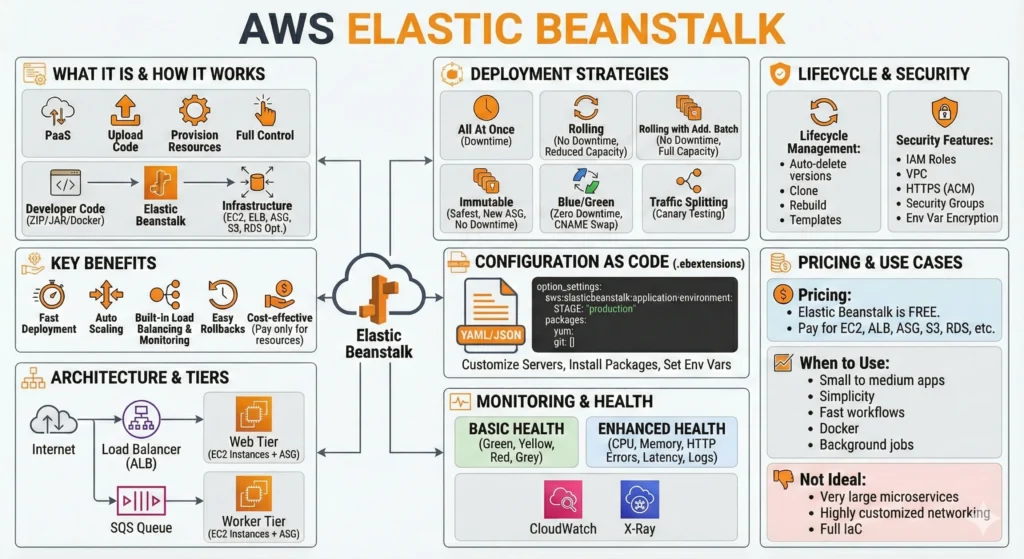
1. AWS Elastic Beanstalk
1. AWS Elastic Beanstalk: The “Managed” Powerhouse
Elastic Beanstalk is a Platform as a Service (PaaS) that automates the “heavy lifting” of infrastructure. It is the perfect balance between the simplicity of Heroku and the power of AWS.
- The Workflow: You upload your code (ZIP, WAR, or Docker image) $\rightarrow$ EB provisions the environment (EC2, ALB, S3, CloudWatch) $\rightarrow$ Your app is live.
- Key Platforms: Docker (Single/Multi-container via ECS), Node.js, Python, Java, .NET, Go, Ruby, and PHP.
Elastic Beanstalk gives speed, automation, and convenience, while keeping full control over AWS resources. and works with most popular languages and also supports single or multi-container Docker setups.
You bring the code; AWS handles the infrastructure.
- Application can be: –
- Docker Containers, Single and Multi-container using ECS.
- NodeJS, Java, Dotnet, PHP, Ruby, Python and Go. etc.
- On servers such as Apache, Nginx, Passenger and IIS.
- Key Benefits: –
- Fast deployment – upload ZIP/JAR/Docker image → app goes live.
- Auto Scaling – scale up/down automatically based on load
- Built-in load balancing and monitoring and health checks.
- Full control – SSH into instances, change ASG/ALB settings.
- Easy rollbacks
- Cost-effective – EB is free, you pay only for EC2, ALB, etc.
DevSecOps Perspective: “Security by Design”
- Identity & Access (IAM)
- Least Privilege: Never use a default “FullAccess” role. Create a custom Instance Profile that only allows the EC2 instances to access the specific S3 buckets or DynamoDB tables they need.
- Service Roles: Ensure the Elastic Beanstalk service role is restricted to managing only the resources in your specific environment.
- Secrets Management
- Don’t Hardcode: Use AWS Secrets Manager or Systems Manager (SSM) Parameter Store.
- Automation: Use .ebextensions to fetch secrets during the deployment phase and set them as environment variables, ensuring your GitHub/Bitbucket repo never contains sensitive keys.
- Shifting Security Left (CI/CD)
- Vulnerability Scanning: Before the code reaches EB, integrate tools like Snyk or Trivy in your GitHub Actions or AWS CodeBuild. If a high-severity vulnerability is found in a library, the build should fail immediately.
- Image Scanning: If using Docker, use Amazon ECR to scan images for vulnerabilities before Elastic Beanstalk pulls them.
- Infrastructure Hardening
- VPC Placement: Deploy your EC2 instances in private subnets and keep only the Load Balancer (ALB) in the public subnet.
- Managed Updates: Enable Managed Platform Updates so AWS automatically patches your OS and runtime (Java/Python/Node) during maintenance windows.
Real-World Chalanges
While EB simplifies things, it introduces specific challenges that DevOps engineers face daily:
| Challenge | Impact | Solution |
| Slow Deployments | Updates can take 5–15 mins, slowing down the feedback loop. | Use Immutable Deployments to avoid configuration drift, even if they take longer. |
| “Severe” Health Status | App goes down, but the reason isn’t immediately clear in the console. | Deep dive into /var/log/web.stdout.log and use AWS X-Ray to trace where requests are failing. |
| Configuration Drift | Manual changes in the AWS Console are lost during the next eb deploy. | Strict use of Infrastructure as Code (IaC) via .ebextensions or Terraform. |
| Deployment Hangs | The environment gets stuck in “Updating” for 30+ minutes. | Often caused by a failing post-install script. Check eb-engine.log via SSH to find the blocker. |
| Port Mismatch | ALB sends traffic to port 80, but app listens on 8080. | Standardize environment variables ($PORT) across all microservices. |
2. Architecture – How Elastic Beanstalk Works
Imagine you are building a Restaurant.
- The Building (EC2): This is where the cooking happens.
- The Security Guard (ALB): He stands at the gate, checks the customers, and directs them to the right table.
- The Extra Tables (Auto Scaling): If more customers come, the manager automatically adds more tables; if they leave, he removes them to save money.
- The Store Room (S3): Where all the recipes and old bills are kept.
- The External Accountant (RDS): He keeps the financial records safe in a separate, secure office so that even if the restaurant has a fire, the data is safe.
In EB, AWS gives you the whole setup automatically, but you must decide how high the security walls should be.
When you deploy, EB doesn’t just “create” resources; it orchestrates a complex ecosystem. Here is how to harden each piece:
2.1. The Compute Layer (EC2 & ASG)
- EB launches EC2 instances inside an Auto Scaling Group.
- DevSecOps Hardening: Private Subnets: Never put EC2 instances in a public subnet. Keep them in a Private Subnet and let the Load Balancer (in the public subnet) talk to them.
- IMDSv2: Always enforce Instance Metadata Service Version 2. This prevents “SSRF” attacks where hackers try to steal your IAM role credentials.
- Gold Images: Periodically use “Custom AMIs” that are pre-patched and scanned for vulnerabilities.
2.2. The Traffic Layer – Application Load Balancer
- Distributes traffic to healthy instances.
- DevSecOps Hardening:
- WAF Integration: Attach an AWS WAF (Web Application Firewall) to your ALB to block SQL Injection and Cross-Site Scripting (XSS).
- HTTPS Only: Use ACM (AWS Certificate Manager) to enforce SSL. Redirect all HTTP traffic (Port 80) to HTTPS (Port 443) automatically.
2.3. The Storage Layer – S3
- Stores your application versions and logs.
- Encryption at Rest: Ensure the S3 bucket created by EB has AES-256 encryption enabled.
- Public Access Block: Strictly enable “Block Public Access.” Your code should never be public.
2.4. The Data Layer – RDS
- Best Practice: Keep RDS outside of the EB Environment. If you delete your EB environment, the database is deleted too! Keeping it separate allows you to manage database security, patches, and backups independently of the application code.
DevSecOps Integration: “Security as Code”
To be a true DevSecOps professional, you don’t use the AWS Console for security settings. You use .ebextensions:
- Compliance: Use
.configfiles inside the.ebextensions/folder to automatically install security agents (like CloudWatch agent or antivirus) as soon as a new server starts. - Automated Patching: Enable Managed Platform Updates. This ensures AWS automatically applies security patches to the OS (Linux/Windows) without you lifting a finger.
Architectural Challenges & Solutions
| Challenge | Problem | Solution |
| Configuration Drift | Someone manually changes a Security Group rule in the console, but it gets overwritten during the next deployment. | Immutable Infrastructure: Use Terraform or CloudFormation to manage EB. Never make manual changes in the UI. |
| Tight Coupling | Putting the Database inside EB makes it hard to scale or migrate. | Decouple everything. Use RDS for data and ElastiCache for session management. |
| Zombie Environments | Old application versions keep piling up in S3, increasing costs and security risks. | Lifecycle Policies: Configure EB to keep only the last 10 versions and auto-delete the rest. |
| Deployment Failures | A bad .ebextensions script can make the environment “Grey” (Unknown) or “Red” (Unhealthy). | Health Check URL: Always define a specific /health path in your code that returns 200 OK only if the DB and app are both fine. |
| Shared Secrets | Putting API keys in the code is a disaster. | Use AWS Secrets Manager. Use a script in .ebextensions to pull secrets at runtime. |
3. Elastic Beanstalk Environment Tiers
Think of your application like a Pizza Shop:
- Web Tier (The Front Counter): This is where the customers come to order. The staff here must be fast and polite. If a customer asks for a “Monthly Financial Report” (a heavy task), the front counter staff doesn’t start doing math; they just write the request on a slip (SQS message) and move to the next customer.
- Web Server Tier – Websites, REST APIs, Backend apps
- Internet facing Load balancer
- Default domain: –
myapp.region.elasticbeanstalk.com
- Worker Tier (The Kitchen): This is in the back. They don’t talk to customers. They just look at the slips, cook the pizza (process the task), and put it in the box.
- Worker Tier – Backend jobs, Queue processing, Report generation, Email sending etc.
- No load balancer, uses Amazon SQS to receive jobs,, cron jobs,
By separating them, even if the kitchen is super busy, the front counter can still take new orders!
1. Web Server Tier – The “Public” Face
- Primary Job: Handles HTTP/HTTPS requests.
- DevSecOps Tip (Network Isolation): Even though it is “public,” you should place these instances in a Private Subnet and only let the Load Balancer stay in the Public Subnet. This prevents hackers from directly attacking your servers via SSH or other ports.
- WAF: Always attach AWS WAF to the Load Balancer of the Web Tier to block common web attacks like SQL injection.
2. Worker Tier – The “Private” Workhorse
- Primary Job: Pulls tasks from an Amazon SQS queue and processes them.
- Logic: A small program called the SQS Daemon runs on your EC2. it “reads” the queue and “POSTs” the data to your local app (usually at
http://localhost/). - DevSecOps Tip (Queue Encryption): Always enable Server-Side Encryption (SSE) on your SQS queue using AWS KMS. This ensures that even if someone sees the data in the queue, it remains encrypted.
- IAM Isolation: The Worker Tier needs an IAM role with
sqs:ReceiveMessageandsqs:DeleteMessage. The Web Tier only needssqs:SendMessage. Never give both tiers full SQS access.
DevSecOps: “Resilience & Monitoring”
- Dead Letter Queues (DLQ): If a worker fails to process a message 3 times (maybe the code crashed?), SQS should move it to a DLQ. This is a DevSecOps “Detective” control it alerts you that something is wrong with your code logic without stopping the whole system.
- Visibility Timeout: Ensure the SQS Visibility Timeout is longer than the time your code takes to process a task. If your code takes 2 minutes but the timeout is 30 seconds, another worker will pick up the same task, leading to “Double Processing” (a big security/logic risk).
Real-World Challenges
| Challenge | The Danger | Solution |
| Poison Messages | A specific message that causes your code to crash every time it is read. | Use a DLQ (Dead Letter Queue) to “isolate” the bad message so other tasks can continue. |
| Lack of Idempotency | Processing the same “Charge Credit Card” task twice. | Idempotent Logic: Check your database first to see if the task ID has already been completed before doing it again. |
| Cron Job Failures | Worker tiers use cron.yaml for periodic tasks. If it fails, there’s no “alert” by default. | CloudWatch Alarms: Set an alarm on “SQS Oldest Message Age.” If messages sit in the queue too long, it means your workers are dead or too slow. |
| Environment Mismatch | Web Tier is running Version 2.0, but Worker Tier is still on Version 1.0. | Pipeline Automation: Use a single CI/CD pipeline (like GitHub Actions) that deploys to both tiers simultaneously to keep versions in sync. |
| Scaling Lag | A sudden spike of 1 million tasks in the queue. | Scaling Trigger: Change the Auto Scaling trigger from “CPU Usage” to “Queue Depth” (ApproximateNumberOfMessagesVisible). |
4. Deployment Strategies
How Elastic Beanstalk updates your application to a new version. and supports safe and flexible deployment methods; Immutable and Blue/Green are best for production.
- All At Once
- Deploys new version to all instances immediately
- Fast but downtime occurs
- Not recommended for Production
- Rolling
- Updates a few instances at a time
- No downtime, but reduced capacity during update
- Risk: mixed versions temporarily
- Rolling With Additional Batch
- Creates temporary extra instances
- Maintains full capacity
- More cost, no downtime
- Immutable Deployment
- Creates a brand-new Auto Scaling Group
- Switches traffic after new version becomes healthy
- Safest method, no downtime
- Higher cost temporarily
- Blue/Green Deployment (Not a built-in feature, but widely used)
- Create a new environment (Green)
- Test it
- Swap CNAME between Blue (old) and Green (new)
- Zero downtime, instant rollback
- Traffic Splitting
- Sends a small percentage of traffic to the new version
- Used for Canary testing
DevSecOps Perspective
- Blast Radius Reduction: DevSecOps is about minimizing the “Blast Radius” (how many users are affected if a bug goes live). Traffic Splitting and Blue/Green are the best here because you only expose a small group (Canary) to the new code.
- Automated Rollbacks: In your
.ebextensions, you should configure CloudWatch Alarms. If the “5xx Error Rate” increases by 1% during an Immutable deployment, EB should automatically abort and rollback before you even wake up! - Drift Detection: Immutable deployments are great for security because they kill old instances. If a hacker had gained access to an old server (Persistence), that server is destroyed and replaced with a “Clean” one during the deployment.
Real-World Challenges
| Challenge | The Danger | Solution |
| The “Zombie” Version | During Rolling updates, some users see Version 1 while others see Version 2. This can break your Frontend if the API changed! | Use Sticky Sessions on the Load Balancer or ensure your API is Backward Compatible. |
| S3 Version Limits | EB stores every ZIP file in S3. After 1,000 versions, your deployment will fail with an error. | Set up a Lifecycle Policy to auto-delete versions older than 30 days. |
| Database Schema War | If Blue is using the old DB and Green starts changing the table structure, Blue will crash! | Guru Rule: Always make DB changes “Additive” (add columns, don’t delete/rename) so both versions can run together. |
| DNS Propagation Lag | In Blue/Green (CNAME Swap), some users’ computers “remember” the old IP address for minutes/hours. | Lower your DNS TTL (Time to Live) to 60 seconds before you start the deployment. |
| Resource Limits | Immutable deployments double your server count. If your AWS limit is 10 EC2s and you already have 6, the deployment will fail! | Always check your Service Quotas before switching to Immutable or Blue/Green. |
5. Configuration as Code – .ebextensions
Imagine you are ordering a Customized Pizza.
- Standard EB: Is like a “Cheese Pizza” (Basic setup).
.ebextensions: Is your Instruction Note to the chef. It says: “Add extra olives, bake it for exactly 10 minutes, use thin crust, and deliver it in a thermal bag.”
Whenever a new server (EC2) is born in your environment, EB reads these .config files and automatically installs your software, sets your security rules, and configures your “kitchen” exactly how you like it. No manual work needed!
.ebextensions/ lets you customize servers and environment settings using YAML or JSON.
5.1. Infrastructure Hardening – Security
You can use these files to ensure every EC2 instance is secure from the second it starts:
- Security Agent Installation: Automatically install tools like Amazon Inspector or CloudWatch Agent for deep security monitoring.
- Patching: Run
yum update -yduring the instance bootstrap phase to ensure the latest security patches are applied. - Disabling Weak Protocols: Configure the Load Balancer via code to disable old, insecure SSL versions (like TLS 1.0).
5.2. Compliance and Governance
- Log Rotation: Create files in
/etc/logrotate.d/via.ebextensionsto ensure logs don’t fill up the disk and are moved to S3 for auditing. - File Integrity: Use the
files:section to create custom configuration files that restrict permissions (e.g.,mode: "000400"for read-only sensitive configs).
5.3. Example
Here is how a “Guru” would write a config file to handle both app settings and security:
# .ebextensions/01_secure_config.config
packages:
  yum:
    amazon-cloudwatch-agent: [] # Install monitoring agent
    openssl: []                # Ensure latest OpenSSL

files:
  "/etc/config/my_app_security.txt":
    mode: "000400"  # Read-only for root
    owner: root
    group: root
    content: |
      SECURE_MODE=true
      AUDIT_LEVEL=high

option_settings:
  aws:elbv2:listener:443:
    Protocol: HTTPS
    SSLCertificateArns: "arn:aws:acm:region:account:certificate/id"
  aws:elasticbeanstalk:application:environment:
    DB_CONNECTION_TIMEOUT: "30"
Real-World Challenges
| Challenge | The Danger | Solution |
| YAML Syntax Errors | A single missing space or wrong indentation will make your deployment Fail or hang. | Validator: Use a YAML Linter or the eb codesigning tool before pushing. |
| The “Silent” Failure | A script in commands: fails, but the deployment continues, leaving the server “broken.” | Exit Codes: Ensure your scripts use proper exit codes. Use ignoreErrors: false so the deployment stops if security setup fails. |
| Secrets Exposure | Hardcoding API keys in .ebextensions (which are stored in Git) is a massive security risk. | SSM Integration: Use .ebextensions to run a script that pulls secrets from AWS Systems Manager (SSM) Parameter Store at runtime. |
| Ordering Chaos | If you try to run a command that needs a package not yet installed, it fails. | Naming Convention: Use numbers in filenames (e.g., 01_packages.config, 02_files.config) to force EB to run them in order. |
| Immortal Files | If you delete a file from .ebextensions, it might still exist on the running EC2 instances. | Immutable Deployments: Always use Immutable deployments so that every update starts with a 100% clean server. |
6. Monitoring & Health
Elastic Beanstalk includes strong monitoring features.
Enhanced health gives deep visibility into your app’s performance and helps troubleshoot quickly.
Basic Health: –
- Green (OK)
- Yellow (Degraded)
- Red (Unhealthy)
- Grey (Unknown)
Enhanced Health: –
Provides metrics from an agent running inside EC2: –
- CPU, memory, disk
- HTTP errors
- Latency
- Application logs
Health states include: –
- OK
- Warning
- Degraded
- Severe
- Info
- Pending
- Suspended
Other Features: –
- CloudWatch Logs integration
- X-Ray support for tracing requests
- Direct log download from console or CLI
6.1. Basic vs. Enhanced Health
- Basic Health: Only looks at the Load Balancer level. If the server is responding, it’s “Green.”
- Enhanced Health: It uses a Health Daemon inside each EC2 instance. It captures:
- Application Metrics: Response times (latency) and 4xx/5xx error rates.
- System Metrics: CPU, Memory, and Disk utilization.
- OS-Level Health: If a specific process (like Nginx or Python) crashes, Enhanced Health catches it even if the EC2 instance is still “running.”
6.2. AWS X-Ray: Finding the “Ghost in the Machine”
- Trace Everything: X-Ray provides a “Service Map” of your application. In a DevSecOps world, this helps identify bottlenecks and security anomalies. For example, if your app suddenly starts making 1,000 requests to an external IP, X-Ray will show this visually.
- Troubleshooting: It helps you find exactly which database query or API call is making your app slow.
6.3. Centralized Logging – The Audit Trail
- CloudWatch Logs: Always enable Streaming of logs to CloudWatch.
- DevSecOps Benefit: Logs are your “Black Box.” If a hacker tries to breach your app, their attempts are recorded in the logs. By moving logs to CloudWatch, they are safe even if the hacker deletes the EC2 instance.
Real-World Challenges
| Challenge | The Danger | Solution |
| “Grey” Status Hang | Environment stays in “Grey” (Unknown/Pending) for too long during a deployment. | Events Tab: Check the “Events” section in EB Console immediately. Usually, it’s an IAM permission error or a script failing in .ebextensions. |
| The Log Overflow | High traffic generates massive logs that fill up the EC2 disk, causing the app to crash. | Log Rotation: Use .ebextensions to configure logrotate and stream to CloudWatch so local files are deleted regularly. |
| Silent Failures | Your app returns a 200 OK but it’s actually showing an empty page (Logic Error). | Custom Health Checks: Don’t just check the / home page. Create a /health endpoint that checks the DB connection and external APIs. |
| Alarm Fatigue | Getting 100 emails every night for a 1% CPU spike. | Smart Thresholds: Use “M out of N” alarms (e.g., Alert only if CPU is >80% for 3 consecutive checks of 5 minutes). |
| IAM Service Role | EB cannot report health if its Service Role is missing permissions. | Governance: Periodically audit the aws-elasticbeanstalk-service-role to ensure it hasn’t been modified or deleted. |
7. Lifecycle Management
Elastic Beanstalk helps maintain clean environments.
automatically manages old versions, allows cloning, and lets you rebuild environments anytime.
- Lifecycle Policy: Auto-delete old versions from S3
- Clone Environment: Make a full copy (useful for staging)
- Rebuild Environment: Refresh all servers with clean configuration
- Configuration templates: Reuse settings across teams
7.1. Application Version Lifecycle Policy
- The “Quota” Trap: AWS has a limit of 1,000 application versions per region. If you reach this, your CI/CD pipeline will suddenly Fail, and your developers will be stuck.
- DevSecOps Strategy: Set a policy to keep only the last 25–50 versions.
- Security Tip: Ensure that the S3 bucket storing these versions has Server-Side Encryption (SSE) enabled and “Public Access” blocked. Old code versions can contain sensitive logic; they must be protected even if they are “old.”
7.2. Cloning: The “Security Sandbox”
- Creates a new environment with the same settings.
- DevSecOps Tip: Use Cloning to perform Penetration Testing. Clone your production environment into a “Security” VPC, run your attack tools (like OWASP ZAP) against it, and then terminate it. This way, you find holes without affecting live users.
7.3. Rebuild vs. Drift
- Configuration Drift: Over time, people might change a Security Group rule or an IAM permission manually in the console. This is “Drift.”
- Periodically Rebuild your non-production environments. A rebuild forces Elastic Beanstalk to recreate every resource from scratch using your code. If the rebuild fails, it means you have “Drift” that needs to be fixed in your
.ebextensions.
Real-World Challenges
| Challenge | The Danger | Solution |
| The “Limit” Failure | Deployments fail because S3 is full of 1,000+ versions of old code. | Lifecycle Policy: Enable “Delete old versions” based on count (e.g., keep 50) or age (e.g., 30 days). |
| Loss of “Golden” Version | An aggressive lifecycle policy might delete a stable version you need for a critical rollback. | Tagging: Manually “Tag” stable production versions so they are excluded from auto-deletion. |
| Cloning Inconsistency | Cloning an environment doesn’t always clone the “Data” (RDS/Redis). | Decoupling: Always keep your Database outside of Beanstalk. Use environment variables to point the cloned app to a “Staging” database. |
| Secret Leakage | Cloning an environment might carry over old or “Development” API keys into a “Production-like” clone. | SSM/Secrets Manager: Never store secrets in Configuration Templates. Fetch them at runtime based on the environment name. |
| Template Staleness | A Configuration Template created 6 months ago might use an “End of Life” (EOL) Linux platform. | Managed Updates: Combine templates with Managed Platform Updates to ensure your base OS is always patched. |
8. Security Features
Integrates with IAM, VPC, SSL, and SGs to provide a secure application environment.
- IAM roles for:
- EC2 instance profile
- EB service role
- Supports VPC deployment
- EC2 in private subnets
- Load balancer in public subnet
- HTTPS via ACM certificates
- Security Groups for EC2 + ALB
- Environment variables encryption
8.1. Identity & Access Management (IAM)
- EC2 Instance Profile: This is the “Identity” of your server.
- Never use the default
AWSElasticBeanstalkWebTier. Create a custom role that follows Least Privilege. If your app doesn’t need to write to S3, remove that permission!
- Never use the default
- IMDSv2 (Enforced): By default, EC2 uses Instance Metadata Service v1, which is vulnerable to SSRF attacks. Enforce IMDSv2 in your EB configuration to require a session token for metadata access.
8.2. Virtual Private Cloud (VPC)
- Putting everything in a Public Subnet is dangerous. so use
- Private Subnets: Place your EC2 instances in a private subnet with no direct internet access.
- Public Subnets: Only put the Application Load Balancer (ALB) here.
- NAT Gateway: Use a NAT Gateway or VPC Endpoints for your instances to securely talk to other AWS services like S3 or DynamoDB.
8.3. HTTPS & Data Protection
- SSL via ACM: Use AWS Certificate Manager for free, auto-renewing SSL certificates.
- HSTS (HTTP Strict Transport Security): Use
.ebextensionsto add HSTS headers. This tells browsers: “Only talk to me over HTTPS, never plain HTTP.” - KMS Encryption: Ensure your environment variables and S3 logs are encrypted using AWS Key Management Service (KMS).
8.4. Security Groups (SGs)
- Layered Defense: Create a “Chain.”
- ALB SG: Allows traffic from the internet on port 443.
- EC2 SG: Only allows traffic from the ALB SG. It should block everything else. This ensures nobody can bypass the load balancer to attack your servers directly.
DevSecOps Integrations
- AWS WAF (Web Application Firewall): Attach WAF to your Beanstalk ALB. It acts as a “Smart Filter” to block hackers, bots, and SQL injection attacks before they reach your code.
- Amazon Inspector: Run automated security assessments on your EB instances to find unintended network exposure or software vulnerabilities.
- Secrets Manager: Stop using “Environment Properties” for passwords. Use AWS Secrets Manager to rotate your database passwords automatically every 30 days.
Real-World Challenges
| Challenge | The Danger | DevSecOps / Guru Solution |
| SSRF Attacks | Hackers use your app to steal your server’s IAM credentials via the metadata service. | Enforce IMDSv2 in the EB “Instance” configuration settings. |
| Default Security Groups | EB often adds wide-open rules (like Port 80 for everyone) during setup. | Manual Hardening: Audit your Security Groups immediately after environment creation to close unneeded ports. |
| Outdated Platforms | Running on an old version of Node.js or Python that has known security holes. | Managed Platform Updates: Enable “Weekly Maintenance Windows” where AWS automatically patches the OS and Runtime. |
| Sensitive Logs | Developers accidentally log passwords or API keys to CloudWatch. | Log Scrubbing: Use middleware in your code to mask sensitive data before it is printed to the logs. |
| “Over-Privileged” Roles | Using one IAM role for 10 different applications. | Granular Roles: Each Beanstalk application should have its own unique IAM role. |
9. Pricing
While EB has no direct cost, the “Hidden” costs of the resources it creates can surprise you if not managed with a DevSecOps mindset.
9.1. Compute (EC2) and the “Spot” Advantage
- You pay for the hourly rate of the EC2 instance type you choose (e.g., $t3.medium$).
- Spot Instances: For Dev and Staging environments, use EC2 Spot Instances. These can save you up to 90% on costs. Since DevSecOps encourages “Stateless” apps, your environment can handle a Spot instance being replaced without any drama.
9.2. Load Balancer – ALB / NLB
- Cost Factor: You pay for the “Load Balancer Capacity Units” (LCU).
- If your app is under a DDoS attack, your Load Balancer costs will skyrocket as it tries to handle millions of fake requests.
- Use AWS WAF (Web Application Firewall). Although WAF costs money, it prevents the Load Balancer from processing “junk” traffic, often saving you more money in the long run.
9.3. Data Transfer
- Moving data out of AWS to the internet or between different Regions costs money.
- Keep your Elastic Beanstalk and your RDS database in the same Availability Zone whenever possible (for non-production) to avoid cross-zone data transfer fees.
9.4. Storage – S3 & EBS
- S3: EB stores every version of your code as a ZIP file. If you deploy 10 times a day, you’ll have thousands of files soon.
- EBS: Every EC2 has a “hard drive” (EBS volume). Even if you stop the instance, you still pay for the storage!
DevSecOps Strategy “FinOps” Integration
- Tagging for Accountability: Use EB to “Tag” every resource with
Project: MarketingorEnvironment: Production. This allows you to see exactly which team is spending the most money in the AWS Billing Dashboard. - Automated Shutdown: Use a “Cron Job” or a Lambda script to Terminate Dev/Test environments at 6:00 PM and Rebuild them at 9:00 AM. Since EB is PaaS, rebuilding is just one command (
eb restore).
Real-World Pricing Challenges “Hidden” Costs
| Challenge | The Financial Danger | Solution |
| Idle Load Balancers | You created a “Test” environment and forgot about it. The ALB alone costs even with zero traffic. | Deployment Policy: Set a “TTL” (Time to Live) for test environments. Use automation to delete them after 48 hours. |
| NAT Gateway Costs | Putting EB in a private subnet requires a NAT Gateway, | VPC Endpoints: For small apps, use Interface VPC Endpoints for S3/CloudWatch instead of a NAT Gateway to save ~60%. |
| Unattached EBS/EIP | You deleted an EB environment, but the “Static IP” (Elastic IP) or “Volume” stayed behind. | Detective Controls: Use AWS Config rules to alert you whenever there is an “Unattached Elastic IP” charging you money. |
| CloudWatch Log Growth | Your app is in “Debug Mode” and writing GBs of logs to CloudWatch every hour. | Log Retention: Set a 7-day or 14-day retention policy on your log groups so old logs are auto-deleted. |
| Snapshots & Backups | Automatic RDS backups and EBS snapshots can grow to be 20% of your total bill. | Lifecycle Manager: Use AWS Backup to set a strict “delete after 30 days” policy for non-production snapshots. |
10. When to Use Elastic Beanstalk
Elastic Beanstalk is your “Fast Track” to the cloud. It is best for teams that have 10 developers and maybe only 1 DevOps person. You use it when your main goal is to ship features, not to spend weeks configuring Kubernetes clusters. It gives you the “Best of AWS” (Scaling, Security, Monitoring) by default, so you don’t have to be an expert to go live.
Best for: –
- Small to medium apps
- Teams who want simplicity
- Fast deployment workflows
- Docker apps
- Background job processing (worker tier)
Not ideal for: –
- Very large microservices
- Highly customized networking
- Full Infrastructure as Code (Terraform + ECS/EKS preferred)
- Small Teams: If you are a startup or a small team in a big company, EB acts as your Automated DevOps Engineer.
- Monolithic or Simple Microservices: If your app is a single “Node.js” or “Python” backend, EB is much faster to set up than ECS.
- Rapid Prototyping (POCs): When you need to show a demo to a client by Monday, EB is the way. You can go from “Code on Laptop” to “Live URL” in 15 minutes.
- Standard Docker Apps: If you have a simple
Dockerfile, EB handles the deployment without needing to learn “Task Definitions” or “Pods.”
DevSecOps Perspective
- Automated Patching: One of the biggest security risks is an outdated OS. EB has Managed Platform Updates that automatically apply security patches to Linux/Windows for you.
- Standardized Security: It creates a “Repeatable” security pattern. Every time you deploy, the same Security Groups and IAM roles are applied, reducing the chance of “Human Error” (the #1 cause of data breaches).
- Built-in Auditability: Because everything is managed by one service, your “Audit Trail” in AWS CloudTrail is much cleaner. You can see exactly when the environment was updated and by whom.
Real-World Challenges
Even though it’s “Easy,” Elastic Beanstalk has some “Vastav” (Real) challenges that can bite you later:
| The Challenge | Why it’s a headache | Advice |
| The “Black Box” Problem | AWS manages the magic. If a deployment fails deep inside, it can be hard to “peek under the hood” to see what went wrong. | Always use Enhanced Health. It gives you the “Internal Logs” you need to debug. |
| Rigid Networking | If your company has a very complex VPC with 50 different rules and private links, EB’s “Auto-config” might clash with your network. | For highly customized networking, start moving towards Terraform + ECS. |
| Slow Scaling Speed | EB scales by adding full EC2 instances. This can take 2-4 minutes. In a sudden “Viral” spike, your app might crash before the new server is ready. | Use Step Scaling policies and keep a “Buffer” of 20% extra capacity. |
| Platform Lag | When a new version of Node.js or Java comes out, it might take AWS a few weeks/months to support it in Beanstalk. | If you need the “Latest and Greatest” on Day 1, use Docker on Beanstalk or move to ECS. |
| Microservice Sprawl | If you have 50 small microservices, managing 50 different EB environments becomes a nightmare and gets expensive (50 Load Balancers!). | Once you hit 5-10 services, it’s time to switch to ECS with Fargate to save money and stay organized. |
11. Elastic Beanstalk – Common Issues & Troubleshooting
1. Deployment & Configuration Issues
Issues where the application fails to launch or gets stuck during updates.
| Issue | Common Causes | Fix Steps |
| Application Failing to Deploy | 1. Wrong ZIP/WAR structure. 2. Missing dependencies. 3. Syntax errors in .ebextensions. | 1. Check Logs: Go to EB Console → Logs → Request Full Logs. 2. Verify ZIP: Ensure package.json (Node), requirements.txt (Python), or .war (Java) is at the root, not inside a subfolder.3. Validate Config: Fix any syntax errors in your .config files. |
| Environment Stuck in “Updating” | 1. Complex .ebextensions scripts.2. Broken package installations. 3. Instance failing health checks. | 1. Check Log Files: Look at /var/log/eb-engine.log or /var/log/cfn-init.log.2. Simplify: Temporarily comment out .ebextensions to isolate the error.3. Rebuild: Try an Immutable deployment instead of Rolling. |
| .ebextensions Errors | 1. Invalid YAML formatting (indentation). 2. Incorrect namespace usage. 3. Permission issues (root vs. user). | 1. Validate YAML: Use an online YAML validator. 2. Check Indentation: YAML is sensitive to spaces. 3. Consult Logs: Check /var/log/eb-engine.log for specific parsing errors. |
| Slow Deployments | 1. Large ZIP file size. 2. Installing heavy packages at runtime. | 1. Lighten the Load: Remove node_modules (let EB install them) or bake dependencies into a Docker image.2. Pre-build: Compile assets before uploading. |
2. Runtime Health & Stability
Issues where the application is running but the environment health is poor.
| Issue | Common Causes | Fix Steps |
| “Severe” or “Degraded” Health | 1. App crashing immediately. 2. Port mismatch. 3. Missing environment variables. | 1. Monitoring: Check the “Health” dashboard messages. 2. Verify Port: Ensure app listens on port 8080 (default for many platforms) or use the $PORT env variable.3. Env Vars: Confirm all required secrets/variables are set in configuration. |
| High CPU / Memory Usage | 1. Traffic spikes. 2. Memory leaks in code. 3. Instance type too small. | 1. Scale Up: Increase instance size (e.g., t3.small → t3.medium).2. Scale Out: Enable Auto Scaling (min 2 instances). 3. Debug: SSH into instance and run top to identify resource hogs. |
3. Connectivity & Network Errors (5xx / SSL)
Issues related to the Load Balancer, Gateway, or Security.
| Issue | Symptoms & Causes | Fix Steps |
| 502 Bad Gateway | 1. Load balancer cannot reach the app (often port issue). | 1. Check if the app is running on the correct port. 2. Check Security Group rules allowing traffic from ALB to EC2. |
| 503 Service Unavailable | 1. No healthy instances registered. | 1. Check Target Group health in EC2 console. 2. Ensure the / health check path exists in your app.3. Restart the environment: eb restart. |
| 504 Gateway Timeout | 1. App takes too long to respond. | 1. Increase the Load Balancer timeout in settings. 2. Optimize slow database queries or long-running code. 3. Increase instance power. |
| SSL / HTTPS Issues | 1. App works on HTTP but fails on HTTPS. | 1. Certificate: Ensure a valid ACM certificate is attached to the ALB listener. 2. Listener Rule: Verify the listener is set to port 443 (HTTPS). |
4. Database & Worker Issues
Issues related to RDS connections or Background Workers (SQS).
| Issue | Common Causes | Fix Steps |
| Database Connection Failures | 1. Wrong Security Group rules. 2. Incorrect hostname/port. 3. DB in a private subnet without routing. | 1. Security Groups: Open the RDS Security Group Inbound rules to allow traffic from the EB Instance Security Group. 2. Env Vars: Store DB credentials in Environment Properties, not code. 3. Check Port: MySQL (3306), Postgres (5432). |
| Worker (SQS) Not Processing | 1. Wrong Queue URL. 2. Broken cron.yaml.3. IAM permission issues. | 1. IAM Role: Ensure the Instance Profile has permission to read/delete from SQS. 2. Logs: Check /var/log/eb-activity.log.3. Verify URL: Double-check the SQS URL in configuration. |