
AWS Disaster Recovery (DR) Strategies
Think as: Insurance for your digital house.
Imagine you are running a very busy restaurant.
- RTO (Recovery Time Objective): If the power goes out, how long can you keep customers waiting before they leave? Is it 5 minutes or 1 hour? This is your “downtime tolerance.”
- RPO (Recovery Point Objective): If your order system crashes, how many recent orders are you okay with losing? The last 5 minutes of orders? Or the whole day’s orders? This is your “data loss tolerance.”
AWS Disaster Recovery is simply the plan you have in place to bring your “restaurant” (application) back online after a “fire” (server crash or outage).
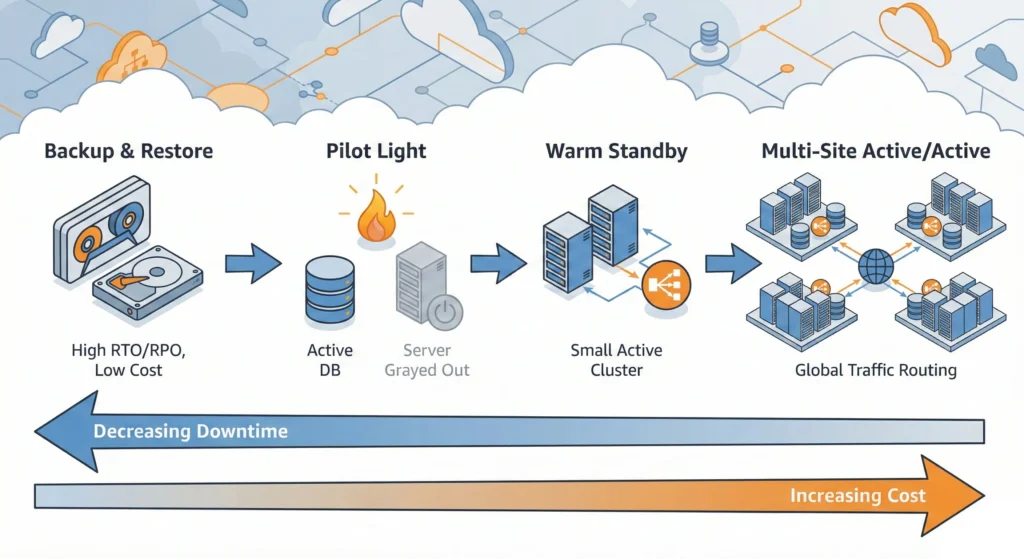
The 4 Main Strategies (Analogy):
- Backup & Restore: You have the recipe book kept in a safe. If the kitchen burns, you rebuild it and buy ingredients again. (Cheapest, but takes the longest).
- You regularly save copies of your data. If disaster strikes, you create new servers and load this data.
- Best for: Non-critical apps where waiting 24 hours to recover is okay.
- AWS Backup (Central place to manage backups).
- Amazon S3 (Where backups are stored cheaply).
- Amazon S3 Glacier (For long-term storage, very cheap).
- Pilot Light – The “Ready to Start” method: You have a small gas flame always burning. When you need to cook, you turn the knob, and the big fire starts instantly. (Faster than backup, cheaper than full running).
- You keep the critical core (like the database) running in another region, but the application servers are turned off to save money. When disaster hits, you turn the servers on.
- Best for: Critical business functions that need to be up in minutes/hours, not days.
- Amazon RDS Read Replicas (Keeps data synced in another region).
- Amazon EC2 (The servers you switch on).
- Warm Standby – Scaled Down” method: You have a second kitchen with a small stove running, but not fully staffed. If the main kitchen closes, you quickly call staff to the second one. (Very fast recovery).
- mini-version of your production website is always running in another region. It can handle a little traffic. In a disaster, you make it bigger (scale it up) to handle all traffic.
- Best for: Business-critical apps requiring recovery in minutes.
- AWS Auto Scaling (To make the mini-version big quickly).
- Multi-Site (Active-Active) – The “Zero Downtime” method: You have two identical restaurants open 24/7. If one closes, customers just walk into the other one across the street without noticing. (Most expensive, zero downtime).
- You run your full application in two different places at once. Both handle traffic. If one fails, the other takes over instantly.
- Best for: Banks, Hospitals, and e-commerce giants who cannot lose even a second.
- Amazon Route 53 (Directs traffic to the healthy site).
- AWS Global Accelerator (Speeds up traffic globally).
—
DevSecOps Architect Level
As an architect, your job is balancing Cost vs. RTO/RPO. The lower the RTO/RPO, the higher the cost.
- Data Replication Strategies:
- Synchronous Replication: Writes are confirmed only after being written to both primary and DR sites. Guarantees RPO = 0, but introduces latency. (Used in Multi-Site).
- Asynchronous Replication: Writes are confirmed at the primary immediately, then sent to DR. RPO > 0 (seconds/minutes), but faster performance. (Used in Pilot Light/Warm Standby).
- Deep Dive into Strategies:
- Pilot Light Architecture:
- Data Tier: Use Amazon Aurora Global Database for cross-region replication (latency < 1 sec).
- App Tier: Maintain AMIs (Amazon Machine Images) using EC2 Image Builder. Use Infrastructure as Code (IaC) like Terraform or AWS CloudFormation to provision the VPC and EC2 instances only during a DR event.
- Warm Standby Architecture:
- Maintain a “Functional Minimum.” If Prod has 20 nodes, DR has 2 nodes.
- Use Route 53 Health Checks to monitor the primary region. If it fails, update DNS to point to the DR load balancer (ELB).
- Multi-Site (Hot Standby):
- DynamoDB Global Tables: Multi-region, multi-master database. Writes in Region A are replicated to Region B instantly.
- Traffic routing: Use Weighted Routing in Route 53 to split traffic 50/50 or Failover Routing for active-passive setups.
- Pilot Light Architecture:
- Disaster Recovery Testing:
- You must simulate failures. Use AWS Fault Injection Simulator (FIS) to stress test the environment and validate if your Auto Scaling triggers correctly during a failover.
—
Use Case
Scenario: A Banking Application in India (e.g., UPI Payment Gateway).
- Requirement: Users must be able to send money 24/7.
- Selected Strategy: Multi-Site (Active-Active).
- Implementation:
- Region 1: Mumbai (ap-south-1).
- Region 2: Hyderabad (ap-south-2).
- Database: Amazon Aurora Global Database spanning both regions.
- Traffic: Route 53 directs users to the nearest region with lowest latency.
- Outcome: If the Mumbai region goes down due to a flood, all traffic automatically routes to Hyderabad. Zero downtime for the user.
Benefits
- Business Continuity: Operations continue even during major outages.
- Compliance: Meets RBI or GDPR data protection regulations.
- Reputation: Customers trust reliable services; downtime kills trust.
Technical Challenges
- Data Consistency (Split Brain): In Active-Active, if the network between regions breaks, both sides might try to write data. Resolving these conflicts is hard.
- Configuration Drift: The DR site might be outdated compared to Prod (e.g., Prod has a new security patch, DR doesn’t). Use AWS Config to ensure both regions match.
- Cost: Running resources in two regions doubles the infrastructure cost.
- Failback Complexity: Failing over to DR is easy; moving back to the original region after it is fixed (Failback) is technically difficult (syncing changed data back).
- Disaster Recovery of Workloads on AWS: Recovery in the Cloud (Whitepaper)
- AWS Elastic Disaster Recovery (AWS DRS) – Official Service
- Amazon Route 53 – DNS Failover
- AWS Backup Documentation
| Feature | Backup & Restore | Pilot Light | Warm Standby | Multi-Site (Active-Active) |
| Cost | $ (Low) | $$(Medium) | $$$ (High) | $$$$ (Very High) |
| RTO (Time) | Hours / Days | 10s of Minutes | Minutes | Real-time / Zero |
| RPO (Data Loss) | Hours | Minutes | Seconds / Minutes | Near Zero |
| Active Resources | None (Data only) | Data only (App off) | Scaled down App | Full Scale App |
| Analogy | Spare Tire in trunk | Gas Pilot Light | Spare Car (engine cold) | Two Cars driving |
| Best For | Low priority data | Core business apps | Business Critical | Mission Critical |