
AWS Well-Architected Framework
Think as: “Building a House According to Government Safety Codes.”
Imagine you are constructing a big house (your application). You cannot just pile bricks and hope it stands. You need to follow architectural standards (building codes) to ensure:
The AWS Well-Architected Framework is simply that set of “Building Codes” and “Checklists” provided by AWS. It guides you to build cloud solutions that are safe, strong, cheap to run, and easy to maintain.
Think of it as: “Building a House According to Government Safety Codes.”
- Reliability: Ensuring the house doesn’t collapse during a heavy monsoon storm.
- Security: Ensuring thieves cannot break the locks or jump the gate.
- Cost Optimization: Ensuring you don’t leave the AC on in empty rooms (wasting money).
- Operational Excellence: Ensuring you have a toolkit handy to fix a leaking pipe immediately.
- Performance Efficiency: Ensuring the house layout allows people to move around quickly without traffic jams.
- Sustainability: Using solar panels and green energy to minimize environmental impact.
The AWS Well-Architected Framework is a collection of best practices, design principles, and guidelines. It helps you understand if your cloud “house” is built correctly. It prevents you from making common mistakes that could lead to your website crashing, getting hacked, or costing too much money.
Why do we need it? If you build without a plan, you might succeed initially, but as you grow, problems will appear. This framework helps you:
- Measure: Check if your current setup is good or bad.
- Improve: Find risks (like open doors for hackers) and fix them.
- Standardize: Make sure everyone in your team builds things the same correct way.
Key Components: It is built on 6 Pillars (like the 6 main pillars holding up a roof). If one pillar is weak, the roof might fall.
The Framework isn’t just a checklist; it is a mechanism for governance and continuous improvement. It provides a consistent approach to evaluating architectures and implementing designs that scale.
The 6 Pillars Deep Dive:
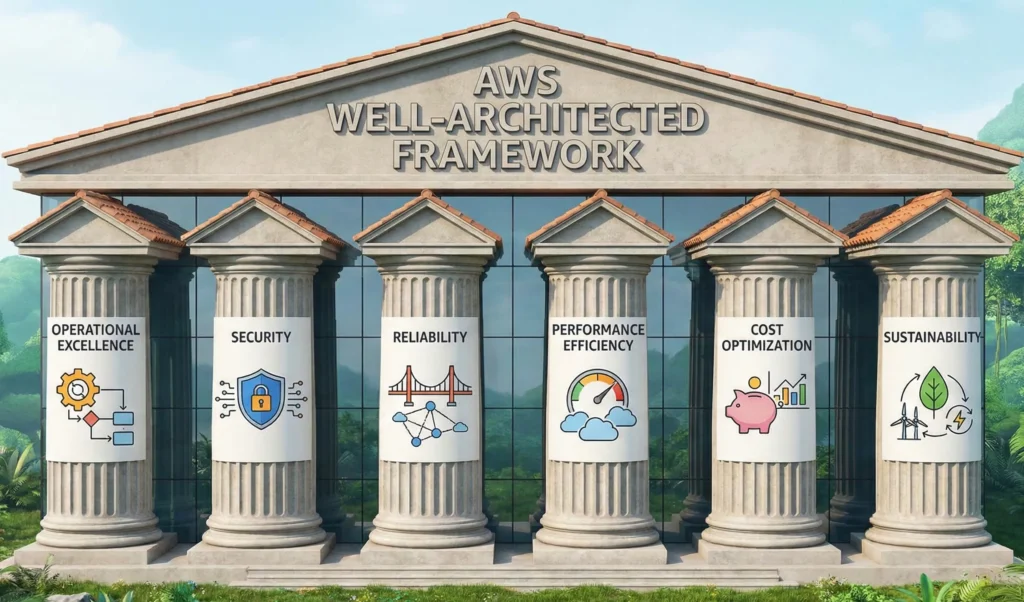
| Pillar | Goal | Key Topics | Tools |
| 1. Operational Excellence | Run and monitor systems to deliver business value and improve processes. | Automate changes, respond to events, define standards. | • AWS CloudFormation: Infrastructure as Code (IaC) • Amazon CloudWatch: Monitoring and observability • AWS Config: Audit configurations |
| 2. Security | Protect information, systems, and assets while delivering business value. | Identity management, data protection (encryption), incident response. | • AWS IAM: Manage users and permissions • AWS KMS: Encryption keys • AWS Shield & WAF: Protection against DDoS/web attacks • Amazon GuardDuty: Intelligent threat detection |
| 3. Reliability | Recover from infrastructure or service disruptions and acquire computing resources to meet demand. | Distributed system design, recovery planning, change management. | • Auto Scaling: Automatically add servers during high traffic • Amazon S3 Glacier: Long-term backup archives • Amazon Route 53: Reliable DNS service |
| 4. Performance Efficiency | Use computing resources efficiently to meet system requirements. | Selecting right resource types (Compute, Storage, Database), evolving technology. | • Amazon Elasticache: In-memory caching • Amazon CloudFront: Content Delivery Network (CDN) • AWS Lambda: Serverless compute |
| 5. Cost Optimization | Run systems to deliver business value at the lowest price point. | Understanding spend, controlling fund allocation, selecting right pricing models. | • AWS Cost Explorer: Visualize spending patterns • AWS Budgets: Set budget alerts • AWS Trusted Advisor: Real-time advice for savings |
| 6. Sustainability | Minimize the environmental impact of running cloud workloads. | Region selection, user behavior patterns, hardware/data patterns. | (Not specified in input) |
1. Operational Excellence Pillar
Think as: “Running a High-End Hotel Kitchen.” – Imagine you are the head chef of a busy 5-star hotel in Mumbai.
- Preparation: You don’t just guess the ingredients every day. You have a written Recipe Book (Infrastructure as Code) so that the Biryani tastes exactly the same whether you cook it or your assistant cooks it.
- Monitoring: You have Supervisors (Monitoring) watching the kitchen. If the gas stove pressure drops, they know immediately before the food gets spoiled.
- Improvement: If a customer complains the soup was cold, you don’t just heat it up. You change the process so that soup is always served immediately after boiling. You learn from mistakes.
In the Cloud: Operational Excellence is not just about keeping the lights on. It is about automating your tasks, so you don’t make manual errors, watching your systems closely, and constantly improving your code based on what you learn.
What is it? Operational Excellence is the ability to run your systems effectively, gain insight into their operations (see what is happening inside), and continuously improve your processes to deliver value to your customers.
Why is it important? If you rely on humans to click buttons to update your website, they will eventually make a mistake. Someone might delete the wrong file or forget to save a backup. Operational Excellence focuses on replacing “manual work” with “software automation.”
Core Concepts:
- Don’t do it manually: If you have to do a task more than once, write a script (code) to do it.
- Make small changes: Don’t change the whole website at once. Change one button. If it breaks, it’s easy to fix.
- Learn from failure: If something breaks, find out why and fix the process, not just the error.
Key Tools
- AWS CloudFormation: Think of this as your “Digital Recipe.” You write a text file describing your servers, and AWS builds them exactly as described.
- Amazon CloudWatch: This is your “CCTV Camera.” It watches your servers and tells you if they are too busy, too hot, or broken.
- AWS Config: This is your “Auditor.” It checks if anyone changed the settings without permission (e.g., “Did someone leave the firewall open?”).
DevSecOps Architect Level
At the Architect level, Operational Excellence is about adopting “Operations as Code.” You define your entire workload (applications, infrastructure, policies) as code and update it with code.
Design Principles:
- Perform operations as code: In the cloud, you can define your entire workload (applications, infrastructure) as code and update it with code. This limits human error and enables consistent responses to events.
- Make frequent, small, reversible changes: Design workloads to allow components to be updated regularly. Make changes in small increments that can be reversed if they fail (Deployment strategies like Blue/Green or Canary).
- Refine operations procedures frequently: As you evolve your workload, evolve your operations appropriately. Use “Game Days” to practice failure handling.
- Anticipate failure: Perform “pre-mortems” to identify potential sources of failure so that they can be removed or mitigated.
- Learn from all operational failures: Drive improvement through post-incident analysis (Post-Mortems).
Advanced Tools
- AWS Systems Manager (SSM): The operational hub. It allows you to patch, configure, and manage instances at scale without logging into them.
- AWS CodePipeline: Automates the build, test, and deploy phases of your release process (CI/CD).
- AWS X-Ray: Analyze and debug production, distributed applications, such as those built using a microservices architecture.
- Amazon EventBridge: Serverless event bus that connects application data from your own apps, SaaS, and AWS services (key for Event-Driven Architecture).
–
Use Cases
- Automated Patching: Instead of manually updating Windows/Linux on 100 servers, use AWS Systems Manager to automatically patch them every Saturday night.
- Environment Replication: You need a “Testing” environment that looks exactly like “Production.” Use AWS CloudFormation to clone the environment in minutes.
- Proactive Alerting: Instead of waiting for a user to call and say “The site is slow,” Amazon CloudWatch detects high CPU usage and triggers an Auto Scaling action to add more servers automatically.
Benefits
- Consistency: Every environment is identical (no “it works on my machine” issues).
- Speed: fast deployment of new features.
- Reduced Risk: Automated rollbacks mean less downtime during failed updates.
- Knowledge Sharing: Since operations are written in code, the documentation is the code itself.
Technical Challenges
- Alert Fatigue: Setting up too many alarms in CloudWatch can lead to ignoring them. You need to tune alerts to be meaningful (Signal vs. Noise).
- Learning Curve: Moving from “Clicking in Console” to “Writing CloudFormation/Terraform” requires learning new languages (YAML/JSON/HCL).
- Legacy Mindset: It is hard to convince traditional IT teams that they shouldn’t SSH into servers to fix things manually.
- Observability Costs: Storing massive amounts of logs and metrics in CloudWatch can become expensive if not managed (e.g., setting retention policies).
- Best Practices: Operational Excellence Pillar and AWS Systems Manager Documentation
2. Security Pillar
Think as: “A High-Security Gated Community.” – Imagine you live in a very premium apartment complex (your application).
- Identity (IAM): Not just anyone can walk in. Residents have ID cards. Guests need a passcode. The security guard checks everyone.
- Data Protection (Encryption): You don’t leave your gold jewelry on the balcony. You lock it inside a safe (Encryption). Even if a thief breaks into the house, they can’t open the safe.
- Perimeter Defense (WAF & Shield): There is a high wall with electric fencing around the community to stop mobs (DDoS attacks) from entering.
- Monitoring (GuardDuty): There are CCTV cameras everywhere with AI. If someone is jumping a wall at 3 AM, the alarm rings automatically.
In the Cloud: Security is about keeping the bad guys out (Hackers), protecting what’s inside (Data), and knowing exactly who is doing what at all times.
What is it? The Security pillar focuses on protecting information and systems. It’s not just about “firewalls”; it’s about knowing who is accessing your data and ensuring they only see what they strictly need to see.
Why is it important? If your security is weak, hackers can steal your customers’ passwords or credit card numbers. This ruins your reputation. In the cloud, security is the highest priority (Job Zero).
Core Concepts:
- Least Privilege: Give people only the access they need. If you hire a plumber, you give him the key to the bathroom, not the key to your master bedroom safe.
- Encrypt Everything: Scramble your data so it looks like nonsense to anyone who steals it.
- Traceability: Record every single action. “Who deleted this file? When? From where?”
Key Tools
- AWS IAM (Identity and Access Management): The “Passport Control” of AWS. It decides “Who are you?” (Authentication) and “What can you do?” (Authorization).
- AWS KMS (Key Management Service): The “Key Maker.” It creates and manages digital keys used to lock (encrypt) your data.
- AWS Shield: The “Riot Control.” It protects your site from massive traffic attacks (DDoS) designed to crash your server.
DevSecOps Architect Level
For an Architect, Security is not an afterthought; it is integrated into every layer (Defense in Depth). We move from “Perimeter Security” to “Zero Trust.”
Design Principles:
- Implement a strong identity foundation: Centralize privilege management. Rely on short-term credentials (like IAM Roles) rather than long-term keys.
- Enable traceability: Integrate logs and metrics to automatically detect and investigate security events.
- Apply security at all layers: Apply controls to the edge network, VPC, load balancer, OS, and application code.
- Automate security best practices: Create security mechanisms as code (e.g., an AWS Config rule that auto-remediates open S3 buckets).
- Protect data in transit and at rest: Classify data into sensitivity levels and use mechanisms like encryption, tokenization, and access control.
Advanced Tools
- Amazon GuardDuty: A threat detection service that continuously monitors for malicious activity (e.g., cryptocurrency mining on your EC2, unusual login locations).
- AWS WAF (Web Application Firewall): filters malicious web traffic (like SQL Injection or Cross-Site Scripting) before it hits your app.
- AWS Secrets Manager: Rotates, manages, and retrieves database credentials and API keys throughout their lifecycle.
- AWS Security Hub: A single dashboard that aggregates alerts from GuardDuty, Inspector, and Macie to give you a “Security Score.”
Use Cases
- Ransomware Protection: By using AWS Backup with “Vault Lock” and S3 Object Lock, you ensure that even if a hacker (or you!) tries to delete your backups, they cannot be deleted for a set period.
- Compliance (GDPR/HIPAA): If you are handling health data, use AWS Artifact and AWS Config to prove to auditors that your data is encrypted and access is restricted.
- DDOS Mitigation: During a big sale (like Big Billion Days), competitors might try to crash your site. AWS Shield Advanced absorbs that bad traffic so real customers can still buy.
Benefits
- Trust: Customers trust you with their data.
- Compliance: You avoid heavy government fines.
- Visibility: You know exactly what is happening in your account 24/7.
–
Technical Challenges
- “The Weakest Link”: You can have the best firewall, but if a developer commits their AWS Access Keys to a public GitHub repo, you are hacked. Human error is the biggest challenge.
- Complexity vs. Usability: If you make security too strict (e.g., asking for MFA every 10 minutes), employees will find “workarounds” that create new risks.
- Misconfiguration: AWS provides the tools, but you must configure them. A simple “Public Read” setting on an S3 bucket causes 90% of data leaks.
Cheat Sheet
| Feature | Concept | AWS Service |
| Authentication | “Who are you?” | AWS IAM |
| Encryption | Locking data | AWS KMS (Keys), CloudHSM |
| Network Security | Firewalls & Filtering | AWS WAF, Security Groups, NACLs |
| Threat Detection | Intelligent Alarms | Amazon GuardDuty |
| DDoS Protection | Anti-Flooding | AWS Shield (Standard & Advanced) |
| Vulnerability Scanning | Finding weak spots | Amazon Inspector |
| Compliance | Audit & Reports | AWS Artifact, AWS Audit Manager |
3. Reliability Pillar
Think of Reliability as having a Spare Tire and a Toolkit in your car.
- Without Reliability: If your tire punctures on a highway, you are stuck. You have to wait hours for a mechanic (System Downtime).
- With Reliability: You have a spare tire (Redundancy). You know how to change it quickly (Recovery Procedure). You reach your destination with only a small delay.
- Even better (AWS Automation): It’s like a car that automatically inflates the tire or switches to a backup wheel while you are driving, so you don’t even need to stop!
In the Cloud: Reliability means your system stays online even if things break. It’s not about preventing failure (because things will fail); it’s about recovering from failure so quickly that your customers don’t even notice.
What is it? The Reliability pillar ensures that your workload performs its intended function correctly and consistently when it’s expected to. It includes the ability to operate and test the workload through its total lifecycle.
Why is it important? If your online shop goes down during a “Big Billion Day” sale, you lose money and trust. Reliability ensures that even if a server catches fire or a power cut happens in the data center, your website automatically shifts to a healthy server.
Core Concepts:
- Recover Automatically: Don’t wake up at 3 AM to reboot a server. Set up systems that detect a crash and restart themselves.
- Scale Horizontally: Instead of one giant super-computer (which is a single point of failure), use many small computers. If one dies, the others take the load.
- Stop Guessing Capacity: Don’t guess how many servers you need. Use automation to add more when busy and remove them when idle.
Key Tools & Official Links:
- Amazon Auto Scaling: The “Traffic Controller.” If 1,000 users visit, it gives you 2 servers. If 100,000 visit, it automatically adds 10 more servers.
- Amazon Route 53: The “Smart Phonebook.” It translates
www.google.comto an IP address. If one server is down, it smartly routes users to a healthy server. - Amazon S3 Glacier: The “Deep Storage Vault.” It’s a super cheap place to keep backups that you don’t need instantly but might need next year.
DevSecOps Architect Level
For an Architect, Reliability is about designing distributed systems that prevent failures from cascading. We treat failures as a “normal” day-to-day occurrence.
Design Principles:
- Test recovery procedures: Don’t wait for a real disaster to see if your backup works. Use Chaos Engineering (deliberately breaking things) to test your resilience.
- Automatically recover from failure: Monitor workloads for KPIs. If a threshold is breached, trigger automation (e.g., Lambda functions) to fix it.
- Scale horizontally to increase aggregate workload availability: Replace one large resource with multiple small resources to reduce the impact of a single failure.
- Manage change in automation: Changes to your infrastructure should be made using automation (IaC) that can be tracked and reviewed.
Advanced Tools & Official Links:
- AWS Elastic Load Balancing (ELB): Distributes incoming application traffic across multiple targets (EC2 instances, containers) in different Availability Zones.
- Amazon RDS Multi-AZ: Automatically creates a “Standby” database. If the primary database fails, AWS flips the switch to the standby (Failover) without manual intervention.
- AWS Fault Injection Simulator (FIS): A managed service to perform chaos engineering experiments on AWS.
- AWS Backup: A centralized service to automate and manage backups across AWS services.
–
Use Cases
- Disaster Recovery (DR): If an earthquake hits the Mumbai region, your application can automatically start running in the Singapore region using Route 53 and S3 Cross-Region Replication.
- Handling Flash Sales: During a cricket match, traffic spikes. Auto Scaling adds servers instantly so the app doesn’t hang.
- Bad Deployment Rollback: You push a code update that breaks the site. A reliable pipeline detects the error and automatically rolls back to the previous stable version.
Benefits
- Business Continuity: You stay in business even when major outages occur.
- Reputation: Customers trust that your service is always “up.”
- Data Integrity: You don’t lose customer data during crashes.
–
Technical Challenges
- Cost of Redundancy: Keeping a “Standby” database or extra servers costs money. You are paying for insurance.
- Complexity: Building a system that spans multiple Availability Zones (AZs) or Regions is harder to code and debug than a single-server app.
- Data Consistency: When you have copies of data in two places, keeping them perfectly synced in real-time is a difficult computer science problem (CAP Theorem).
Cheat Sheet
| Feature | Concept | AWS Service |
| High Availability | “Always On” (Multi-AZ) | Multi-AZ RDS, ELB |
| Scalability | “Grows with demand” | Auto Scaling, Lambda |
| Fault Tolerance | “Continues despite errors” | SQS (Decoupling), Route 53 |
| Disaster Recovery | “Plan B for catastrophe” | S3 Cross-Region Replication, AWS Backup |
| Traffic Routing | DNS & Health Checks | Amazon Route 53 |
| Chaos Testing | “Breaking things on purpose” | AWS Fault Injection Simulator |
4. Performance Efficiency Pillar
Performance Efficiency is all about using your computing resources wisely. It is not just about being “fast”; it is about being fast without wasting power or money. It means choosing the correct tool for the job not just the biggest one and ensuring your system works smoothly whether 10 people use it or 10 million people use it.
Think of Performance Efficiency as choosing the correct vehicle for a trip.
- The Scenario:
- City Commute: If you need to deliver a tiffin in a crowded Mumbai street, you choose a Scooter (agile, small, fast for short distances).
- Heavy Haul: If you need to move furniture from Delhi to Bangalore, you choose a Large Truck (powerful, high capacity).
- Racing: If you are on a racing track, you need a Sports Car (optimized for pure speed).
- The Mistake: Using a Truck to deliver a tiffin is inefficient (slow, wastes fuel). Using a Scooter to move furniture is impossible (under-powered).
- In AWS: You don’t use a massive super-computer for a simple personal blog (Waste). You don’t use a tiny server for a video streaming app (Crash). You pick the “Right Tool” for the “Right Job.”
Performance Efficiency is simply “Responsiveness.” Does your app load in 1 second, or does the user get frustrated waiting?
Key Design Principles:
- Democratize advanced technologies: You don’t need to be a Ph.D. scientist to use AI or Machine Learning. Just use AWS services that do the hard work for you.
- Go global in minutes: You can deploy your application in India, USA, and Europe simultaneously. This makes your app fast for users everywhere.
- Use Serverless architectures: Stop managing servers! Use services where you just upload code, and AWS handles the power. It’s like using a taxi (Ola/Uber) instead of maintaining your own car.
- Experiment often: In the old days, buying a server was permanent. In AWS, you can “rent” a server for 1 hour to test it. If it’s slow, delete it and try a bigger one.
Key Tools Mentioned:
- AWS Lambda: Run code without provisioning or managing servers (Serverless).
- Amazon CloudFront: A Content Delivery Network (CDN) that speeds up your website by storing images closer to the user (e.g., storing images in a Chennai edge location for South Indian users).
- Amazon ElastiCache: Uses “in-memory” caching (RAM) to deliver data in microseconds, much faster than reading from a hard disk.
DevSecOps Architect,
Performance Efficiency is about Data-Driven Selection and Continuous Review. We focus on four phases: Selection, Review, Monitoring, and Trade-offs.
- Selection (Compute, Storage, Database):
- Compute: Don’t default to
m5.large. Analyze if your workload is CPU-bound (use C-family), Memory-bound (use R-family), or bursty (use T-family). - Database: Stop using Relational DBs (RDS) for everything.
- Use Amazon DynamoDB for single-digit millisecond latency at any scale.
- Use Amazon ElastiCache for Redis to offload read traffic from your primary database.
- Network: Use AWS Global Accelerator to route traffic through the AWS global network instead of the public internet to reduce jitter.
- Compute: Don’t default to
- Review (Evolving Technology):
- Cloud evolves fast. An architecture designed 2 years ago might be obsolete.
- Graviton Processors: Migrate x86 instances to AWS Graviton (ARM-based) for up to 40% better price-performance.
- Serverless First: Prioritize event-driven architectures (Lambda, EventBridge) to remove idle capacity completely.
- Monitoring:
- You cannot improve what you cannot measure.
- Use Amazon CloudWatch to track metrics like CPU Utilization and Disk I/O.
- Use AWS X-Ray for distributed tracing to find exactly where the bottleneck is in a microservices chain.
–
Use Cases
Scenario: An Indian OTT Platform (like JioCinema or Hotstar) streaming the Cricket World Cup Final. The Problem: 20 Million users are watching the match live. They expect HD quality with zero buffering. The traffic is massive and unpredictable.
The Performance Solution:
- Caching: They use Amazon ElastiCache to store the live score. Instead of querying the database 20 million times a second, the app reads the score from the cache (RAM), which is instant.
- Content Delivery: They use Amazon CloudFront. The video segments are cached locally in Mumbai, Delhi, Kolkata, etc., so the video doesn’t travel from a central server every time.
- Compute: They use AWS Lambda to handle background tasks (like analytics) which scales up instantly as viewership spikes.
Benefits
- Low Latency: Viewers see the “Sixer” almost instantly (no lag).
- High Throughput: The system handles terabytes of video data without crashing.
- Scalability: The system handles 1 user or 1 crore users with the same architecture.
–
Technical Challenges
Achieving high performance is often a balancing act between cost and speed.
Common Issues & Solutions
| Issue | Problem Description | Solution |
| Database Bottlenecks | Your app is fast, but the database (RDS) is slow because too many users are reading data at once. | Implement Caching using Amazon ElastiCache. Store frequent queries in memory to reduce load on the DB. |
| High Latency for Global Users | Users in the US accessing a server in Mumbai experience a 2-second delay. | Use Amazon CloudFront (CDN) to serve static content from a location near the user. |
| Wrong Instance Type | You chose a memory-heavy instance for a video processing task (which needs CPU), wasting money and performing poorly. | Use AWS Compute Optimizer. It analyzes your history and recommends the correct instance type. |
- Performance Efficiency Pillar – AWS Well-Architected Framework
- Amazon ElastiCache Documentation
- Amazon CloudFront Developer Guide
- AWS Lambda Documentation
–
Cheat Sheet
| Feature | Concept | AWS Service |
| Compute Power | Run code without servers | AWS Lambda |
| Global Speed | Content Delivery Network (CDN) | Amazon CloudFront |
| Database Speed | In-memory Caching | Amazon ElastiCache (Redis/Memcached) |
| Optimization | AI advice on resources | AWS Compute Optimizer |
| Database | NoSQL for high scale | Amazon DynamoDB |
| Monitoring | Performance Metrics | Amazon CloudWatch |
5. Cost Optimization Pillar
The Cost Optimization pillar is not just about spending less money; it is about spending money smartly. It ensures you get the maximum business value at the lowest price point. It means avoiding unnecessary expenses (waste) and choosing the right pricing models for your specific needs.
Think of Cost Optimization as managing electricity in your home.
- Without Optimization: You leave the AC running in every room even when no one is there. You use old, power-hungry yellow bulbs. Your bill at the end of the month is huge (Waste).
- With Optimization: You switch off lights when leaving a room (Stop resources). You install 5-star rated inverter ACs (Right-sizing). You use LED bulbs (Modern Technology).
- The Result: You get the same comfort, but your bill is 50% less.
- In AWS: You don’t leave servers running 24/7 if nobody uses them. You don’t buy a massive server for a small website.
Cost Optimization is about developing a “Cost-Aware” culture. You should know exactly where every Rupee is going.
The Key Principles:
- Practice Cloud Financial Management (FinOps): Just like you budget your monthly salary, your team must budget for cloud spend. It shouldn’t be a surprise at the end of the month.
- Adopt a consumption model: Stop guessing. Pay only for the computing resources you require. If you need more later, scale up then.
- Stop spending money on undifferentiated heavy lifting: Don’t build your own data center or manage physical racks. Let AWS handle the hardware so you focus on your app.
- Analyze and attribute expenditure: Use “Tags.” You should be able to say, “The Marketing team spent ₹10,000 and the Dev team spent ₹5,000.”
Key Tools:
- AWS Cost Explorer: The dashboard that shows your spending history and forecasts future bills.
- AWS Budgets: Sets a limit. If your bill crosses ₹5,000, it sends you an email alert immediately.
- AWS Trusted Advisor: An automated checklist that finds idle resources (waste) and tells you to delete them.
Cost Optimization is about developing a “Cost-Aware” culture. You should know exactly where every Rupee is going.
The Key Principles:
- Practice Cloud Financial Management (FinOps): Just like you budget your monthly salary, your team must budget for cloud spend. It shouldn’t be a surprise at the end of the month.
- Adopt a consumption model: Stop guessing. Pay only for the computing resources you require. If you need more later, scale up then.
- Stop spending money on undifferentiated heavy lifting: Don’t build your own data center or manage physical racks. Let AWS handle the hardware so you focus on your app.
- Analyze and attribute expenditure: Use “Tags.” You should be able to say, “The Marketing team spent ₹10,000 and the Dev team spent ₹5,000.”
Key Tools:
- AWS Cost Explorer: The dashboard that shows your spending history and forecasts future bills.
- AWS Budgets: Sets a limit. If your bill crosses ₹5,000, it sends you an email alert immediately.
- AWS Trusted Advisor: An automated checklist that finds idle resources (waste) and tells you to delete them.
–
Use Cases
Scenario: An Indian EdTech startup launching a new exam preparation app. The Problem: They have limited funding (Bootstrapped). They cannot afford huge server bills, but traffic spikes heavily during exam months (May/June).
The Cost Solution:
- Compute: They use AWS Lambda (Serverless). They pay only when a student solves a question. During the night (no students), the cost is zero.
- Database: They use Amazon Aurora Serverless, which shuts down automatically when nobody is using the app.
- Content: Video lectures are stored in Amazon S3 Intelligent-Tiering. Old videos automatically move to cheaper storage without manual work.
Benefits
- Increased Runway: Money saved on servers is used for marketing.
- Scalability without Penalty: They handle exam-day traffic without paying for that capacity all year round.
- Predictability: Using AWS Budgets, they never get a “shock” bill.
Technical Challenges
Cost optimization is often ignored until the bill becomes too high. It requires discipline.
Common Issues & Solutions
| Issue | Problem Description | Solution |
| Zombie Resources | You deleted an EC2 instance, but forgot to delete the attached EBS Volume (Hard Disk). It keeps charging you money. | Use AWS Trusted Advisor or AWS Config to detect “Unattached EBS Volumes” and delete them. |
| NAT Gateway Costs | Your private servers are downloading gigabytes of updates/logs, causing high Data Transfer costs through the NAT Gateway. | Create VPC Endpoints (Gateway type) for S3 and DynamoDB. This traffic is free and bypasses the NAT Gateway. |
| Over-Provisioning | Developers launch m5.xlarge (4 vCPU) just to be “safe,” but the app only uses 5% CPU. | Use AWS Compute Optimizer. It analyzes usage and recommends downsizing to m5.large or t3.medium. |
- AWS Cost Optimization Pillar – Whitepaper (PDF)
- AWS Compute Optimizer User Guide
- AWS Pricing Calculator
Cheat Sheet
| Feature | Concept | AWS Service |
| Visualize Spend | Dashboard for bills | AWS Cost Explorer |
| Alerts | “Wake up call” for spending | AWS Budgets |
| Discount (Commit) | Pay less for 1-3 year contract | Savings Plans / Reserved Instances |
| Discount (Risky) | Cheap spare capacity | EC2 Spot Instances |
| Right-Sizing | AI advice on instance size | AWS Compute Optimizer |
| Eliminate Waste | Finds idle resources | AWS Trusted Advisor |
| Storage Savings | Move old data to cheap tier | S3 Lifecycle Policies |
6. Sustainability Pillar: The Green Cloud
The Sustainability pillar is the newest addition to the framework. It focuses on minimizing the environmental impact (Carbon Footprint) of your cloud workloads. It answers the question: “How can we build software that is good for the planet?” It basically means using computing power efficiently so we consume less electricity and generate less e-waste.
Think of Sustainability as building an Eco-Friendly House.
- Traditional House: You leave lights on 24/7, use old power-hungry appliances, and waste water. This hurts the environment.
- Sustainable House: You use solar panels (Green Energy), switch off fans when leaving the room (Stop Idle Resources), and use LED bulbs (Efficient Hardware).
- In AWS: Instead of running servers on “dirty” energy (coal), you pick Regions powered by wind or hydro. You write code that runs faster so it uses less battery/power.
remember that Sustainability in the cloud follows a Shared Responsibility Model:
- AWS Responsibility (of the Cloud): AWS ensures their data centers, cooling systems, and servers are energy-efficient. They are moving toward 100% renewable energy.
- Customer Responsibility (in the Cloud): You must design your app to use fewer resources. If you launch 100 servers but only need 10, you are wasting energy, even if AWS is efficient.
Key Principles:
- Maximize Utilization: Don’t let servers sit idle. An idle server still consumes power.
- Anticipate User Behavior: If your Indian users sleep from 12 AM to 6 AM, scale down your application to zero during that time.
- Use Managed Services: Shared services (like AWS Fargate or S3) are more efficient because AWS packs many users onto the same hardware, reducing total energy use.
Key Tools:
- AWS Customer Carbon Footprint Tool: A dashboard that tells you exactly how much carbon emission your AWS account is causing.
DevSecOps Architect, Sustainability requires analyzing the entire lifecycle of the workload.
1. Region Selection:
- Not all AWS Regions are equal. Some regions (like
eu-north-1in Sweden orus-west-2in Oregon) run on almost 100% renewable energy (Hydro/Wind). - Strategy: If data residency laws allow, deploy batch jobs or background tasks in these “Green Regions” to lower your carbon intensity immediately.
2. Hardware Patterns:
- Graviton Processors: AWS Graviton (ARM-based) chips are up to 60% more energy-efficient than traditional x86 processors. Switching to Graviton is the easiest “Green” win.
- Spot Instances: Using Spot instances helps AWS use “spare” capacity that is already powered on, rather than turning on new hardware.
3. Data Patterns:
- Storage Tiers: Storing data on high-speed disks (SSD) consumes more energy than storing it on Tape (Glacier).
- Data Lifecycle: “Dark Data” (data you store but never use) is an environmental cost. Delete unneeded data or move it to Amazon S3 Glacier Deep Archive.
- Compression: Compressing data before sending it over the network reduces the size, which means less energy is needed to transmit it.
4. Software Architecture:
- Optimize your code. A Python script that takes 10 minutes to process consumes more energy than a Rust/Go binary that does it in 1 minute.
- Loosen your SLAs (Service Level Agreements). Do you really need that report instantly? If you wait 5 minutes, you might be able to batch process it more efficiently.
Use Cases
Scenario: A Machine Learning (ML) company training large AI models. The Problem: Training AI models consumes massive amounts of electricity (GPUs running at 100% for days).
The Sustainable Solution:
- Region: They choose an AWS Region powered by Hydro-electricity.
- Timing: They schedule training jobs to run only when the local power grid has excess renewable energy (AWS acts on this via Spot placement).
- Hardware: They use AWS Trainium, a chip designed specifically for ML training that is more power-efficient than standard GPUs.
Benefits
- Brand Reputation: They can market their AI as “Green AI.”
- Cost Reduction: Sustainability and Cost are usually best friends. Using less energy usually means paying less money.
Technical Challenges
The biggest challenge is that Sustainability is often a “Hidden” metric. It doesn’t break the app if you ignore it.
Common Issues & Solutions
| Issue | Problem Description | Solution |
| “Dark Data” Hoarding | Keeping terabytes of old logs “just in case.” This wastes storage energy. | Implement S3 Lifecycle Policies to automatically delete logs older than 90 days. |
| Inefficient Code | Loops that constantly poll a database (e.g., while True: check_db()). This keeps the CPU running 100%. | Switch to Event-Driven Architecture (e.g., AWS Lambda triggers) so code runs only when needed. |
| Over-Replication | Storing the same data in 5 different regions for “extreme safety” when 2 is enough. | Assess your business requirements and reduce replication to necessary levels. |
- Sustainability Pillar – AWS Well-Architected Framework (PDF)
- AWS Customer Carbon Footprint Tool
- Amazon Sustainability (The Climate Pledge)
Cheat Sheet
| Feature | Concept | Action/Tool |
| Measure | Know your impact | AWS Customer Carbon Footprint Tool |
| Location | Pick green energy grids | Region Selection (e.g., EU-North-1) |
| Compute | Efficient chips | AWS Graviton (ARM) |
| Utilization | Don’t run idle | Auto Scaling / Serverless |
| Storage | Use tape for archives | Amazon S3 Glacier |
| Data | Reduce transfer size | Compression (Gzip/Brotli) |