
Kubernetes Role-Based Access Control
Kubernetes RBAC (Role-Based Access Control) doesn’t have to be complicated. It all boils down to one simple question: Who can do What to Which resource, and Where?
Every RBAC policy revolves around these three elements interacting with each other:
- Subjects (The “Who”): Who is asking for access?
- User Accounts: Humans or processes outside the cluster (e.g., Jane the developer, or an external CI/CD tool). Kubernetes defers user management to external Identity Providers (OIDC, Active Directory).
- ServiceAccounts: Identities managed by Kubernetes for applications running inside Pods.
- Groups: Collections of users (e.g.,
dev-team,system:masters).
- Resources (The “Which”): What Kubernetes object is being targeted? (e.g., Pods, Deployments, Secrets, Nodes).
- Verbs (The “What”): What action is the subject trying to perform? (e.g.,
get,list,watch,create,update,patch,delete).
The Four Pillars of RBAC
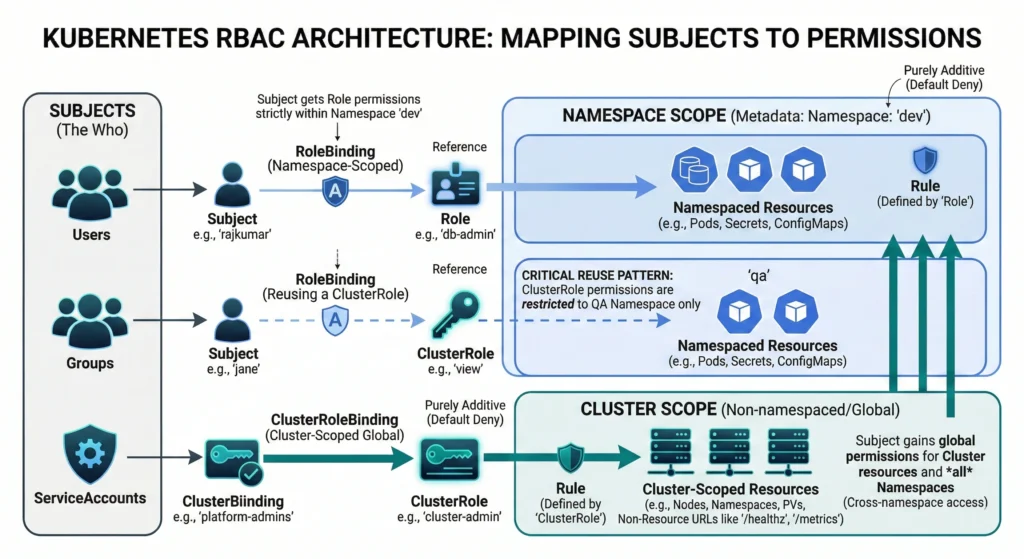
Kubernetes uses four primary API objects to map Subjects to Resources and Verbs. They are divided by scope: Namespace-level (isolated) and Cluster-level (global).
Defining Permissions (The Rules)
- Role: Defines a set of permissions (Rules) within a single, specific namespace. For example: “Can read Pods in the
devnamespace.” - ClusterRole: Defines permissions across the entire cluster. It is used for non-namespaced resources (like Nodes), global endpoints (like
/healthz), or to define a template of permissions that can be applied across all namespaces.
Granting Permissions (The Connections)
- RoleBinding: Connects a Subject to a
Rolewithin a specific namespace. (e.g., “Give Jane thepod-readerRole in thedevnamespace”).- Pro-tip: A RoleBinding can also reference a
ClusterRole, but it restricts those cluster-wide permissions down to the single namespace where the RoleBinding exists.
- Pro-tip: A RoleBinding can also reference a
- ClusterRoleBinding: Connects a Subject to a
ClusterRoleacross the entire cluster. (e.g., “Give theadmin-groupthe ability to delete Pods in every namespace”).
Kubernetes uses RBAC to handle Authorization. It is the industry standard. Instead of giving permissions to a specific person, you create a Role (e.g., “Database Admin”) and assign people to that Role.
There are 4 main objects in RBAC you must understand:
Role (Namespace Level)
A set of permissions inside one specific Namespace.
A Role is simply a set of rules that defines what actions are allowed on which resources, but restricted entirely to one specific Namespace. Think of it as a localized permission slip that keeps your microservices and developers working safely within their assigned boundaries.
Imagine an IT corporate park. A Role is like an employee ID card configured strictly for the “Finance Department” on the 3rd floor (your Namespace). With this card, you can open the main door, read the notice board, and use the printer on that specific floor. But if you try to take this same card to the “HR Department” on the 4th floor, it simply won’t work. The permissions are entirely bound to your specific floor.
Quick Reference
| Feature | Kubernetes Role Details |
| Scope Level | Namespace Level only (e.g., dev-namespace). |
| Can Access Pods? | Yes, if defined, but only within the same namespace. |
| Can Access Nodes? | No, Nodes are cluster-scoped objects. |
| Rule Strategy | Additive only (Allow explicitly; everything is Deny by default). |
| Attachment | Requires a RoleBinding to be assigned to a user or service account. |
Core Mechanics:
- Namespace-Scoped: A
Rolemust be created within a specific namespace. The permissions it grants are exclusively applicable to the resources within that exact namespace. It cannot grant access to cluster-scoped resources (likeNodesorNamespaces) or resources in other namespaces. - Additive Nature: RBAC in Kubernetes is purely additive. A
Roleonly contains “allow” rules. There are no “deny” rules. If no rule explicitly allows an action, the action is implicitly denied by default. - Rule Structure: A
Rolecontains a list ofrules. Each rule specifies:apiGroups: The API group containing the resource (e.g.,""for core resources like Pods,"apps"for Deployments).resources: The target resource types (e.g.,"pods","services","secrets").verbs: The allowed actions (e.g.,"get","list","watch","create","update","patch","delete").resourceNames(Optional): Restricts the rule to specific, named instances of a resource (e.g., allowing access only to a pod namedmy-specific-pod).
For advanced architects, designing a Role goes beyond just granting access; it’s an exercise in strict threat modeling.
- Wildcards (
*): Extreme caution is needed here. Usingresources: ["*"]orverbs: ["*"]essentially makes the subject a namespace administrator. Avoid wildcarding in production environments entirely. - ResourceNames: You can restrict access down to a specific instance of a resource. For example, allowing an application to
getonly a single ConfigMap nameddatabase-config, rather than having access to all ConfigMaps in the namespace. - Escalation Paths: Be highly critical of giving out the
bind,escalate, orimpersonateverbs. Furthermore, giving a service account permission tocreatePods effectively gives them the ability to mount any Secret available in that namespace, which can easily lead to privilege escalation. - Usage Context: A
Roleby itself is completely inactive. It simply defines a set of capabilities. To apply these capabilities to a user, service account, or group, it must be bound using aRoleBinding.
Rule Structure: A Role contains a list of rules. Each rule specifies:
apiGroups: The API group containing the resource (e.g.,""for core resources like Pods,"apps"for Deployments).resources: The target resource types (e.g.,"pods","services","secrets").verbs: The allowed actions (e.g.,"get","list","watch","create","update","patch","delete").resourceNames(Optional): Restricts the rule to specific, named instances of a resource (e.g., allowing access only to a pod namedmy-specific-pod).
Example YAML Specification:
apiVersion: rbac.authorization.k8s.io/v1 # The required API version for RBAC objects.
kind: Role                               # Specifies this is a namespace-scoped permissions object.
metadata:
  namespace: dev-env                     # MANDATORY: The strict boundary for these rules.
  name: advanced-dev-role                # The unique identifier for this Role.
  labels:                                # Optional: Useful for querying/filtering Roles.
    environment: development
    managed-by: security-team
  annotations:                           # Optional: Additional non-identifying metadata or notes.
    description: "Maximized example role demonstrating all rule configurations."

rules:
# ========================================================================
# RULE BLOCK 1: Core Resources & Subresources
# ========================================================================
- apiGroups: [""]                        # "" represents the "Core" API group (Pods, Services, ConfigMaps, Secrets).
  resources:
    - "pods"                             # The primary resource.
    - "pods/log"                         # Subresource: Allows viewing logs (`kubectl logs`).
    - "pods/portforward"                 # Subresource: Allows port-forwarding (`kubectl port-forward`).
    - "pods/exec"                        # Subresource: Allows executing commands inside containers (`kubectl exec`).
  verbs:
    - "get"                              # Read a single object by name.
    - "list"                             # Read a collection of objects (e.g., `kubectl get pods`).
    - "watch"                            # Stream real-time updates (e.g., `kubectl get pods -w`).
    # Note: We omitted write verbs (create, update, delete) here for safety.

# ========================================================================
# RULE BLOCK 2: Non-Core API Groups (e.g., Apps, Networking)
# ========================================================================
- apiGroups:
    - "apps"                             # The API group for Deployments, StatefulSets, ReplicaSets, DaemonSets.
    - "networking.k8s.io"                # The API group for Ingresses and NetworkPolicies.
  resources:
    - "deployments"
    - "deployments/scale"                # Subresource: Allows scaling deployments up or down.
    - "networkpolicies"
  verbs:
    - "create"                           # Create new objects.
    - "update"                           # Modify existing objects (replaces the whole object).
    - "patch"                            # Partially modify existing objects.
    - "delete"                           # Delete a single object.
    - "deletecollection"                 # Delete multiple objects at once (HIGH RISK).

# ========================================================================
# RULE BLOCK 3: Maximum Granularity (Restricting by Object Name)
# ========================================================================
- apiGroups: [""]
  resources: ["configmaps"]
  resourceNames:                         # STRICT RESTRICTION: Limits the rules to ONLY these specific named objects.
    - "app-database-config"              # The user CANNOT read any other ConfigMap in the namespace except these two.
    - "frontend-settings"
  verbs: ["get", "update"]               # Can read and modify only those specific ConfigMaps.

# ========================================================================
# RULE BLOCK 4: The Wildcard (Use with Extreme Caution)
# ========================================================================
- apiGroups: ["batch"]                   # The API group for Jobs and CronJobs.
  resources: ["*"]                       # Wildcard (*): Means ALL resources within the "batch" API group.
  verbs: ["*"]                           # Wildcard (*): Means ALL verbs. Grants full admin control over batch jobs.
ClusterRole (Cluster Level)
A set of permissions for the entire cluster.
While a standard Role locks things down to a single namespace, a ClusterRole is your powerhouse for defining permissions across the entire cluster.
A ClusterRole is a set of rules that grants access to resources across your entire Kubernetes cluster, rather than being stuck inside one specific namespace. If you want to give a user the ability to view Nodes (which exist outside of namespaces) or view Pods across every namespace at once, you must use a ClusterRole.
Imagine an IT corporate building. A regular
Roleis like an employee ID card that only opens doors on the 3rd floor (one namespace). A ClusterRole, on the other hand, is like the Building Manager’s Master Key. With this master key, you can access the basement utility rooms (cluster-scoped resources like Nodes) and you can also open the doors on every single floor of the building (cross-namespace access).
Quick Reference
| Feature | Kubernetes ClusterRole Details |
| Scope Level | Cluster-wide (Non-namespaced). |
| Target Resources | Nodes, PersistentVolumes, Namespaces, etc. |
| Cross-Namespace | Can allow access to resources (like Pods) across all namespaces. |
| Non-Resource URLs | Can grant access to endpoints like /healthz or /metrics. |
| Attachment Method | ClusterRoleBinding (cluster-wide) OR RoleBinding (restricted to one namespace). |
–
Why do we even need a ClusterRole if we already have Roles? Certain things in Kubernetes simply don’t live inside a namespace. For example, a physical worker Node doesn’t belong to a namespace; it hosts the namespaces! If you want a monitoring tool to read the status of all your Nodes, a standard Role cannot help you. You must create a ClusterRole.
Furthermore, if you are a cluster administrator, you don’t want to create 50 separate Roles for yourself in 50 different namespaces just to read Pods. You create one ClusterRole that says “Can read Pods”, and attach it cluster-wide.
The permissions defined within a ClusterRole are purely additive, adhering to a default-deny authorization model. A ClusterRole is logically inert until attached to an authenticable subject (a User, Group, or ServiceAccount) via a binding.
Its primary operational capabilities include granting access to:
- Cluster-scoped resources: Objects that do not exist within any namespace, such as
Nodes,Namespaces,PersistentVolumes, andClusterRoleBindings. - Non-resource endpoints: API server endpoints that are not standard Kubernetes objects, such as
/healthz,/metrics, or/version. - Namespaced resources across all namespaces: The ability to execute operations on namespaced resources (e.g.,
Pods,Secrets,Deployments) globally across the entire cluster without specifying individual namespaces.
Binding Mechanisms
There are two primary mechanisms for binding a ClusterRole:
- ClusterRoleBinding: Binds the permissions globally. The subject receives the defined permissions across all namespaces and for all cluster-scoped resources.
- RoleBinding: While typically used to bind a
Role, aRoleBindingcan also reference aClusterRole. When this occurs, the permissions defined in theClusterRoleare constrained exclusively to the specific namespace in which theRoleBindingresides. This architectural feature allows administrators to define generalized permission sets (e.g., standardadmin,edit, orviewroles) once at the cluster level and reuse them across multiple distinct namespaces, preventing the proliferation of duplicateRoleobjects.
For advanced architects, managing ClusterRoles requires rigorous governance.
- Aggregation Rules (
aggregationRule): You can build massive, composite ClusterRoles by dynamically combining smaller ones usingmatchLabels. For instance, the defaultadminoreditClusterRoles in Kubernetes are often aggregations of dozens of smaller, micro-ClusterRoles provided by custom controllers. - Escalation Risks: Granting
bindorescalatepermissions on ClusterRoles is extremely dangerous. It allows a subject to grant themselves or others cluster-admin privileges. - Non-Resource URLs: ClusterRoles are the only way to grant access to backend API server paths that aren’t standard Kubernetes objects, using the
nonResourceURLsfield (e.g., granting access to/metricsfor Prometheus scraping).
Rule Structure: A ClusterRole contains a list of rules. Each rule specifies:
apiGroups: The API group containing the resource (e.g.,""for core cluster-scoped resources like Nodes or Namespaces,"storage.k8s.io"for StorageClasses).resources: The target resource types. In a ClusterRole, this includes cluster-scoped resources (e.g.,"nodes","namespaces","persistentvolumes") as well as namespaced resources accessed globally across all namespaces (e.g.,"pods","secrets").verbs: The allowed actions (e.g.,"get","list","watch","create","update","patch","delete","bind","escalate").resourceNames(Optional): Restricts the rule to specific, named instances of a resource (e.g., allowing access only to a specific physical node namedworker-node-01).nonResourceURLs(Exclusive to ClusterRoles): Specifies raw HTTP endpoints on the Kubernetes API server that are not standard Kubernetes objects (e.g.,"/healthz","/metrics","/version"). Note: This field cannot be combined withapiGroups,resources, orresourceNamesin the same rule block.
Example YAML Specification:
apiVersion: rbac.authorization.k8s.io/v1 # Required API version for RBAC
kind: ClusterRole                        # Specifies this is a cluster-scoped object
metadata:
  # CRITICAL: Notice the ABSENCE of the 'namespace' field.
  # Adding a namespace here will cause Kubernetes to ignore it or throw an error.
  name: maximized-cluster-admin          # Unique global identifier
  labels:                                # Useful for organizing and for Aggregation (see below)
    security-tier: privileged
    rbac.authorization.k8s.io/aggregate-to-admin: "true"
  annotations:                           # Metadata for human context or tooling
    description: "Demonstrates cluster-wide resources, cross-namespace access, non-resource URLs, and aggregation."

# ========================================================================
# AGGREGATION RULE: Combine multiple ClusterRoles into one
# ========================================================================
# If you use `aggregationRule`, the `rules` array below is automatically
# populated by the Kubernetes controller. It dynamically gathers rules from
# ANY other ClusterRole that matches this label selector.
aggregationRule:
  clusterRoleSelectors:
  - matchLabels:
      rbac.authorization.k8s.io/aggregate-to-admin: "true"

rules:
# ========================================================================
# RULE BLOCK 1: Cluster-Scoped Resources (Cannot be done with a standard Role)
# ========================================================================
- apiGroups: [""]                        # Core API group
  resources:
    - "nodes"                            # The underlying worker machines
    - "nodes/metrics"                    # Subresource: Node-level metrics
    - "namespaces"                       # The namespaces themselves
    - "persistentvolumes"                # Global storage volumes (PVs, not PVCs)
  verbs:
    - "get"
    - "list"
    - "watch"
    - "patch"                            # Allows modifying node labels or taints

# ========================================================================
# RULE BLOCK 2: Cross-Namespace Access (Global Pod viewing)
# ========================================================================
# When bound with a ClusterRoleBinding, this allows the user to run commands
# like `kubectl get pods --all-namespaces`.
- apiGroups: [""]
  resources: ["pods", "secrets"]
  verbs: ["get", "list", "watch"]

# ========================================================================
# RULE BLOCK 3: Controlling Security & Access Objects Globally
# ========================================================================
- apiGroups: ["rbac.authorization.k8s.io"] # RBAC API group
  resources:
    - "clusterroles"
    - "clusterrolebindings"
  verbs: ["*"]                           # Wildcard (*): Full admin rights over RBAC globally. HIGH RISK.

# ========================================================================
# RULE BLOCK 4: Non-Resource URLs (Unique to ClusterRoles)
# ========================================================================
# Accessing raw HTTP endpoints on the Kubernetes API server that are NOT
# standard Kubernetes objects (like Pods or Nodes).
- nonResourceURLs:
    - "/healthz"                         # API server health check endpoint
    - "/healthz/*"                       # Wildcard for sub-paths under /healthz
    - "/metrics"                         # Prometheus metrics endpoint
    - "/version"                         # API server version info
  verbs:
    - "get"                              # Read-only access to these HTTP endpoints
RoleBinding
The glue that connects a User to a Role.
A Role defines what actions are allowed. But a Role alone is useless until you assign it to someone. That is exactly where a RoleBinding comes in. It is the vital glue that connects a user, team, or application to a specific set of permissions within a single namespace.
Think of a
RoleBindingas an assignment document. If you have aRolecalled “Database Admin” that allows deleting pods, and a user named “Rajkumar”, theRoleBindingis the rule that explicitly says: “Rajkumar gets the Database Admin Role in thedevnamespace.” Without this binding, Rajkumar has no permissions, and the Role just sits there unused.
Imagine a highly secure bank. The Role is the list of privileges printed on an access badge (e.g., “Can open the vault”). The Subject is the actual human employee, Rajkumar. The RoleBinding is the HR authorization letter that officially prints Rajkumar’s name and photo onto that specific access badge and hands it to him. Until HR issues that binding, Rajkumar is just a person, and the badge is just a piece of plastic.
Quick Reference
| Feature | Kubernetes RoleBinding Details |
| Primary Purpose | Grants the permissions defined in a Role to a subject. |
| Scope Level | Namespace Level only (e.g., dev-namespace). |
| Supported Subjects | Users, Groups, or ServiceAccounts. |
Role Reference (roleRef) | Can point to a Role OR a ClusterRole. |
| Mutability | roleRef is immutable (cannot be changed after creation). |
–
Core Mechanics: The “Who” and the “What”
The RoleBinding in Kubernetes is an API object within the rbac.authorization.k8s.io group that explicitly maps a set of authorization rules to one or more subjects within the strict boundary of a specific namespace.
To fully grasp RoleBindings, you need to understand the “Who” and the “What”.
- The “Who” (
subjects): This can be a human User (likerajkumar@devsecopsguru.in), a Group (likebackend-developers), or a ServiceAccount (an identity given to a pod or automated pipeline). A single RoleBinding can map to multiple subjects at once! - The “What” (
roleRef): This is the exact name of the Role you are assigning.
Important Note: A RoleBinding only works inside the namespace where it is created. If Rajkumar has a RoleBinding in the dev namespace, he cannot automatically access the prod namespace.
Object Architecture The resource relies on two primary data structures:
subjects: An array of entities receiving the permissions. Validkindvalues include:User: Represents a human operator or external entity. Kubernetes defers user management to external authenticators (e.g., OIDC, x509 certificates, authenticating proxies) and relies on the string value provided by the authenticator.Group: Represents a collection of users, also managed by the external identity provider.ServiceAccount: A native Kubernetes resource utilized by automated processes and pods running within the cluster. ServiceAccounts must specify their originating namespace in the subject definition.
roleRef: A singular object reference defining the permissions being granted. Thekindcan be either aRole(must exist in the same namespace) or aClusterRole(exists at the cluster scope).
Immutability The roleRef field in a RoleBinding is strictly immutable. Once the object is instantiated in the etcd datastore, the API server’s validation logic prevents any UPDATE operations that attempt to modify the roleRef.name or roleRef.kind. Modifying the target role requires a discrete DELETE followed by a CREATE operation. The subjects array, conversely, is fully mutable and can be patched or updated dynamically.
For the advanced architects out there, here are the crucial mechanics under the hood:
- Namespace Scoping Constraints The operational authority of a
RoleBindingis entirely constrained by itsmetadata.namespaceattribute. If theroleRefpoints to aRole, the binding authorizes operations according to that Role within the defined namespace. If theroleRefpoints to aClusterRole, the Kubernetes authorization webhook dynamically reduces the effective scope of thatClusterRole. The subjects are granted the permissions defined in theClusterRole, but the authorization engine restricts the execution of those permissions strictly to the namespace housing theRoleBinding. ARoleBindingcannot, under any circumstances, authorize operations against cluster-scoped resources (e.g.,Nodes) or non-resource URLs, even if the referencedClusterRolecontains rules for them. - ServiceAccount Cross-Namespace Authorization While the authorization scope is locked to the binding’s namespace, the subjects themselves do not have to reside there. A
RoleBindinginnamespace-acan specify aServiceAccountsubject located innamespace-b. This allows cross-namespace operational architectures, common in continuous deployment reconciliation loops, without granting cluster-wide access. - Binding to a ClusterRole: A
RoleBinding(which is namespace-scoped) can actually reference aClusterRole(which is cluster-scoped). When this happens, the global permissions of the ClusterRole are instantly restricted to only the namespace where the RoleBinding exists. This is a powerful pattern for reusing common permission templates (like aneditorviewprofile) across hundreds of namespaces without duplicatingRoleobjects. - Immutability: The
roleReffield is strictly immutable. If you bind Rajkumar to theviewrole, but later decide he needs theeditrole, you cannot usekubectl editto change theroleRef. You must delete the entire RoleBinding and create a new one.
Binding Structure: A RoleBinding does not contain rules; instead, it contains two primary data blocks that map the “Who” to the “What”. Each RoleBinding specifies:
subjects: An array of entities (the “Who”) receiving the permissions. Each subject specifies:kind: The type of identity (e.g.,"User","Group", or"ServiceAccount").name: The exact string identifier of the user, group, or service account (e.g.,"rajkumar","dev-team-leads","my-app-sa").namespace(Conditional): Strictly required if the subjectkindis a"ServiceAccount", as service accounts are namespace-bound.
roleRef: A singular, immutable reference to the permissions (the “What”) being granted. It specifies:kind: The type of role being attached (e.g.,"Role"or"ClusterRole").name: The exact name of the target role (e.g.,"db-admin").apiGroup: The API group for RBAC objects (always"rbac.authorization.k8s.io").
Example YAML Specification:
apiVersion: rbac.authorization.k8s.io/v1 # Required API version for RBAC objects
kind: RoleBinding                        # Specifies this grants permissions within a specific namespace
metadata:
  name: advanced-db-admin-binding        # The unique identifier for this binding
  namespace: dev                         # MANDATORY: The namespace where this binding is active
  labels:                                # Optional: Used for querying and organizing bindings
    managed-by: security-team
    environment: development
  annotations:                           # Optional: Additional context or audit tracking info
    ticket-reference: "JIRA-1234"
    description: "Binds the db-admin Role to Rajkumar, the dev-ops group, and a specific ServiceAccount."

# ========================================================================
# SUBJECTS: The "Who" (Users, Groups, or ServiceAccounts)
# You can have multiple subjects in a single RoleBinding.
# ========================================================================
subjects:

# 1. A Standard Human User
- kind: User
  name: "rajkumar"                       # Case-sensitive. Must match exactly how the identity provider passes the name.
  apiGroup: rbac.authorization.k8s.io    # Required for User and Group subjects

# 2. A Group of Users
- kind: Group
  name: "dev-team-leads"                 # Grants the role to anyone belonging to this group in your identity provider.
  apiGroup: rbac.authorization.k8s.io

# 3. A Kubernetes ServiceAccount (in the SAME namespace)
- kind: ServiceAccount
  name: "database-migration-sa"          # Used by pods/applications, not humans.
  namespace: dev                         # Explicitly state the namespace (defaults to the RoleBinding's namespace if omitted, but best practice is to include it).

# 4. A Kubernetes ServiceAccount (in a DIFFERENT namespace)
# Yes, you can grant an application in the 'qa' namespace permissions
# to do something in the 'dev' namespace using a RoleBinding in 'dev'!
- kind: ServiceAccount
  name: "cross-namespace-auditor-sa"
  namespace: qa                          # The namespace where the ServiceAccount lives.

# ========================================================================
# ROLEREF: The "What" (The Permissions)
# CRITICAL RULE: roleRef is IMMUTABLE. You cannot update the roleRef
# of an existing RoleBinding. You must delete and recreate it to change it.
# ========================================================================
roleRef:
  kind: Role                             # Can be a 'Role' OR a 'ClusterRole'
  name: db-admin                         # The name of the Role being granted. Must exist in the 'dev' namespace (unless it's a ClusterRole).
  apiGroup: rbac.authorization.k8s.io    # Required
ClusterRoleBinding
The glue that connects a User to a ClusterRole.
By now, you know how to create global rules using a ClusterRole. But just like a Role, those global rules are totally useless until you hand them to someone. That’s exactly where the ClusterRoleBinding steps in. It is the ultimate administrative glue that connects a user, a group, or an automated service account to a ClusterRole, granting them permissions across the entire Kubernetes cluster.
A ClusterRoleBinding is a global assignment document. If you have a user named Rajkumar and you want him to be the “Cluster Admin” everywhere meaning he can manage resources in every single namespace, as well as cluster-level resources like Nodes you create a ClusterRoleBinding. It tells Kubernetes: “Give Rajkumar the Cluster Admin role and apply it globally.”
Imagine a massive hotel with hundreds of rooms (namespaces) and a basement utility area (cluster-scoped resources). A regular
RoleBindingis the hotel manager giving a guest a keycard that only opens Room 101. A ClusterRoleBinding, however, is the hotel manager giving the Head of Security a Universal Master Keycard. With this single card, the Head of Security can open absolutely every door in the building and access the basement utility rooms.
Quick Reference
| Feature | Kubernetes ClusterRoleBinding Details |
| Primary Purpose | Grants permissions defined in a ClusterRole globally. |
| Scope Level | Cluster-wide (Non-namespaced). |
| Target Resources | Grants access to all namespaces AND cluster-scoped objects. |
| Supported Subjects | Users, Groups, or ServiceAccounts. |
Role Reference (roleRef) | Must point to a ClusterRole. |
| Mutability | The roleRef is completely immutable after creation. |
Why do we need a ClusterRoleBinding when we already have a RoleBinding?
If you use a RoleBinding to assign a ClusterRole, the user only gets those permissions inside one specific namespace. But what if Rajkumar is your top-level infrastructure engineer? It would be a nightmare to create a separate RoleBinding for him in 500 different namespaces!
Scope and Authorization Mechanics
Because a ClusterRoleBinding lacks a namespace declaration in its metadata, the authorization module evaluates its grants globally. A subject mapped via a ClusterRoleBinding gains access to:
- Cluster-scoped resources: e.g.,
Nodes,Namespaces,CustomResourceDefinitions(CRDs). - Cross-namespace operations: e.g.,
kubectl get pods --all-namespaces. The subject gains the privileges defined in theClusterRolefor all existing and future namespaces. - Non-resource URLs: e.g.,
/api,/healthz,/metrics.
Unlike a RoleBinding, a ClusterRoleBinding cannot reference a Role in its roleRef; it strictly requires a ClusterRole.
Data Structure The schema requires two mandatory blocks:
subjects: An array of entities receiving the grant. When specifying aServiceAccountas a subject, thenamespacefield within the subject array is strictly required, as theClusterRoleBindingitself has no namespace context to infer from.roleRef: An immutable reference requiringapiGroup(rbac.authorization.k8s.io),kind(ClusterRole), andname.
Immutability and Lifecycle
The roleRef block is strictly immutable after creation. The Kubernetes API server will reject any PUT or PATCH operation that attempts to modify the roleRef.name. To alter the referenced ClusterRole, the ClusterRoleBinding must be explicitly deleted and recreated. The subjects array remains fully mutable.
Security Escalation Vectors
ClusterRoleBindings represent the highest escalation vector in a Kubernetes cluster. Binding a subject to the default cluster-admin ClusterRole circumvents all other RBAC restrictions, granting unrestricted access to all APIs and resources. Furthermore, granting a subject the ability to create, update, or patch ClusterRoleBindings enables privilege escalation, as the subject could bind themselves or a compromised ServiceAccount to a highly privileged ClusterRole.
For advanced architects, handling ClusterRoleBindings is high-stakes security work.
- System Account Bindings: When a Kubernetes cluster boots up, it automatically creates dozens of default
ClusterRoleBindingsfor internal controllers (like thesystem:kube-schedulerorsystem:node). Tampering with these default bindings can immediately break cluster routing and scheduling logic. - Group Bindings over User Bindings: At an enterprise level, you should almost never bind a
ClusterRoleto a specificUser(likerajkumar@devsecopsguru.in). Instead, bind it to an OIDCGroup(likeinfrastructure-admins). This way, when Rajkumar moves to a different team, you simply remove him from the IdP group, and his global Kubernetes access is instantly revoked without needing to touch the cluster YAMLs. - The
cluster-adminRisk: Binding a subject to the defaultcluster-adminClusterRole gives them unrestricted “superuser” access to perform any action on any resource. This should be heavily guarded and monitored.
Binding Structure: A ClusterRoleBinding does not contain rules; instead, it contains two primary data blocks that map the “Who” to the “What” at a global, cluster-wide level. Each ClusterRoleBinding specifies:
subjects: An array of entities (the “Who”) receiving the global permissions. Each subject specifies:kind: The type of identity (e.g.,"User","Group", or"ServiceAccount").name: The exact string identifier of the user, group, or service account (e.g.,"rajkumar","platform-admins","global-monitoring-sa").namespace(Strictly Required for ServiceAccounts): Even though a ClusterRoleBinding is a cluster-scoped object, ServiceAccounts themselves natively live inside specific namespaces. You must define the namespace where the ServiceAccount originates.
roleRef: A singular, immutable reference to the global permissions (the “What”) being granted. It specifies:kind: This MUST be"ClusterRole"(a ClusterRoleBinding cannot reference a standard namespace-level"Role").name: The exact name of the target ClusterRole (e.g.,"cluster-admin","view").apiGroup: The API group for RBAC objects (always"rbac.authorization.k8s.io").
Example YAML Specification:
apiVersion: rbac.authorization.k8s.io/v1 # Required API version for RBAC
kind: ClusterRoleBinding                 # Specifies a cluster-wide binding
metadata:
  # CRITICAL: Do NOT define a namespace here. This is a global object.
  name: maximized-global-admin-binding   # Unique identifier for the binding
  labels:                                # Optional: For filtering and organization
    security-level: critical
    department: platform-engineering
  annotations:                           # Optional: Audit tracking or metadata
    ticket: "INFRA-9999"
    description: "Grants cluster-wide read/write to specific users, groups, and service accounts."

# ========================================================================
# SUBJECTS: The "Who" receiving global permissions
# You can bind multiple identities simultaneously.
# ========================================================================
subjects:

# 1. A Standard Human User
- kind: User
  name: "rajkumar"                       # Case-sensitive username (from OIDC, AWS IAM, etc.)
  apiGroup: rbac.authorization.k8s.io

# 2. A Group of Users
- kind: Group
  name: "platform-admins"                # Grants the role globally to everyone in this IDP group
  apiGroup: rbac.authorization.k8s.io

# 3. A Built-in Kubernetes System Group (Use with extreme caution)
- kind: Group
  name: "system:authenticated"           # Grants the role to ANY authenticated user in the cluster
  apiGroup: rbac.authorization.k8s.io

# 4. A Kubernetes ServiceAccount
# Notice: Even though this is a global ClusterRoleBinding, the ServiceAccount
# itself still lives inside a specific namespace, so you MUST define it here.
- kind: ServiceAccount
  name: "global-monitoring-sa"           # E.g., a Prometheus service account
  namespace: monitoring                  # The namespace where the SA was created

# ========================================================================
# ROLEREF: The "What" (The Permissions being granted)
# CRITICAL RULE 1: roleRef is IMMUTABLE. You cannot update it later.
# CRITICAL RULE 2: In a ClusterRoleBinding, the kind MUST be "ClusterRole".
# ========================================================================
roleRef:
  kind: ClusterRole                      # Cannot be a "Role". Must be a "ClusterRole".
  name: view                             # The target ClusterRole (e.g., 'view', 'edit', 'admin', 'cluster-admin')
  apiGroup: rbac.authorization.k8s.io
DevSecOps Architect Level
In a mature DevSecOps pipeline, RBAC Roles are treated as code and heavily audited. You shouldn’t be manually writing and applying YAMLs without validation.
- Use infrastructure-as-code scanners like Checkov or KICS in your CI/CD pipelines to scan your Role YAMLs for overly permissive verbs like
["*"]before they are ever deployed. - Implement policy engines like Kyverno or OPA Gatekeeper as validating admission webhooks to outright block the creation of overly broad Roles in the cluster.
- Use KubeLinter to ensure RBAC best practices are followed by developers.
- For continuous auditing of who has what access in runtime, tools like Aqua Security or open-source scanners like Kubesec help visualize and lock down RBAC sprawl.
Additional Details
- Key Components
- Role & ClusterRole: The rule definitions (The “What” and “Which”).
- RoleBinding & ClusterRoleBinding: The assignment mechanics (The “Who”).
- Subjects: Users, Groups, and ServiceAccounts.
- Key Characteristics
- Namespace isolation vs. Cluster-wide global access.
- Immutability of the
roleRefassignment. - Cross-namespace authorization capabilities using ServiceAccounts.
- Use Case
- Let’s say you want to allow a developer named “Niki” to view Pods and logs in the
frontendnamespace, but she shouldn’t be able to edit or delete them. You would create aRolewithget,list,watchverbs for pods, and bind it to Niki using aRoleBindingstrictly in thefrontendnamespace.
- Let’s say you want to allow a developer named “Niki” to view Pods and logs in the
- Benefits
- Granular Security: Micro-segmentation of developer and application access.
- Compliance: Meets strict industry standards for auditability and access control.
- Automation Safety: Ensures automated pipelines only have access to what they explicitly need to deploy.
- Best Practices
- Principle of Least Privilege: Never grant
cluster-adminunless absolutely necessary. Granular Roles are safer. - Use Groups over Users: Bind Roles to Groups (e.g.,
backend-devs) rather than individual users. It makes onboarding and offboarding vastly easier. - Every App gets a ServiceAccount: Never use the
defaultServiceAccount for your deployments. Create a specific ServiceAccount for each app so you can tightly control what Kubernetes APIs that app can access.
- Principle of Least Privilege: Never grant
- Technical Challenges
- RBAC Sprawl: In large clusters, managing thousands of Roles and Bindings becomes difficult to track without visualization tools.
- Cross-Namespace Complexity: Designing architectures where a CI/CD ServiceAccount in a
toolsnamespace needs specific permissions indev,qa, andprodrequires careful planning to avoid accidental global admin grants.
- Limitations
- No “Deny” Rules: Because RBAC is strictly additive, you cannot write a rule that says “Allow everything EXCEPT deleting pods.” You must explicitly list all allowed actions.
- External User Management: Kubernetes does not manage users natively. Troubleshooting why a human user can’t access a resource often requires debugging the external OIDC/Active Directory integration first.
- Common Issues
- Binding a ClusterRole via RoleBinding Expecting Global Access: A common mistake is creating a
RoleBindingto aClusterRoleand wondering why the user can’t see pods in other namespaces. TheRoleBindingrestricts theClusterRole‘s power to that single namespace! - Editing an Existing Binding: Developers often try to use
kubectl edit rolebinding <name>to change theroleRef. This fails becauseroleRefis immutable.
- Binding a ClusterRole via RoleBinding Expecting Global Access: A common mistake is creating a
- Problems and Solutions
- Problem: You are unsure if your newly applied RBAC rules actually worked. Solution: Master the
auth can-icommand. You don’t need to guess; Kubernetes will tell you. - Test your own permissions:
kubectl auth can-i create deployments --namespace dev - Test a specific user’s permissions:
kubectl auth can-i list secrets --namespace production --as jane - Test a ServiceAccount’s permissions:
kubectl auth can-i delete pods --as system:serviceaccount:default:my-app-sa
- Problem: You are unsure if your newly applied RBAC rules actually worked. Solution: Master the
Conclusion
Understanding RBAC is non-negotiable for anyone operating a production Kubernetes environment. By firmly grasping the relationship between Subjects, Roles, and Bindings, you transition from simply making things work to making things secure. Start small, enforce the principle of least privilege, and treat your RBAC configurations as vital infrastructure code.