
GenAIOps & LLM Inference on Kubernetes: vLLM, PagedAttention & EKS GPU Scaling
Production guide to operating Large Language Models on Kubernetes, featuring vLLM PagedAttention mechanics, continuous batching, Karpenter GPU node provisioning, and KEDA token queue autoscaling.
GenAIOps & LLM Inference on Kubernetes: vLLM, PagedAttention & EKS GPU Scaling
Section titled “GenAIOps & LLM Inference on Kubernetes: vLLM, PagedAttention & EKS GPU Scaling”Serving traditional machine learning models (like fraud classifiers or recommendation trees) requires sub-millisecond CPU/GPU compute for small tabular tensors. In contrast, serving Large Language Models (LLMs) like Llama 3, Mistral, and DeepSeek introduces unique infrastructure bottlenecks:
- Multi-gigabyte model weights requiring massive High Bandwidth Memory (HBM/VRAM).
- KV-Cache Memory Fragmentation: Autoregressive token generation consumes dynamic memory per concurrent user, quickly leading to Out-Of-Memory (OOM) GPU crashes.
- High operational costs ($10,000s/month) for idle GPU clusters.
GenAIOps (Generative AI Operations) is the specialized engineering discipline for deploying, optimizing, securing, and scaling LLM infrastructure reliably in cloud-native environments.
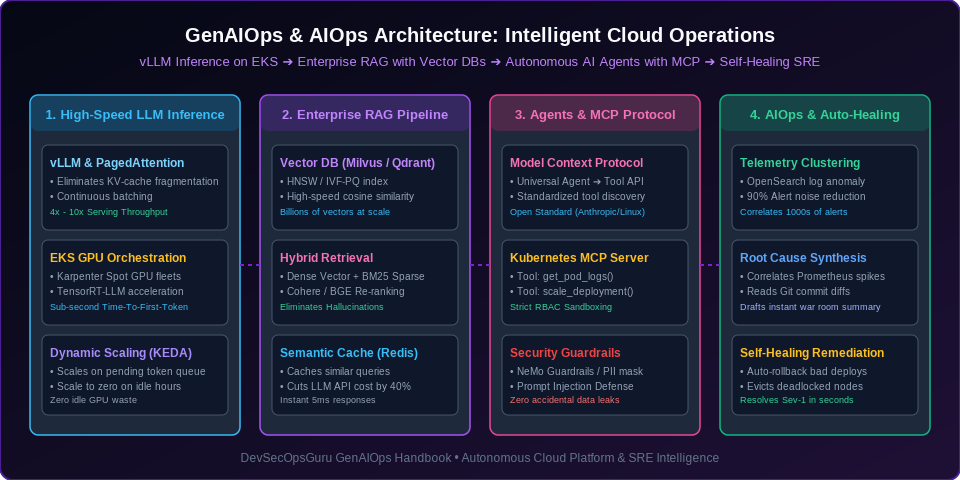
1. Why vLLM & PagedAttention Changed LLM Serving
Section titled “1. Why vLLM & PagedAttention Changed LLM Serving”In standard HuggingFace Transformers pipelines, memory for the Key-Value (KV) Cache must be pre-allocated contiguously for the maximum possible sequence length (e.g., 8,192 tokens). Because most user prompts are short, 60% to 80% of expensive GPU VRAM is wasted in fragmentation.
vLLM (an open-source project from UC Berkeley) introduced PagedAttention, inspired by classic operating system virtual memory paging:
┌────────────────────────────────────────────────────────┐│ GPU High Bandwidth Memory (VRAM) ││ ││ Traditional Serving: Heavy Memory Fragmentation ││ [Prompt 1: 50 toks] [ WASTED RESERVED VRAM: 2000 toks ]││ ││ vLLM PagedAttention: Non-Contiguous Physical Pages ││ ┌──────────┐ ┌──────────┐ ┌──────────┐ ┌──────────┐ ││ │ Page 1 │ │ Page 2 │ │ Page 3 │ │ Page 4 │ ││ │ (16 toks)│ │ (16 toks)│ │ (16 toks)│ │ (16 toks)│ ││ └──────────┘ └──────────┘ └──────────┘ └──────────┘ ││ * Physical pages allocated on-demand as tokens stream *│└────────────────────────────────────────────────────────┘Key Advantages of vLLM:
Section titled “Key Advantages of vLLM:”- Zero Memory Waste: Dynamic page allocation brings VRAM waste down to under 4%.
- Continuous Iteration-Level Batching: Instead of waiting for an entire batch to finish generating all sentences, new incoming requests join the batch at the token level immediately.
- 4x - 10x Serving Throughput: Allows 10x more concurrent users on a single NVIDIA A10G or H100 GPU compared to basic HuggingFace serving.
2. Production vLLM Deployment Manifest on AWS EKS
Section titled “2. Production vLLM Deployment Manifest on AWS EKS”Deploying an OpenAI-compatible vLLM inference server on Kubernetes:
apiVersion: apps/v1kind: Deploymentmetadata: name: vllm-llama3-service namespace: genai labels: app.kubernetes.io/name: vllm-llama3spec: replicas: 2 selector: matchLabels: app: vllm-llama3 template: metadata: labels: app: vllm-llama3 annotations: prometheus.io/scrape: "true" prometheus.io/port: "8000" prometheus.io/path: "/metrics" spec: # Toleration for Karpenter Spot GPU instances tolerations: - key: "nvidia.com/gpu" operator: "Exists" effect: "NoSchedule" nodeSelector: node.kubernetes.io/instance-type: "g5.4xlarge" # 1x NVIDIA A10G (24GB VRAM) containers: - name: vllm-server image: vllm/vllm-openai:v0.4.0 args: [ "--model", "meta-llama/Meta-Llama-3-8B-Instruct", "--tensor-parallel-size", "1", "--gpu-memory-utilization", "0.90", "--max-model-len", "8192", "--port", "8000" ] env: - name: HUGGING_FACE_HUB_TOKEN valueFrom: secretKeyRef: name: hf-token-secret key: token ports: - containerPort: 8000 name: http resources: requests: cpu: "8" memory: "32Gi" nvidia.com/gpu: "1" limits: cpu: "14" memory: "48Gi" nvidia.com/gpu: "1" readinessProbe: httpGet: path: /health port: 8000 initialDelaySeconds: 60 periodSeconds: 103. Dynamic Autoscaling with KEDA on Pending Prompt Queue
Section titled “3. Dynamic Autoscaling with KEDA on Pending Prompt Queue”Standard CPU/Memory metrics are useless for autoscaling LLM deployments because a GPU running vLLM will always report near 100% memory allocation (due to the pre-allocated PagedAttention KV cache).
Instead, KEDA (Kubernetes Event-Driven Autoscaling) scales vLLM pods based on Prometheus metrics tracking the number of waiting requests / pending tokens:
apiVersion: keda.sh/v1alpha1kind: ScaledObjectmetadata: name: vllm-gpu-scaler namespace: genaispec: scaleTargetRef: name: vllm-llama3-service minReplicaCount: 1 maxReplicaCount: 8 cooldownPeriod: 300 triggers: - type: prometheus metadata: serverAddress: http://prometheus-k8s.monitoring.svc.cluster.local:9090 metricName: vllm_num_requests_waiting query: sum(vllm:num_requests_waiting{namespace="genai"}) threshold: "5" # Add an extra GPU node for every 5 queued requests4. Architectural Best Practices for GenAIOps
Section titled “4. Architectural Best Practices for GenAIOps”- Pre-Cache Model Weights via CSI / Ephemeral Volumes: Downloading a 30GB model checkpoint from Hugging Face on every pod restart creates massive container launch delays (10+ minutes). Pre-load weights into an Amazon EFS share or an S3-backed AWS Mountpoint CSI Driver for instant container boot times.
- Pin Model Quantization for FinOps: Use AWQ (Activation-aware Weight Quantization) or GPTQ (4-bit) to fit an 8B model into 6GB of VRAM or a 70B model into 40GB of VRAM, running on low-cost single-GPU instances instead of expensive multi-GPU clusters.
- Expose Standard OpenAI Endpoints: By running
--port 8000withvllm.entrypoints.openai.api_server, your internal engineering teams can consume the self-hosted LLM using standard OpenAI client libraries (openai.ChatCompletion.create) by simply pointingbase_url="http://vllm-llama3.genai.svc:8000/v1".