
AWS Cloud to EKS Authentication & Access Control
How user is securely allowed to run kubectl commands on an EKS cluster.
EKS Authentication and Access Control is simply the process of verifying who (user) are using AWS IAM and then deciding what (Actions) are allowed to do inside the cluster using native Kubernetes RBAC. These two mechanisms operate on a strictly decoupled model, ensuring high security and easy management.
Prerequisite: Before continuing with this topic, ensure you have a foundational understanding of native Kubernetes Role-Based Access Control
To understand this decoupled flow, think of a highly secure corporate office building:
- AWS IAM (Authentication/AuthN): This is the main security gate at the ground floor. Employees show there ID card, and the security guard confirms.
- EKS Identity Mapping: This is the receptionist who checks Employee verified ID against a pre-registration database and hands a specific, color-coded visitor badge.
- Kubernetes RBAC (Authorization/AuthZ): These are the electronic locks on specific rooms (like the server room). The locks do not care about employee original ID card; they only look at the color of badge (mapped Kubernetes group) to decide if the door opens.
Quick Reference
| Concept / Feature | Handled By | Purpose |
| Authentication (AuthN) | AWS IAM | Proves employee’s identity. Defines the user or machine role. |
| Authorization (AuthZ) | Kubernetes RBAC | Dictates permissions (e.g., read pods, create deployments). |
| Token Generation | AWS CLI / Authenticator | Creates a temporary token to talk to the EKS API. |
| Identity Mapping (Legacy) | aws-auth ConfigMap | The legacy way to map IAM users/roles to Kubernetes users/groups. |
| Identity Mapping (Modern) | EKS Access API | The modern way to map IAM to K8s directly via AWS API. |
| Workload Identity (Legacy) | IRSA | IAM Roles for Service Accounts (using OIDC) to give pods AWS permissions. |
| Workload Identity (Modern) | EKS Pod Identity | The simplified agent-based way to grant AWS permissions to the applications. |
User to Cluster Access (Inbound): Authentication, Mapping, and Authorization
When engineer execute a command like kubectl get pods against an Amazon Elastic Kubernetes Service (EKS) cluster, are initiating a sophisticated, multi-stage security handshake. Kubernetes natively lacks a built-in user identity database; it does not know what a password is or how to store user credentials. Instead, EKS operates on a strictly decoupled security model: it delegates Authentication (AuthN) to AWS Identity and Access Management (IAM) and relies on native Kubernetes Role-Based Access Control (RBAC) for Authorization (AuthZ).
Understanding the exact mechanics of this flow especially the transition from the legacy aws-auth ConfigMap to the modern EKS Access Management API is critical for securing modern cloud-native environments.
1. The Authentication Handshake (AuthN): Cryptographic Mechanics
The process of proving your identity to the EKS cluster relies on a short-lived, cryptographically signed token generated on your local machine and validated by the EKS Control Plane.
Here is the exact, step-by-step technical workflow:
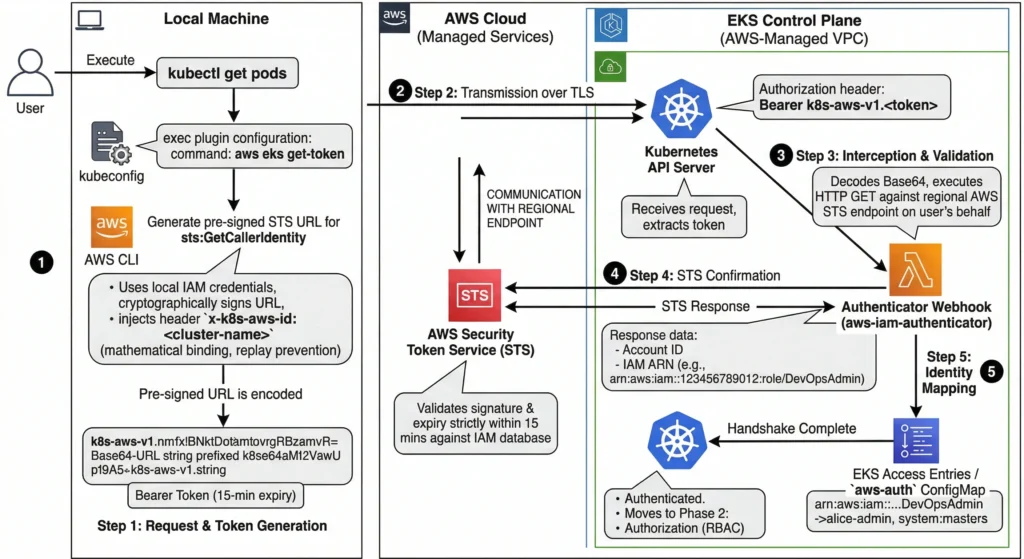
Step 1: The Request, Token Generation, & Cluster Binding
- When you execute a
kubectlcommand, the executable reads the localkubeconfigfile. In an EKS environment, this file is configured with anexecplugin that invokes theaws eks get-tokencommand. - The AWS CLI uses your local AWS credentials to construct a pre-signed URL for the AWS Security Token Service (STS)
GetCallerIdentityAPI action. - This pre-signed URL contains cryptographic signatures proving you hold the private keys for the IAM identity, but it never transmits the secret keys themselves.
- The Security Secret (Replay Prevention): During generation, the CLI injects a specific header into the signed URL:
x-k8s-aws-id: <cluster-name>. This mathematically binds the token to one specific cluster. If an attacker intercepts this token, they cannot use it to log into a different EKS cluster, as the signature would become invalid if the header is changed. - To make this URL compatible with Kubernetes token authentication, it is Base64-URL encoded and prefixed with the string
k8s-aws-v1.. This resulting string becomes yourBearertoken.
Step 2: Transmission over TLS
- The
kubectlclient injects this Bearer token into the standard HTTPAuthorizationheader and transmits the API request (e.g.,GET /api/v1/pods) to the EKS API Server over a secure TLS connection.
Step 3: Webhook Interception & Validation
- The Kubernetes API Server receives the request and extracts the token. Because it doesn’t natively understand AWS IAM, it is configured with a Webhook Token Authenticator.
- It forwards the token to the
aws-iam-authenticatorserver (a dedicated component running invisibly inside the AWS-managed EKS Control Plane). - The webhook removes the
k8s-aws-v1.prefix and decodes the Base64 payload back into the original pre-signed STS URL. - Crucially, the webhook does not blindly trust the URL. It actually executes the HTTP
GETrequest against the regional AWS STS endpoint on your behalf.
Step 4: STS Confirmation
- AWS STS receives the pre-signed request from the webhook.
- STS validates the cryptographic signature against its own IAM database and verifies that the URL has not expired (these tokens strictly expire in 15 minutes).
- If valid, STS returns an
HTTP 200 OKresponse containing AWS Account ID, IAM User/Role ID, and full IAM Amazon Resource Name (ARN) (e.g.,arn:aws:iam::123456789012:role/DevOpsAdmin).
Step 5: Identity Mapping
- STS just returned an AWS IAM ARN, but Kubernetes doesn’t know what an IAM ARN is! Kubernetes only understands native usernames and groups (like
system:masters). - The authentication webhook must now translate the AWS identity into a Kubernetes identity. It does this by checking the cluster’s EKS Access Entries (the modern API) or the legacy
aws-authConfigMap. - If it finds a mapping that says: “Map
arn:aws:iam::123456789012:role/DevOpsAdminto the Kubernetes usernamealice-adminand the groupsystem:masters“, the translation is complete. - The webhook returns
alice-adminandsystem:mastersback to the Kubernetes API Server.
The Handshake is Complete. You are now officially authenticated. The API Server now moves to Phase 2: Authorization (RBAC) to see if alice-admin is actually allowed to perform the requested action.
2. Identity Translation: Bridging AWS and Kubernetes
At this point, the EKS Control Plane knows your validated AWS identity (e.g., arn:aws:iam::123456789012:role/DevOpsRole). However, Kubernetes RBAC has absolutely no concept of an “IAM ARN.” It only understands native Kubernetes usernames (like alice) and groups (like system:masters).
The cluster must translate the AWS ARN into a Kubernetes identity. In modern EKS, this is dictated by the cluster’s Authentication Mode (API, CONFIG_MAP, or API_AND_CONFIG_MAP).
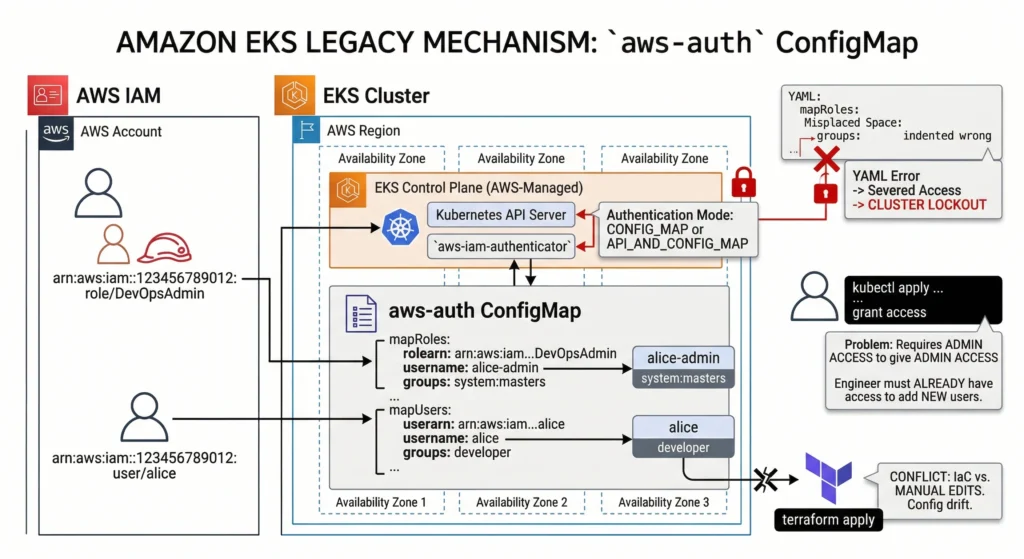
The Legacy Mechanism: aws-auth ConfigMap
(Used when Authentication Mode is CONFIG_MAP or API_AND_CONFIG_MAP)
For years, the standard method for mapping identities was manually editing a Kubernetes ConfigMap named aws-auth located in the kube-system namespace.
- How it works: It utilizes YAML arrays (
mapRolesandmapUsers) to statically link IAM ARNs to Kubernetes usernames and groups. - The DevSecOps Drawbacks: This approach is notoriously brittle.
- The Lockout Risk: A single misplaced space or indentation error in the YAML can instantly sever access for all human users and worker nodes, resulting in a catastrophic cluster lockout.
- The “Chicken and Egg” Problem: It requires engineers to already have administrative access to the cluster via
kubectlto grant access to others. - IaC Conflict: It frequently suffers from configuration drift when managed via external Infrastructure as Code (IaC) tools like Terraform.
- Lab: Test
aws-authConfigMap knowledge in local sandbox environment. EKS aws-auth ConfigMap Lab
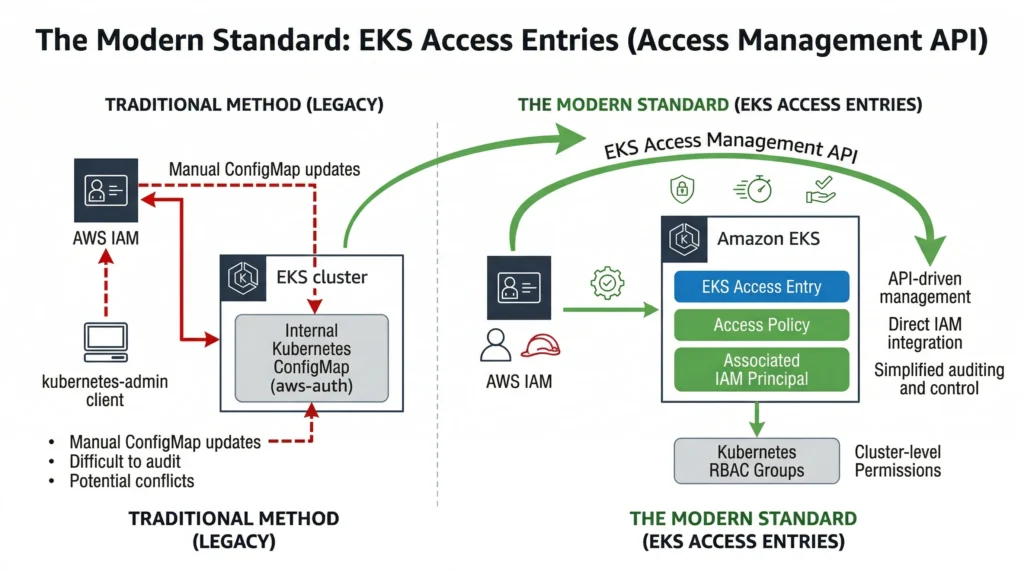
The Modern Standard: EKS Access Entries (Access Management API)
(Used when Authentication Mode is API or API_AND_CONFIG_MAP)
To solve the brittleness of the ConfigMap, AWS shifted identity mapping entirely out of the Kubernetes data plane and into the AWS Control Plane using Access Entries.
- Cluster administrators create Access Entries directly via the AWS API, CLI, or Terraform. An Access Entry acts as a managed, direct link between an IAM Principal and a Kubernetes identity.
- AWS-Managed Access Policies: Instead of writing complex Kubernetes
ClusterRoleBindingsin YAML, you can attach AWS-managed policies (e.g.,AmazonEKSClusterAdminPolicy,AmazonEKSAdminViewPolicy) directly to an Access Entry. AWS automatically translates this into the correct Kubernetes RBAC permissions under the hood. - The Benefits:
- Syntax Safety: Because it uses AWS APIs, inputs are strictly validated, making YAML-based cluster lockouts impossible.
- Centralized Auditing: Every access change is logged in AWS CloudTrail, satisfying strict compliance requirements.
- External Management: You manage EKS access exactly like you manage access to an S3 bucket without ever needing to run
kubectl.
- Lab: Test the EKS Access Management API functionality using the AWS CLI or Console.
The 5 Golden Rules of EKS Identity Mapping
EKS security, you must internalize these rules. Failing to understand them is the 1st cause of “Access Denied” errors in DevSecOps environments.
Rule 1: AWS IAM does NOT grant in-cluster permissions. Attaching the AdministratorAccess IAM policy to an AWS user makes them an admin of your AWS account, but it grants them zero permissions inside the Kubernetes cluster. You must explicitly map their ARN to a Kubernetes group (like system:masters) using an Access Entry or the aws-auth ConfigMap.
Rule 2: The SSO “Assumed Role”. When humans log in via AWS IAM Identity Center (SSO) or assume a role, their active ARN looks like this: arn:aws:sts::123:assumed-role/DevOpsRole/alice-session.
- The Rule: You must map the underlying IAM Role ARN (
arn:aws:iam::123:role/DevOpsRole), NOT the temporary STS assumed-role ARN. Furthermore, any paths in the role ARN (e.g.,role/my-team/DevOpsRole) must be stripped out in the mapping; EKS only matches the role name.
Rule 3: The system:nodes Requirement. EKS worker nodes are not magically part of the cluster. The EC2 instances use this exact same IAM-to-RBAC mapping process! The IAM Role attached to your EC2 instances must be mapped to the system:nodes group so the kubelet can securely register itself with the control plane. If this mapping breaks, your nodes will show as NotReady.
Rule 4: Evaluation Order (API_AND_CONFIG_MAP). If your cluster is in migration mode (API_AND_CONFIG_MAP), EKS evaluates Access Entries first. If it finds a matching Access Entry for an IAM ARN, it uses it and stops looking. It only falls back to the aws-auth ConfigMap if no Access Entry exists.
Rule 5: The Cluster Creator Exemption. Historically, the IAM identity that created the cluster was permanently, invisibly granted system:masters access. With the new Access Management API, this is no longer a hidden shadow-rule. You now explicitly set --bootstrap-cluster-creator-admin-permissions=true during cluster creation, which visibly creates a standard Access Entry for the creator, making your security posture 100% transparent.
3. Authorization Execution: Kubernetes RBAC
Once the Identity Translation phase provides the EKS API Server with your mapped Kubernetes username and assigned groups, the request officially enters the native Kubernetes Authorization (AuthZ) module.
AWS IAM’s job is completely finished. AWS IAM cannot dictate whether you are allowed to delete a Pod in a specific namespace. That is strictly the domain of Kubernetes Role-Based Access Control (RBAC).
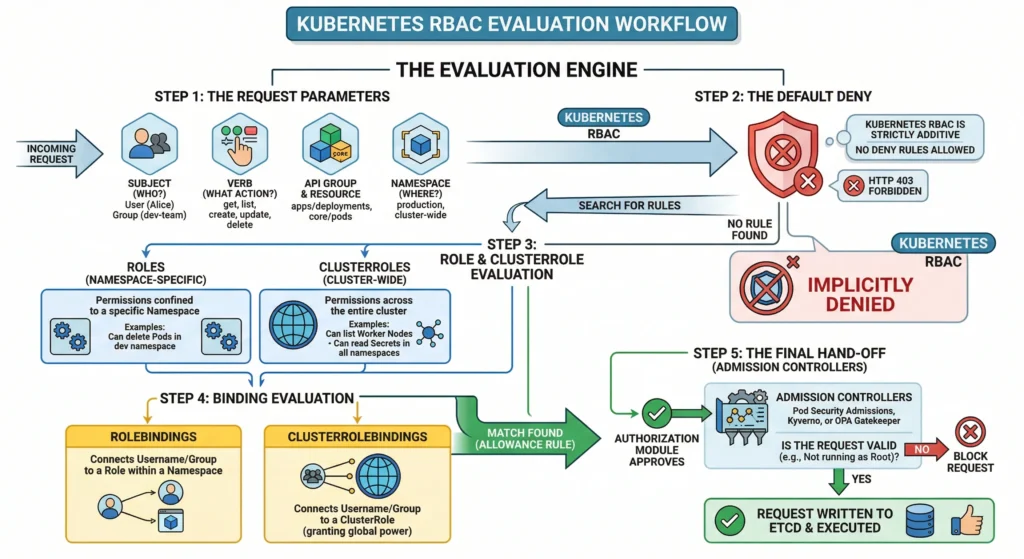
The API Server evaluates your requested action against the configured RBAC objects in the cluster using the following workflow:
The Evaluation Engine
Step 1: The Request Parameters The system identifies exactly what you are trying to do. It breaks the API request down into four key components:
- Subject: Who are you? (e.g., User:
alice, Group:dev-team). - Verb: What is the action? (e.g.,
get,list,create,update,delete). - API Group & Resource: What are you targeting? (e.g.,
apps/deploymentsorcore/pods). - Namespace: Where are you doing it? (e.g.,
productionor cluster-wide).
Step 2: The Default Deny Kubernetes RBAC is strictly additive. By default, all requests are implicitly denied. There is no concept of a “Deny Rule” in Kubernetes RBAC you only write rules that grant access. If no rule explicitly allows your action, you are blocked with an HTTP 403 Forbidden error.
Step 3: Role and ClusterRole Evaluation The system searches for permission sets:
- Roles: Define permissions confined to a specific Namespace (e.g., “Can delete Pods in the
devnamespace”). - ClusterRoles: Define permissions across the entire cluster (e.g., “Can list Worker Nodes” or “Can read Secrets in all namespaces”).
Step 4: Binding Evaluation Having a Role exist isn’t enough; it must be assigned to you. The system checks:
- RoleBindings: Connects your username/group to a Role within a specific namespace.
- ClusterRoleBindings: Connects your username/group to a ClusterRole, granting you that power globally.
Step 5: The Final Hand-off (Admission Controllers) If a matching allowance rule is found, the authorization module approves the request. However, the command is not executed yet. The API Server passes the approved request to the Admission Controllers (e.g., Pod Security Admissions, Kyverno, or OPA Gatekeeper). These controllers perform the final check (e.g., “Alice is allowed to create a Pod, but is she trying to run it as Root? If yes, block it.”). If the Admission Controllers approve, the request is finally written to etcd and executed.
Crucial RBAC Concepts for EKS Admins
- The
system:mastersException: If the Identity Translation phase mapped your AWS ARN to the Kubernetes groupsystem:masters, the entire RBAC evaluation engine is bypassed. You are granted unrestricted superuser access instantly. Use this mapping sparingly. - AWS Managed Policies (The Invisible RBAC): If you used modern EKS Access Entries with an AWS-managed policy (like
AmazonEKSAdminViewPolicy), AWS automatically generates and manages invisibleClusterRolesandClusterRoleBindingsunder the hood. You won’t see them in your standard YAML repositories, but the K8s API server respects them natively. - The DevSecOps Debugging Tool: If an engineer complains about an
Access Deniederror, you don’t need to guess. You can impersonate them to test their RBAC rules using theauth can-icommand:
# Test if Alice can delete deployments in the prod namespace
kubectl auth can-i delete deployments -n prod --as alice