
EKS Data Plane / Worker Nodes
A worker node is a virtual machine (Amazon EC2 instance) or serverless compute environment (AWS Fargate) that provides the compute, memory, and storage resources required to run Kubernetes Pods. They register themselves with the EKS Control Plane and continuously communicate with it to receive pod scheduling instructions.
Core Components of a Worker Node
Every EC2-based EKS worker node runs three critical background processes:
- Kubelet: The primary “node agent.” It communicates with the EKS Control Plane API server, ensuring that the containers described in PodSpecs are running and healthy.
- Kube-proxy: Maintains network rules on the node, allowing network communication to Pods from network sessions inside or outside of cluster.
- Container Runtime: The software responsible for running containers. EKS standardizes on containerd (Docker is no longer supported as the underlying runtime).
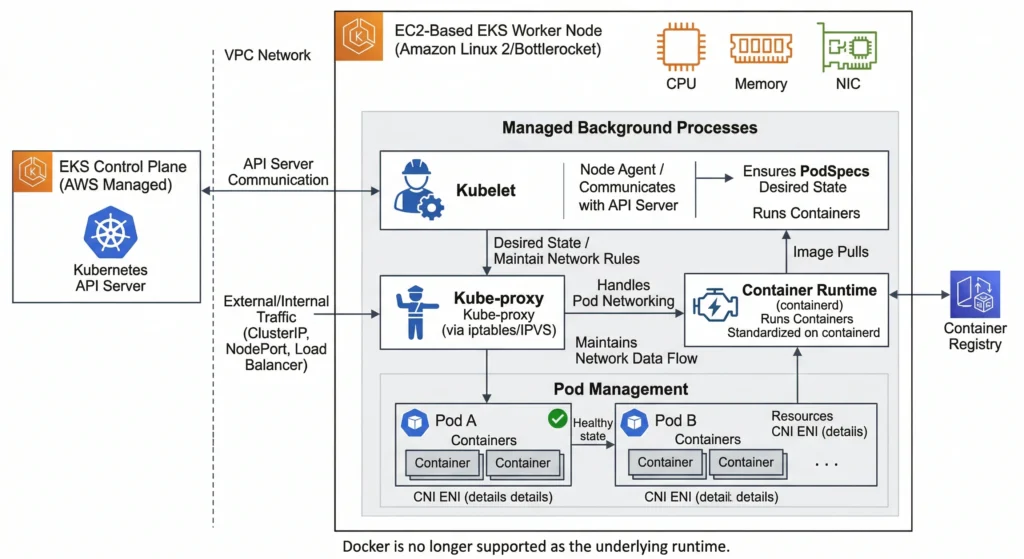
Types of Compute Options in EKS
AWS offers to provision and manage worker nodes. Choosing the right one depends on customer operational overhead preference and specific use cases.
| Feature | Managed Node Groups (MNG) | Self-Managed Nodes (same for on premises) | EKS Auto Mode | AWS Fargate |
|---|---|---|---|---|
| Management | AWS handles provisioning, lifecycle, and updates for Node Groups. | Customer manage EC2 Auto Scaling Groups (ASG) and updates manually. install Kubelet, Kube proxy and CRI. | AWS automatically provisions, scales, and manages right-sized EC2 nodes directly based on Pod requirements (no node groups to manage). | Serverless; no underlying EC2 instances to manage at all. |
| OS Customization | Supports standard EKS AMIs and custom AMIs. | Full control over the OS and bootstrapping process. | Managed by AWS (uses optimized Amazon Linux 2023 AMIs). | Managed by AWS (Amazon Linux only). |
| Access | SSH / SSM access allowed. | Full SSH and root access. | SSM access is supported, but nodes are highly ephemeral and managed by AWS. | No SSH access allowed. |
| Pricing | Standard EC2 pricing (Spot or On-Demand). | Standard EC2 pricing (Spot or On-Demand or on premises). | Standard EC2 pricing (Spot or On-Demand), highly optimized for zero waste. managed by defining Deployment.yaml | Pay per vCPU and memory allocated per Pod. |
| Best For | Standard workloads where customer want node groups but prefer AWS to handle the patching. | Legacy apps, deep OS-level tweaking, or extreme custom compliance. | The new default for modern EKS. Best for hands-off scaling while retaining standard EC2 capabilities (like DaemonSets). | Serverless workloads, bursty traffic, zero-maintenance requirements (No DaemonSets). |
Choosing the Right Operating System (AMI)
When choosing the underlying Operating System for EC2 worker nodes, AWS provides several EKS-optimized Amazon Machine Images (AMIs). The right choice impacts cluster’s security posture, boot speed, and maintenance overhead.
| Operating System (AMI) | OS Family | Security & Access | Key Features & Best For |
| Amazon Linux 2023 (AL2023) | RPM-based Linux | Standard: SSH/SSM allowed. Standard attack surface. | The Modern Default. Comes pre-configured with containerd, kubelet, and AWS CLI. Optimized for fast boot times and modern AWS hardware. Best for general-purpose workloads. |
| Bottlerocket | Custom Container OS | Hardened: No SSH or shell by default. Minimal attack surface. | The Security Standard. Purpose-built by AWS only for running containers. Features atomic, transactional updates (can rollback instantly) and extremely fast boot times. Best for DevSecOps production environments. |
| Ubuntu | Debian-based Linux | Standard: SSH/SSM allowed. Standard attack surface. | The Developer Favorite. Officially supported and optimized by Canonical. Best for teams with deep Debian expertise or third-party tools that require specific Ubuntu packages. |
| EKS Accelerated AMIs | AL2023 or Ubuntu | Standard: SSH/SSM allowed. | The Heavy Lifters. These AMIs come pre-packaged with NVIDIA GPU drivers, the NVIDIA container toolkit, and EFA support. Essential for the AI/ML workloads (like vLLM). |
| Windows Server | Windows (2019/2022) | Standard: RDP/SSM allowed. Massive attack surface. | The Legacy Bridge. Used strictly for Windows-based containers (.NET Framework, IIS). Note: EKS requires a “Hybrid Cluster” to run Windows, must still have Linux nodes to run core Kubernetes DNS and networking pods. |
| Amazon Linux 2 (AL2) | RPM-based Linux | Legacy: Reaching End of Life (EOL). | Avoid for New Clusters. This was the historical default but is being phased out in favor of AL2023. |
A DevSecOps Pro-Tip on Bottlerocket: cannot simply SSH into it. Instead, AWS provides an “Admin Container” that can temporarily enable via the AWS SSM Agent. This gives a secure, audited, and isolated shell to run diagnostics without compromising the host operating system’s immutable file system.
Scaling Worker Nodes in EKS
| Feature | Cluster Autoscaler (CAS) | Karpenter (The Modern Standard) | EKS Auto Mode (2026 Default) |
| How it Works | Watches for unschedulable Pods and updates the desired capacity of EC2 Auto Scaling Groups (ASGs). | Bypasses ASGs entirely. Talks directly to the Amazon EC2 Fleet API to provision raw instances. | AWS manages the Karpenter logic completely behind the scenes. No infrastructure to maintain. |
| Provisioning Speed | Slow (1-3+ minutes). Must wait for the ASG to trigger, provision, and register the node. | Fast (Seconds). Just-in-Time (JIT) provisioning directly boots the exact node required. | Fast (Seconds). Identical JIT provisioning, but fully managed. |
| Instance Flexibility | Rigid. manually create separate ASGs for different instance types (e.g., one ASG for x86, one for Graviton, one for Spot). | Highly Dynamic. Automatically evaluates the Pod’s requirements and mixes On-Demand, Spot, x86, and Graviton on the fly. | Highly Dynamic. Automatically selects the most cost-effective compute available. |
| Scaling Down (Cost Optimization) | Basic. Only removes a node if its overall utilization drops below a static threshold (e.g., 50%) for several minutes. | Advanced (Consolidation). Actively monitors the cluster and will intentionally evict Pods to move them to smaller, cheaper nodes to minimize empty space. | Advanced. Managed consolidation ensures that never paying for unused CPU/RAM. |
| Configuration Overhead | High. Requires managing complex ASG tags, IAM roles per group, and matching ASG specs to Kubernetes node groups. | Medium. Requires setting up NodePool and EC2NodeClass Custom Resource Definitions (CRDs) in the cluster. | Zero. Simply enable Auto Mode on the cluster and deploy Pods. |
| Vendor Lock-in | Low. CAS is a Kubernetes SIG project that works across Azure, GCP, and AWS. | High. While open-source, it is heavily optimized for AWS and tightly coupled to the AWS API. | Total. An AWS-exclusive managed service. |
| Best For | Legacy multi-cloud architectures or older clusters that haven’t been upgraded yet. | Complex, high-scale DevSecOps environments requiring granular control over Spot instance routing and node customized AMIs. | Teams that want serverless-like simplicity (like Fargate) but still need standard EC2 capabilities like DaemonSets. |
Networking Amazon VPC CNI (The Network Layer)
Unlike traditional Kubernetes clusters that use fake “overlay” networks, EKS uses the AWS VPC CNI. Every Pod gets a real IP address directly from AWS VPC subnet. This makes networking extremely fast but requires careful planning.
- The Problem (IP Exhaustion): Because Pods consume real AWS IP addresses, a small subnet (like a
/24with 256 IPs) will run out of addresses very quickly, causing new Pods to get stuck in aPendingstate. - The Solutions:
- Prefix Delegation: Instead of assigning one IP at a time, the CNI assigns a whole
/28block (16 IPs) to the node’s Elastic Network Interface (ENI) at once. This drastically increases the maximum number of Pods a single EC2 node can host. - Custom Networking (ENIConfig): If primary subnets are too small, Custom Networking allows to deploy EC2 Worker Nodes in standard subnets, but pull Pod IP addresses from a completely different, massive Secondary CIDR block (like a
/16or100.64.0.0/10CGNAT range) attached to VPC. - Native Network Policies: By default, all Pods can talk to all other Pods. The AWS VPC CNI now natively supports Kubernetes Network Policies, allowing to write YAML to create strict Layer 4 firewalls between Pods without needing third-party tools like Calico.
- Prefix Delegation: Instead of assigning one IP at a time, the CNI assigns a whole
Security Groups (The Firewall Layer)
Security Groups (SGs) act as virtual firewalls at the AWS network level.
| Security Group Type | Managed By | Purpose & Best Practices |
| Cluster SG | AWS EKS | Created automatically when build the cluster. It acts as the primary trust boundary, allowing the Control Plane and the Worker Nodes to communicate with each other securely. |
| Node SG | Customer or EKS | Attached to the EC2 worker nodes. Controls what traffic can reach the host OS. Crucial: Must ensure port 10250 (kubelet) is open to the Control Plane so features like kubectl exec and kubectl logs work. |
| Security Groups for Pods (SGP) | Customer | For extremely strict compliance environments (PCI/HIPAA). This allows customer to attach an AWS Security Group directly to a specific Pod (e.g., a database Pod), bypassing the Node SG entirely for granular, AWS-native isolation. |
IAM and Permissions (The Identity Layer)
In AWS, identity is everything. In EKS, there is a strict separation between what the Worker Node can do and what the Application (Pod) can do.
The Node IAM Role (Infrastructure Needs)
The underlying EC2 instance must have a baseline IAM role just to survive and function in the cluster. It requires three core managed policies:
AmazonEKSWorkerNodePolicy: Allows the kubelet to register the node with the EKS Control Plane.AmazonEC2ContainerRegistryReadOnly: Allows the node to pull private Docker images from Amazon ECR.AmazonEKS_CNI_Policy: Allows the VPC CNI to create network interfaces and assign IP addresses to pods.
Workload Identity (Application Needs)
The Golden DevSecOps Rule: Never attach application permissions (like “Read S3” or “Write DynamoDB”) to the Node IAM Role. If has done, every single Pod on that node inherits those permissions, creating a massive security vulnerability.
Instead, must grant permissions directly to the Pods that need them using one of these two methods:
| Method | Era | How it Works | Verdict |
| IRSA (IAM Roles for Service Accounts) | Legacy / Standard | Uses an OpenID Connect (OIDC) provider to map an AWS IAM Role to a Kubernetes ServiceAccount. | Widely used, but requires complex OIDC trust relationship management. |
| EKS Pod Identity | Modern Standard | Uses an EKS Managed Agent to securely map IAM roles to ServiceAccounts directly via the EKS API without OIDC federation. | The Recommended Approach. It is drastically easier to set up, audit, and manage via Infrastructure as Code (Terraform/eksctl). |
Best Practices for Production Worker Nodes
- Use Multi-AZ Deployments: Spread node groups across at least three Availability Zones to survive data center outages.
- Leverage Spot Instances Cautiously: Use Spot instances for stateless, fault-tolerant workloads (like background workers or web APIs) to save up to 90% on compute costs. Keep stateful apps or ingress controllers on On-Demand nodes.
- Implement Pod Disruption Budgets (PDBs): Prevent node upgrades or Karpenter consolidation from taking down too many replicas of application at once.
- Monitor Node Health: Integrate Amazon CloudWatch Container Insights or Prometheus/Grafana to track node CPU, memory, and disk utilization. Set alerts for when disk space exceeds 85% to prevent node failure.
- Use Managed Node Groups or Karpenter for Upgrades: EKS releases new Kubernetes versions frequently. Managed Node Groups automate the “drain and replace” cycle safely, minimizing downtime.