
EKS Architecture
AWS EKS (Elastic Kubernetes Service). Fully Managed Cloud Kubernetes Cluster.
| Feature/Component | Description | Who Manages It? |
| 1. Control Plane | The “Brain” (API Server, etcd, Scheduler, Controllers). | AWS (Fully Managed) |
| 2. Data Plane | The “Muscle” (Worker Nodes where Pods run). | You (Shared Responsibility) |
| 2.1. Managed Node Groups | Automated EC2 instances running Kubelet. | Shared (AWS automates, you configure) |
| 2.2. AWS Fargate | Serverless compute for containers. | AWS (You just deploy Pods) |
| 2.3. EKS Auto Mode | fully automated compute/storage. | AWS (Automatically create Node upon App deployment) |
| eksctl | Official CLI for fast cluster creation. | Open Source / AWS |
EKS Architecture & The Shared Responsibility Model
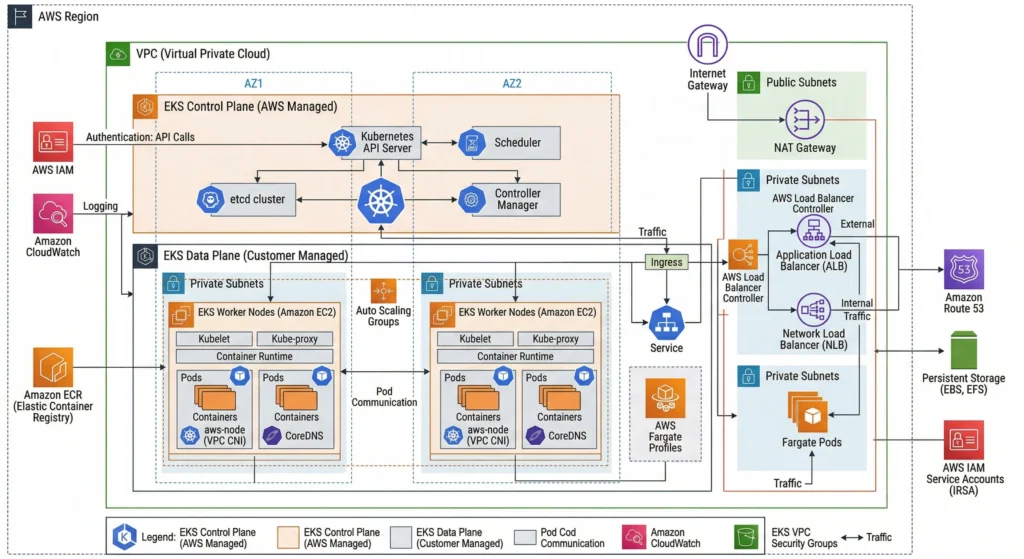
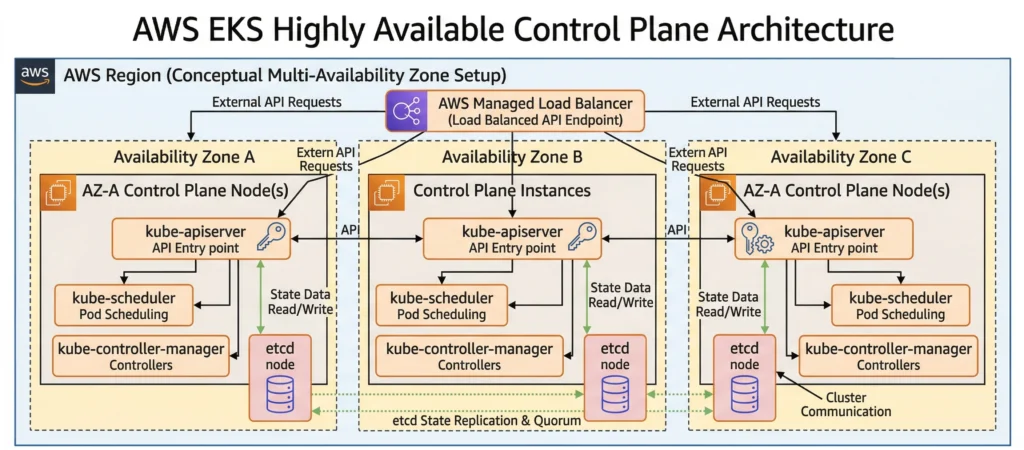
EKS Control Plane / Master node
EKS is a Managed Kubernetes Service. This means AWS completely takes over the “Brain” of the cluster (The Control Plane).
- What AWS Manages: They run the API Server, Scheduler, Controller Manager, and etcd databases across multiple Availability Zones (AZs) to guarantee high availability. If the API server crashes, AWS instantly detects it and replaces it without you even noticing. They also handle the automated backups of etcd.
- What We Manage: Only have to worry about the Worker Nodes, the network configurations VPC, Subnets, security groups, IAM permissions, and your actual containerized applications.
The Compute Options: Where do your Pods run?
Even though AWS manages the Kubernetes control plane (the brain), you still have to decide where your actual Pods (the containers) will live. You have four main choices:
1. EKS Managed Node Groups (The Balanced Approach)
- AWS provisions standard EC2 instances as your choice for you, preinstalled with Kubelet, Kubeproxy and CRI, and registers them to the cluster automatically.
- AWS automates take care of patching and version-updating processes with a single click or API call.
- You pay for the underlying EC2 instances, and with an option to choose mix On-Demand and Spot instances to optimize costs.
2. Self-Managed Nodes (The Maximum Control Approach)
- Bring your own EC2 instances to the cluster. build own custom Amazon Machine Images (AMIs) with Kubectl, Kubeproxy and CRI, configure own Auto Scaling Groups (ASGs), write the bootstrap scripts to join the nodes to the cluster, and manually handle all OS patching and Kubelet updates.
- Highly specific use cases requiring absolute control. This is the go-to option if your organization requires custom operating systems, specialized hardware routing, intricate security hardening, or strict compliance standards that AWS’s default AMIs cannot meet.
3. AWS Fargate (The Serverless Approach)
- Don’t provision, manage, or see any EC2 instances at all.
- Simply declare, “I want to run this Pod with 1 CPU and 2GB RAM,” and AWS instantly provides exact compute capacity for it. You pay only per Pod based on its vCPU and memory usage, not per underlaying server.
- Suitable for Stateless applications, batch jobs, or spiky workloads.
- Note: Fargate does not support stateful workloads requiring EBS volumes or privileged containers.
4. EKS Auto Mode
- The newest evolution in cluster management that bridges the gap between the control of EC2 and the simplicity of Fargate.
- AWS fully automates compute, networking, and storage provisioning. Powered by a managed version of Karpenter under the hood, AWS evaluates your pending Pods and dynamically provisions the exact EC2 instances needed just-in-time when you deploy the POD/application it will start the EC2 node. It automatically sets up Load Balancers, mounts your EBS volumes, scales nodes up and down, and handles all OS patching.
- Most modern production workloads. You get the flexibility of EC2 (including GPU support and persistent storage) without managing node groups, configuring autoscalers, or worrying about instance types. You pay standard EC2 prices plus a small management premium (~10-12%) for the automation.
Provisioning EKS Clusters
Never create infrastructure by clicking buttons in the AWS Console (ClickOps). Manual clicks are not repeatable, prone to human error, and cannot be version-controlled in Git. Instead, we use code:
- eksctl: It’s the fastest way to spin up a cluster. By writing a YAML file,
eksctlhandles all the complex CloudFormation stack creation in the background. - Terraform / OpenTofu: The industry standards. They allow you to provision the entire ecosystem the VPC, private and public Subnets, IAM Roles, Security Groups, and the EKS Cluster itself in a single, unified codebase.
- CDK (Cloud Development Kit): For those who prefer “Infrastructure as Software,” allowing to define your EKS cluster using familiar languages like Python, TypeScript, or Go.
Networking & Scaling
- VPC (Virtual Private Cloud): Cluster needs a network. Always deploy worker nodes in Private Subnets so they are not exposed to the public internet.
- Public/Private Endpoints: EKS allows to make the API Server endpoint public or private.
- Kubeconfig: This is the file on your local machine that allows the
kubectlcommand to talk to EKS cluster. AWS CLI generates this for you automatically using theaws eks update-kubeconfig --region <your-region> --name <your-cluster-name>command.
For senior architects designing at scale, EKS requires deep networking and scaling optimizations:
- AWS VPC CNI deep dive: The native networking plugin for EKS is the Amazon VPC CNI. It attaches Elastic Network Interfaces (ENIs) directly to EC2 instances. The maximum number of Pods you can run on a single node is mathematically bound by the EC2 instance type’s maximum ENIs and IPs per ENI. To overcome IP exhaustion in large clusters, architects must implement Prefix Delegation, which assigns entire
/28IPv4 prefixes to an ENI instead of single IPs. - Control Plane Logging: While AWS manages the control plane, they do not expose the logs by default. An architect must explicitly enable EKS Control Plane Logging to send API, Audit, Authenticator, Controller Manager, and Scheduler logs to Amazon CloudWatch for SIEM integration and forensic analysis.
- CoreDNS Scaling: In massive environments with thousands of services, the default CoreDNS deployment will bottleneck. You must implement the
cluster-proportional-autoscalerto dynamically increase CoreDNS replicas based on the number of nodes and cores in the cluster.
DevSecOps Architect Level: Security in EKS must be implemented at multiple layers.
- Identity & Access: Stop using the old
aws-authConfigMap. Migrate to the new EKS Access Entries for mapping IAM roles to Kubernetes RBAC. Use EKS Pod Identity (the modern replacement for IRSA) to grant individual Pods access to AWS services like S3 or DynamoDB without sharing node-level credentials. - Network Security: Implement Cilium via eBPF to replace the standard kube-proxy for high-performance networking and advanced Network Policies.
- Secret Management: Enable KMS Envelope Encryption on your EKS cluster so that secrets stored in etcd are encrypted at rest using an AWS KMS key.
- Runtime Security: Deploy Falco to monitor container runtime behavior and detect anomalies (like someone opening a terminal shell inside a production pod).
- Image Scanning: Integrate Trivy in your CI/CD pipelines to block vulnerable container images from ever being deployed to EKS.
Cost Optimization
To keep costs under control with these tools:
- Karpenter instead of using legacy Cluster Autoscaler. It provisions exact-match compute nodes faster and more cost-efficiently based on pending pod requirements.
- Kubecost to gain granular visibility into your cluster spending. It allows you to track costs down to the specific Namespace, Deployment, or Pod level.
Common Mistakes
- The IAM Creator Trap: In EKS, the IAM User or Role that creates the cluster is automatically granted full
system:masterspermissions. If you create the cluster with an admin user but try to runkubectlcommands later as a different user, you will get anUnauthorizederror. - Subnet Sizing Errors: When provisioning VPCs manually for EKS, engineers often make their subnets too small (like a
/24subnet). Because every single Pod in EKS gets its own real AWS IP address (via the VPC CNI), you will run out of IP addresses very quickly. Always use larger subnets (e.g.,/19or/20). - Forgetting to Delete the Cluster: EKS Control Planes cost money even if you aren’t running any Pods. If you are just practicing, always destroy the cluster when you are done to avoid a surprise AWS bill.
Additional Details
- Key Components
- Managed Control Plane: API Server, etcd, Scheduler, Controller Manager, Cloud Controller Manager.
- Data Plane: EC2 Nodes, Fargate Profiles, Auto Mode compute.
- VPC CNI Plugin: Manages native AWS IP allocation for Pods.
- Key Characteristics
- Highly Available: Spans across minimum 3 Availability Zones.
- Native AWS Integration: Deep hooks into IAM, VPC, CloudWatch, and Route53.
- Best Practices
- Always use a Private Endpoint for your EKS cluster.
- Use Karpenter instead of the legacy Cluster Autoscaler for faster, more cost-efficient node provisioning.
- Regularly update your cluster. Kubernetes deprecates APIs rapidly; staying more than two versions behind is a massive security and operational risk.
- Technical Challenges
- IP Address Exhaustion: In standard setups, running too many small Pods can consume all available IP addresses in your AWS VPC Subnets.
- IAM Complexity: Mapping AWS IAM roles to Kubernetes RBAC (Role-Based Access Control) can have a steep learning curve.
- Limitations
- Fargate Constraints: AWS Fargate does not support DaemonSets (like standard logging agents), privileged containers, or attaching EBS volumes.
- Version Lags: Managed services always trail slightly behind the raw open-source Kubernetes releases while the cloud provider validates stability.