
Container Fundamentals
Beyond Docker: The Modern Container Ecosystem
Most people think “Container = Docker.” that is wrong. Docker is just one player on a much larger team. To master Kubernetes and modern cloud-native architecture, you need to understand the “Container Wars” and how to build images that are small, fast, and secure.
The Container Runtime War: Driving the Cloud
Think of container runtimes as driving a car. Imagine you want to go for a drive:
- Docker is like a Luxury SUV. It has leather seats, a high-end music system, GPS, and climate control. It does everything for you, but it is heavy and consumes a lot of fuel.
- Kubernetes is a Fleet Manager. It doesn’t care about the music system or leather seats; it just needs the engine to move the cargo.
- Containerd is the Engine taken out of the luxury SUV. It is powerful and reliable but strips away the fancy dashboard.
- CRI-O is a Custom-Built Racing Engine. It was built from scratch specifically for the Fleet Manager (Kubernetes) to be as lightweight as possible.
- Podman is like a Self-Driving Electric Car. It doesn’t need a central driver (Daemon) constantly running in the background. You just get in and go.
Quick Reference
| Feature | Docker (The Celebrity) | Containerd (The Worker) | CRI-O (The K8s Specialist) | Podman (The Secure Rebel) |
| Primary Role | Full Dev Suite (Build, Share, Run) | Core Runtime Backend | K8s-Dedicated Runtime | Secure Dev & Run Tool |
| Architecture | Client-Server (Heavy dockerd daemon) | Daemon (Simplified, modular) | Daemon (Ultra-lightweight) | Daemonless (Fork/Exec model) |
| CLI Tool | docker | ctr (native), nerdctl (Docker-like) | crictl (strictly for debugging) | podman (Drop-in Docker replacement) |
| K8s Support | Removed in v1.24 (No longer supported natively) | Native (The standard for most managed K8s) | Native (Purpose-built for K8s CRI) | Bridge to K8s (podman kube generate / play) |
| Image Building | Native (docker build) | Requires external tools (e.g., BuildKit) | None (Requires external tools like Buildah) | Native (podman build) |
| Rootless? | Supported (Requires complex daemon setup) | Supported (via RootlessKit) | Supported | Yes (Default) + Native SELinux integration |
| Sponsor / Home | Docker, Inc. | CNCF (Donated by Docker) | CNCF / Red Hat | Red Hat |
| Best For | Local Development, MacOS/Windows users | Cloud Managed K8s (EKS, AKS, GKE) | Red Hat OpenShift, Strict K8s Clusters | Security-focused Devs, Linux native users |
- OCI (Open Container Initiative): The rulebook that ensures an image built by Docker can run on Podman or CRI-O.
- CRI (Container Runtime Interface): The “plug” that allows Kubernetes to talk directly to different runtimes like Containerd or CRI-O.
The Evolution of Runtimes
In the early days, Docker was the only game in town. It combined the tools to build images and run containers. As the industry matured, we realized we didn’t always need the whole package.
The Split: Docker eventually separated its core execution logic into a project called Containerd. This allowed other tools to use the engine without the heavy Docker UI.
The Standard: The Open Container Initiative (OCI) was formed to standardize how containers are formatted. This is why you can build an image in Docker and run it in Podman seamlessly.
For an architect, the choice of runtime impacts security posture and cluster performance.
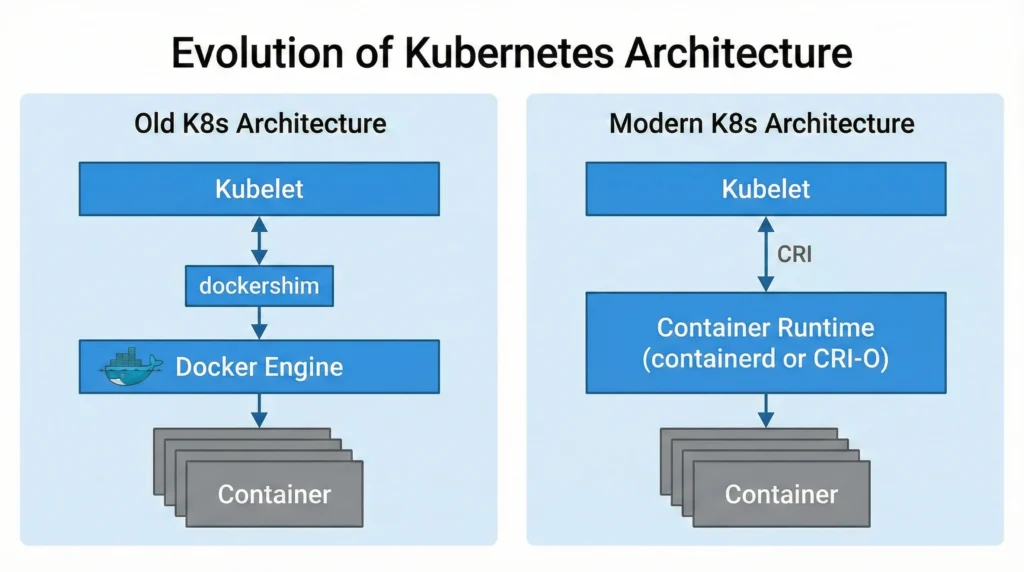
- The Dockershim Deprecation (K8s v1.24+):
- Previously, Kubernetes had to maintain a messy code bridge called “Dockershim” to talk to Docker.
- Now, Kubernetes speaks CRI (Container Runtime Interface) directly.
- Impact: You cannot use Docker Engine as the underlying runtime for K8s clusters anymore. You must use Containerd or CRI-O. Note: You can still use Docker to build images on your laptop or CI/CD pipelines.
- Attack Surface Reduction:
- CRI-O is often favored in high-security environments (like banking or government) because it has a smaller code footprint than Containerd. Less code = fewer potential bugs to exploit.
- Podman introduces the concept of “Fork/Exec” model. Unlike Docker, which relies on a continuously running background process (Daemon) with
rootprivileges, Podman starts containers as child processes of the user. This significantly reduces the risk of privilege escalation attacks.
–
Key Characteristics
- Daemon-based (Docker/Containerd): A central program runs in the background managing all containers. If the Daemon crashes, all containers might lose management capabilities.
- Daemonless (Podman): Each container is independent. If one crashes, the others are unaffected.
- CRI-Compatible: Must be able to receive instructions from the Kubernetes
kubelet.
Use Case
- Docker: Best for a developer’s MacBook or Windows laptop. The “Docker Desktop” experience is still unbeatable for ease of use.
- Containerd: The default choice for almost all general-purpose Kubernetes clusters (AWS EKS, GKE).
- CRI-O: Best for environments strictly sticking to Red Hat ecosystems (OpenShift) or requiring minimal footprints.
- Podman: Best for HPC (High-Performance Computing) and shared servers where users should not have root access.
Benefits
- Modularity: You can swap engines without breaking applications.
- Security: Moving away from the monolithic Docker daemon reduces the “Blast Radius” of a hack.
- Performance: Stripping away the UI and build tools (using CRI-O/Containerd) saves RAM and CPU on production servers.
Limitations
- Docker: Cannot be used natively in K8s anymore. Requires root privileges which is a security risk.
- Podman: Since it has no daemon, tools that expect a socket (like some older monitoring agents) might fail or require specific configuration (
podman.socket). - CRI-O: It is purely a runtime. It has no CLI for developers to “build” images easily like Docker does.
Common Issues and Solutions
- My Docker commands don’t work in the new Kubernetes cluster!
- Solution: You are likely trying to mount the Docker socket (
/var/run/docker.sock) which no longer exists. Usecrictlfor debugging instead ofdockerCLI inside nodes.
- Solution: You are likely trying to mount the Docker socket (
- Podman containers can’t talk to each other.
- Solution: Without a daemon, networking is handled differently. You must explicitly create a pod:
podman pod createand run containers inside it.
- Solution: Without a daemon, networking is handled differently. You must explicitly create a pod:
- Docker: https://docs.docker.com/
- Containerd: https://containerd.io/docs/
- CRI-O: https://cri-o.io/
- Podman: https://podman.io/docs/
- Kubernetes CRI: https://kubernetes.io/docs/concepts/architecture/cri/
Lab The Container Runtime
Quiz The Container Runtime
Writing Optimized Dockerfiles
Read this for more details Writing Dockerfile
(The Art of Multi-Stage Builds)
A beginner writes a Dockerfile and gets a 1 GB image. A pro writes the same app and gets a 50 MB image. How? By using Multi-Stage Builds.
The Problem: The “Fat” Image
When you build a Go or Java app, you need compilers (Maven, GCC, Go tools). But to run the app, you only need the binary file. You don’t need the compiler in production.
❌ Bad Example (Single Stage):
FROM golang:1.21
WORKDIR /app
COPY . .
RUN go build -o myapp main.go
CMD ["./myapp"]
# Result Size: 800MB (Because it includes the Go compiler!)Read this for more details The Solution: Multi-Stage Build
We use two “stages”.
- Stage 1 (Builder): Has all the heavy tools to build the app.
- Stage 2 (Runner): A tiny, empty image where we copy only the final app.
✅ Good Example (Multi-Stage):
# STAGE 1: Build the app
FROM golang:1.21 AS builder
WORKDIR /app
COPY . .
RUN go build -o myapp main.go

# STAGE 2: Run the app
FROM alpine:latest
WORKDIR /root/
# Copy ONLY the binary from Stage 1
COPY --from=builder /app/myapp .
CMD ["./myapp"]
# Result Size: 15MB (Magic!) 🚀🔥 Pro Tip: Always use
alpineversions for your base image (e.g.,python:3.9-alpine) to save massive space.
Image Security: Hardening Security for Containers
(Distroless & Scanning)
Security isn’t an afterthought; it starts at the Dockerfile.
The Threat: “Shell Access”
If a hacker gets into your container, the first thing they do is open a terminal (/bin/sh). If your container has bash, curl, and wget installed, you have given the hacker a toolkit to attack your network.
The Solution: Distroless Images
Google created Distroless images.
- They contain ONLY your application and its dependencies.
- No Package Manager (
apt,yum). - No Shell (
bash,sh). - No Text Editor (
vim,nano).
If a hacker exploits your app, they cannot spawn a shell because there is no shell!
Example:
FROM gcr.io/distroless/static-debian11
COPY --from=build /app/my-app /
CMD ["/my-app"]Vulnerability Scanning
Never deploy an image without scanning it first. Vulnerabilities (CVEs) are found every day.
Top Tools:
- Trivy (Highly Recommended): Easy to use, finds OS and Library bugs.
- Clair: Used by many registries.
- Docker Scan: Built into Docker Desktop (
docker scan my-image).
🧪 Quick Lab: Run a scan on an old image and see how many “High” severity bugs it has.
# Install Trivy
apt-get install trivy

# Scan an image
trivy image python:3.4(Spoiler: You will likely see hundreds of vulnerabilities!)