
EKS Worker Node Autoscaling with Karpenter
Karpenter is now the standard recommendation by AWS for EKS cluster autoscaling. In version 1.0+, Karpenter stabilized its core APIs, separating configuration into two main Custom Resources: NodePools and EC2NodeClasses.
The Core Concepts
1. NodePool (The “What” and “When”)
Formerly known as Provisioner. The NodePool represents the Kubernetes-native side of the configuration. It acts as the “decision engine,” telling Karpenter what kinds of Pods it is allowed to handle and the lifecycle rules for the nodes it creates.
Key Capabilities:
- Requirements (The Hardware Rules): Define exact boundaries using well-known labels.
- Example: “Only provision instances in the
c6gorm6gfamily (Graviton),” or “Only useSpotinstances inus-east-1a.”
- Example: “Only provision instances in the
- Taints & Tolerations: Automatically applies taints to nodes as they spin up, ensuring only specific workloads (like AI agents or database pods) can schedule onto them.
- Disruption & Consolidation: This is where Karpenter saves money. Define how aggressively Karpenter should scale down.
- Consolidation: If a node is only 20% utilized, Karpenter will automatically drain it, move the Pods to a cheaper node, and terminate the empty EC2 instance.
- Expiration: Force nodes to die after a set time (e.g.,
expireAfter: 720hfor 30 days) to ensure fleet constantly cycles onto fresh, patched AMIs.
- Resource Limits: The “FinOps Safety Net.” Cap the
NodePool(e.g.,limits: cpu: 1000, memory: 1000Gi) so a runaway bug in Deployment doesn’t accidentally provision a costaly EC2 instances.
2. EC2NodeClass (The “How” and “Where”)
Formerly known as AWSNodeTemplate. The EC2NodeClass is the AWS-specific configuration. Once the NodePool decides it needs a server, it hands the request to the EC2NodeClass to actually talk to the Amazon EC2 API.
Key Capabilities:
- Subnet and Security Group Discovery: Instead of hardcoding fragile IDs (like
subnet-0abc123), use tags.- Example: “Deploy into any subnet tagged with
karpenter.sh/discovery: my-cluster.” This makes YAML highly reusable across different VPCs.
- Example: “Deploy into any subnet tagged with
- AMI Selection: Defines the Operating System to use the latest AL2023, Bottlerocket, or a custom hardened AMI built by the security team.
- Block Device Mappings (Storage): Configures the physical hard drives attached to the EC2 instances. Define volume size (e.g., 100GB), volume type (
gp3), IOPS, and crucially for DevSecOps ensure that every root volume is encrypted with a specific AWS KMS Key. - FinOps Tagging: Automatically applies AWS resource tags (e.g.,
Team: Platform,Environment: Production) to every EC2 instance and EBS volume it creates, making AWS billing reports perfectly accurate. - User Data (Bootstrapping): Allows us to inject custom shell scripts that run the moment the EC2 instance boots, right before it joins the Kubernetes cluster.
How They Work Together
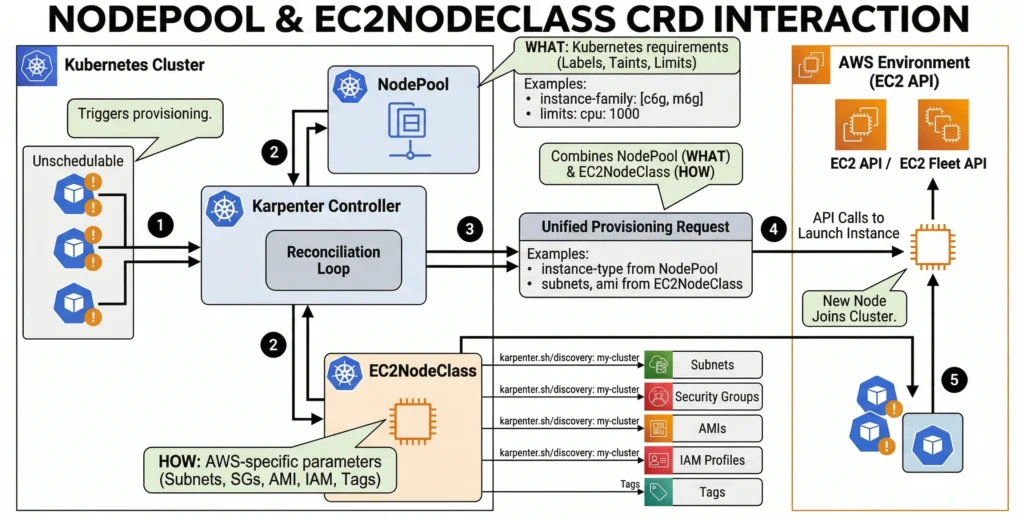
To connect them, NodePool YAML simply references EC2NodeClass by name.
This architecture allows for incredible flexibility. For example, we can create three different NodePools (one for standard apps, one for GPU AI workloads, and one for high-memory databases) that all reference the exact same EC2NodeClass for shared security groups, subnets, and EBS encryption rules.
Configuration Example (Karpenter v1 API)
Here is a practical, production-ready example of how these two resources link together to provision flexible, cost-effective nodes:
# AWS-Specific Configuration (EC2NodeClass)
apiVersion: karpenter.k8s.aws/v1
kind: EC2NodeClass
metadata:
  name: default-node-class
spec:
  # Instructs Karpenter to use the latest AL2023 EKS optimized AMI
  amiSelectorTerms:
    - alias: al2023@latest
  # Automatically discover subnets and security groups via AWS tags
  subnetSelectorTerms:
    - tags:
        karpenter.sh/discovery: my-eks-cluster
  securityGroupSelectorTerms:
    - tags:
        karpenter.sh/discovery: my-eks-cluster
  # The IAM role the EC2 instance will assume
  role: "KarpenterNodeRole-my-eks-cluster"
  # Block device mappings (Disk size)
  blockDeviceMappings:
    - deviceName: /dev/xvda
      ebs:
        volumeSize: 50Gi
        volumeType: gp3

---
# Kubernetes Node Constraints (NodePool)
apiVersion: karpenter.sh/v1
kind: NodePool
metadata:
  name: general-compute
spec:
  template:
    spec:
      # Link this NodePool to the EC2NodeClass defined above
      nodeClassRef:
        group: karpenter.k8s.aws
        kind: EC2NodeClass
        name: default-node-class
      # Define the instance types Karpenter is allowed to use
      requirements:
        - key: "karpenter.sh/capacity-type"
          operator: In
          values: ["spot", "on-demand"]
        - key: "karpenter.k8s.aws/instance-family"
          operator: In
          values: ["m5", "m6i", "m6g", "c5", "c6i"]
        - key: "kubernetes.io/arch"
          operator: In
          values: ["amd64", "arm64"] # Mix Intel/AMD and Graviton!
  # Disruption controls (Consolidation)
  disruption:
    consolidationPolicy: WhenUnderutilized
    consolidateAfter: 30s
Why this is powerful: The above configuration allows Karpenter to mix Spot and On-Demand instances, switch between Intel/AMD and ARM architectures based on what pods tolerate, and aggressively consolidate pods onto fewer, cheaper nodes when traffic drops saving a tremendous amount of money.